This article describes all aspects of graphically representing, or painting, domain objects in a view. After these objects have initially been displayed, you or a user of your application may wish to change the object representation by clicking the mouse or manipulating the object on a touch screen. The process of modifying a domain object after an input event is called editing.
In this context, the support provided by the ILcdGXYPen interface is discussed.
Painting domain objects
Figure 1, “Paint sequence diagram” shows the typical workflow of painting domain objects in a view.
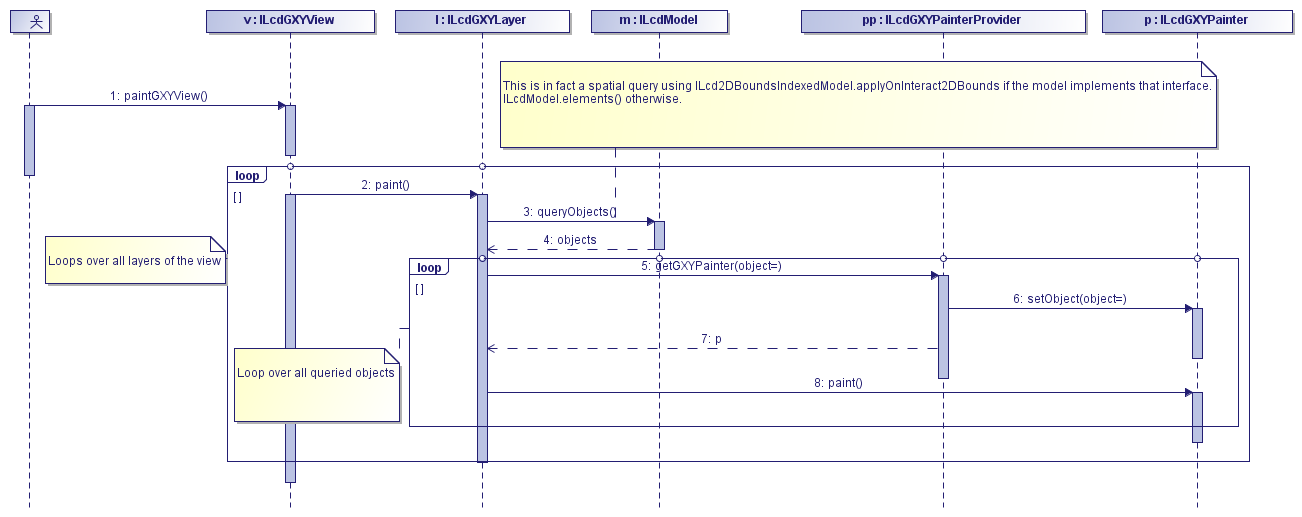
When the view receives a paint request through the method paintGXYView(), it loops over all of its layers and asks each layer to paint itself. In its turn the layer queries the objects from its
model. The layer distinguishes between the geometry and the textual representation (label) of a domain object. To paint the
label, a label painter is required, as described in Choosing a label painter.
The geometry of a domain object is painted with an ILcdGXYPainter as described in Using an ILcdGXYPainter.
Using an ILcdGXYPainter
An ILcdGXYPainter locates and paints a domain object in an ILcdGXYView. The main methods of an ILcdGXYPainter are:
-
setObjectto set the domain object that needs to be painted on the view -
paintto paint the domain object. Its arguments are:-
The java.awt.Graphics where to paint the domain object on
-
The mode: defines which part of the domain object to paint and in which mode (default, selected, or other)
-
The context: defines the layer, the view, the pen, and the required transformations between model, world, and view coordinates as described in Transformations between view and model coordinates.
-
LuciadLightspeed provides several implementations of ILcdGXYPainter to properly represent a specific type of domain object. Main implementations of ILcdGXYPainter lists the main implementations that LuciadLightspeed provides. You can also create your own implementation, for example,
for a customized shape as illustrated in Customizing an ILcdGXYPainter.
Main implementations of ILcdGXYPainter
The main implementations of ILcdGXYPainter that LuciadLightspeed provides are painters:
-
For shapes as listed in Table 1, “LuciadLightspeed shape painters”, these are available in the package
com.luciad.view.gxy.painter -
For rasters such as the
TLcdGXYImagePainter. If you are still usingILcdRasterimplementations, you can useTLcdRasterPainterandTLcdMultilevelRasterPainter. These are available in the packagecom.luciad.format.raster -
That extend the functionality of other painters such as the
TLcdGXYHaloPainterdescribed in Painting halos in GXY views.
Table 1, “LuciadLightspeed shape painters” lists the painters for each of the shapes listed in Commonly used shapes.
| Shape | Painter |
|---|---|
|
|
|
Using a TLcdGXYShapePainter
The TLcdGXYShapePainter paints all supported shapes and is a good first choice of painter.
The program shows how to set the line style of a TLcdGXYShapePainter. To set specific rendering effects such as line style, filling pattern, transparency, and so on, you can implement the interface
ILcdGXYPainterStyle.
Similarly, TLcdGXYShapePainter and all ALcdGXYAreaPainter extensions have a setFillStyle method to set up a fill style for shapes that enclose an area.
See Line and fill styles in GXY views for more information.
Using a TLcdGXYPointListPainter
This is a specific ILcdGXYPainter for painting an ILcdPointList, which is a sequence of ILcdPoint objects.
A TLcdGXYPointListPainter paints a point list either as:
-
Individual points
-
A polyline (each point, except the last one, is connected to the previous point)
-
A polygon (same as a polyline, whereby the last point is connected to the first point)
-
An area (a filled polygon of which the outline is not painted)
-
An outline area (a filled polygon of which the outline is painted)
The TLcdGXYPointListPainter paints the lines between the points either as straight lines, as curves that represent geodetic lines, or as rhumb lines.
The painter delegates this kind of low-level painting to the ILcdGXYPen that is associated to the ILcdGXYLayer.
For more information on the usage of pens, refer to Painting and editing support.
An extension of TLcdGXYPointListPainter is TLcdGXYRoundedPointListPainter which paints a line with rounded corners between the points. A spline algorithm is used to transform the set of points into
a smooth line that interpolates between the original points.
Customizing an ILcdGXYPainter
There are several ways to make a specific implementation of the interface ILcdGXYPainter.
If you need to configure a painter based on the properties of your current domain object, consider creating a custom
ILcdGXYPainterProvider instead. This is shown in Using an ILcdGXYPainterProvider.
If you need more flexibility, reusing one of the predefined painter implementations is often most appropriate. You can do
this by extension (inheritance), by composition, or by a combination of both. Sometimes it may also be required to make your
own implementation, as shown in Implementing a painter and editor in a GXY view, for example.
When a domain object is required which is not a trivial combination of existing domain objects you can
create a new domain object and provide an ILcdGXYPainter implementation for it.
Implementing a painter and editor in a GXY view presents a case study of an ILcdGXYPainter implementation for a hippodrome shape.
Using an ILcdGXYPainterProvider
An ILcdGXYPainter is, in general, suited to paint only one type of domain object. The purpose of an
ILcdGXYPainterProvider is to associate a valid ILcdGXYPainter to each domain object that needs to
be painted on a java.awt.Graphics. The painter is returned by the method getGXYPainter, that takes the particular domain object as an argument as shown in Figure 1, “Paint sequence diagram”.
An ILcdGXYPainterProvider is typically used on a TLcdGXYLayer to get a valid ILcdGXYPainter for representing
domain objects contained in its ILcdModel. In this case, the ILcdGXYPainterProvider must
be set as a property of the TLcdGXYLayer as described in Using an ILcdGXYPainterProvider on a TLcdGXYLayer.
Main implementations of ILcdGXYPainterProvider
Each class of LuciadLightspeed implementing the interface ILcdGXYPainter also implements the interface
ILcdGXYPainterProvider. The method getGXYPainter returns the painter itself for each object.
This is useful when all objects can be painted with the same painter, since it avoids the creation of a new painter provider
as illustrated in Program: Using an link:../../../reference/LuciadLightspeed/com/luciad/view/gxy/ILcdGXYPainter.html[ILcdGXYPainter] as ILcdGXYPainterProvider.
ILcdGXYPainter as ILcdGXYPainterProvider (from samples/gxy/transformation/geodeticToGrid/MainPanel)
TLcdGXYShapePainter painter = new TLcdGXYShapePainter();
layer.setGXYPainterProvider(painter);|
In case you have your own implementation of |
A simple implementation of the interface ILcdGXYPainterProvider is the class TLcdSingleGXYPainterProvider. A TLcdSingleGXYPainterProvider is set up by giving it one ILcdGXYPainter, which it will return upon each request for an ILcdGXYPainter.
Using an ILcdGXYPainterProvider on a TLcdGXYLayer
First, an ILcdGXYPainterProvider must be set as painter provider of the TLcdGXYLayer. Whenever the TLcdGXYLayer needs to paint a domain object, it asks its ILcdGXYPainterProvider for a valid ILcdGXYPainter, in this case a TLcdGXYImagePainter, and delegates the painting to the painter.
Visualizing shapes based on domain object properties
ILcdGXYPainterProvider provides a good entry point to examine a domain object and configure a painter accordingly.
To illustrate this, we will show a painter provider that visualizes population density. Take a look at the painter provider
snippet in Program: Configuring an link:../../../reference/LuciadLightspeed/com/luciad/view/gxy/ILcdGXYPainter.html[ILcdGXYPainter] for an link:../../../reference/LuciadLightspeed/com/luciad/datamodel/ILcdDataObject.html[ILcdDataObject] in an ILcdGXYPainterProvider.
It configures a TLcdGXYShapePainter with a fill color before returning it.
The chosen color is determined by the features of the ILcdDataObject domain object.
You can find the full example in the class PopulationLayerFactory of the package samples.gxy.statisticalPainter.
ILcdGXYPainter for an ILcdDataObject in an ILcdGXYPainterProvider (from samples/gxy/statisticalPainter/PopulationLayerFactory)
  private class PopulationDensityPainterProvider implements ILcdGXYPainterProvider {

    private final TLcdGXYShapePainter fPainter = new TLcdGXYShapePainter();
    private final TLcdGXYPainterColorStyle fFillStyle = new TLcdGXYPainterColorStyle();

    PopulationDensityPainterProvider() {
      fPainter.setFillStyle(fFillStyle);
      fPainter.setLineStyle(new TLcdGXYPainterColorStyle(Color.GRAY, Color.ORANGE));
      // Outlines the selection so the density color remains visible underneath.
      fPainter.setSelectionMode(ALcdGXYAreaPainter.OUTLINED);
    }

    @Override
    public ILcdGXYPainter getGXYPainter(Object aObject) {
      if (aObject instanceof ILcdDataObject) {
        ILcdDataObject dataObject = (ILcdDataObject) aObject;
        Color color = colorForFactor(getDensity(dataObject));
        fFillStyle.setDefaultColor(color);
        fPainter.setObject(aObject);
        return fPainter;
      }
      return null;
    }
}
Using an ILcdGXYPainterProvider on composite shapes
An ILcdShapeList consists of several ILcdShape objects. The task of a TLcdGXYShapeListPainter is to paint each of these ILcdShape objects. For this, it needs to be given an ILcdGXYPainterProvider, which must provide a valid ILcdGXYPainter to paint each ILcdShape object of the ILcdShapeList.
Similarly, TLcdGXYCompositeCurvePainter, TLcdGXYCompositeRingPainter and TLcdGXYSurfacePainter need an ILcdGXYPainterProvider to paint each ILcdCurve object of the ILcdCompositeCurve, ILcdRing or ILcdSurface respectively.
TLcdGXYShapePainter automatically unpacks ILcdShapeList objects and delegates to the appropriate painter.
Customizing an ILcdGXYPainterProvider
An implementation of an ILcdGXYPainterProvider often contains a pool of available ILcdGXYPainter objects. Which painter is returned depends on the object that needs to be painted as shown in Program: A simple implementation of ILcdGXYPainterProvider.
ILcdGXYPainterProvider (from samples/gxy/decoder/custom1/Custom1LayerFactory)
private static class MyPainterEditorProvider implements ILcdGXYPainterProvider, ILcdGXYEditorProvider {
  @Override
  public ILcdGXYPainter getGXYPainter(Object aObject) {
    ILcdGXYPainter painter = null;
    if (aObject instanceof ILcd2DEditablePolyline) {
      painter = fPolylinePainter;
    } else if (aObject instanceof ILcd2DEditablePolygon) {
      painter = fPolygonPainter;
    } else if (aObject instanceof ILcdPoint) {
      painter = fPointPainter;
    } else if (aObject instanceof ILcd2DEditableCircle) {
      painter = fCirclePainter;
    }
    if (painter != null) {
      painter.setObject(aObject);
    }
    return painter;
  }
Program: A simple implementation of ILcdGXYPainterProvider shows the a painter provider, which can provide an ILcdGXYPainter for ILcdCircle objects, for ILcdPolygon objects, for ILcdPolyline objects, for ILcdArcBand objects, for ILcdArc objects, and for ILcdPoint objects. A GXYPainterEditorProvider contains one particular ILcdGXYPainter per type of supported ILcdShape. The ILcdGXYPainter objects returned for ILcdPolygon and ILcdPolyline are instances of the class TLcdGXYPointListPainter, but they are configured differently.
The method getGXYPainter checks the type of the object it receives as an argument, and returns the corresponding ILcdGXYPainter. Note that the object must be set to the ILcdGXYPainter before ILcdGXYPainter is returned by the ILcdGXYPainterProvider.
Painting rasters
|
This section discusses the |
The ILcdRasterPainter interface is an extension of the ILcdGXYPainter interface for painting rasters and multilevel rasters. It contains additional methods for controlling properties that affect
the appearance of the rasters:
-
transparencyspecifies the transparency of the raster in the view. Making a raster partially transparent allows the visualization of underlying rasters or other data in a single view, for example an aerial picture and a map. -
brightnessspecifies the brightness of the raster in the view. Reducing the brightness of a raster can be useful for reducing the contrast of a background map, for example. -
colorModelspecifies the color model that is applied to the raster. Different color models are mostly useful when working withIndexColorModelinstances. For example, you can change the coloring of elevation rasters by setting anIndexColorModelwith 216 colors. In this particular case, the color index should be interpreted as an unsigned short elevation.
In addition, most raster painters have an RGBImageFilter that allows you to alter the colors of the displayed rasters. For example, you can map the original RGB values to grayscale
values, or to RGB values with enhanced contrast.
If the pixel density of a raster appears too high, that is, if too many raster pixels would project onto a single view pixel, a painter may paint the raster outlines instead of the raster itself. This approach avoids having to load too many raster data (lazily) for just painting a few pixels when zoomed out. On the other hand, if the pixel density appears too low, the raster is not painted at all. This approach avoids displaying large blocky raster pixels when zoomed in.
The exact behavior is controlled by these properties:
-
startResolutionFactoris the highest resolution ratio (number of raster pixels per view pixel) at which a raster is painted. The default is 10.0, meaning that a raster is not painted if more than 10 raster pixels would be projected onto a single view pixel, on average. Smaller values (for example 2.0) avoid displaying the raster at an even lower resolution ratio. Smaller values therefore generally improve performance when zoomed out. -
stopResolutionFactoris the lowest resolution ratio (number of raster pixels per view pixel) at which a raster is painted. The default is 0.0, meaning that a raster is always painted, even if a single raster pixel is projected onto many view pixels. Larger values (for example 0.5) avoid displaying the raster at a higher resolution ratio. Larger values therefore avoid displaying blocky rasters when zoomed in. -
forcePaintingis a flag that allows you to override the above settings. Although useful for testing, setting it to true generally causes severe performance drops when zooming out on large rasters. The default is false. -
paintOutlinespecifies whether or not to paint the raster outlines and tile outlines when the pixel density is too high. The default is true. -
outlineColorspecifies the color in which the raster outlines and tile outlines are painted. -
maxNumberOfOutlineTilesspecifies how many outlines of raster tiles can be painted at most. If a raster contains more tiles, only its global outlines are painted.
Main implementations of ILcdRasterPainter
The sections below describe the main implementations of ILcdRasterPainter.
TLcdRasterPainter
TLcdRasterPainter is the main implementation of ILcdGXYPainter for ILcdRaster instances.
It paints rasters onto ILcdGXYView instances, scaling and transforming them on the fly. In addition to the normal raster painter properties, you can tune TLcdRasterPainter by some additional properties. For rasters that have to be transformed to a different reference system, the following properties
are relevant:
-
warpBlockSizespecifies the size of the blocks in which the raster transformation is approximated using bilinear transformation. Smaller values result in more accurate results, but also in larger computation times. The default is 64. With a value of 1, every pixel is transformed without approximation. -
reuseInternalBufferspecifies whether the painter can reuse an internal buffer for storing warped images. If true, this buffer is reused over successive calls. If false, buffers are allocated each time, when required. In the latter case, warped images may be cached along with the painted rasters, depending on thepaintCacheproperty. This allocation and caching strategy may be memory consuming, so reusing the internal buffer is generally recommended. -
paintCachespecifies whether the painter should cache the raster images that it has drawn. The images are cached with the rasters that are painted, provided they implement theILcdCacheinterface. For example,TLcdRasterandTLcdMultilevelRasterimplementILcdCache. Note that this caching strategy may be memory consuming if many raster objects are painted at the same time. -
borderspecifies the size of an additional border around the view, expressed in pixels, inside which the raster is transformed and then cached. For small pan operations in the view, the cached version can then be reused. When the pan operations exceed the border size, the raster is transformed again.
For rasters that do not have to be transformed to a different reference system, the following properties are relevant:
-
useSubTileImageCachingspecifies whether the raster painter should perform internal caching of images corresponding to raster subtiles. This helps to avoid disk access during painting (due to lazy loading of raster tiles) and may also speed up the painting of rasters with non-standard color models (for example 16-bit indexed color images). -
useDeferredSubTileDecodingspecifies whether the paint method of the raster painter may defer the painting of tiles that have not been decoded yet. Parts of the displayed raster may then remain temporarily blank, but the application is not held up by the decoding. The display is updated completely when all tiles have been decoded. This setting is only applicable ifuseSubTileImageCachingis set to true.
If you know that the rasters are defined in the same reference system as the view, you can use the TLcdNoWarpRasterPainter instead of the more general TLcdRasterPainter. This implementation always uses the method retrieveTile of the interface ILcdRaster, to retrieve entire images at once. These images can then be scaled and painted efficiently.
If you know that the rasters are defined in a different reference system than the view, you can use TLcdWarpRasterPainter. This implementation always uses the method retrieveValue of ILcdRaster to retrieve single raster values at a time, constructing transformed images to be painted.
The current implementation of TLcdRasterPainter delegates to TLcdNoWarpRasterPainter if possible. Otherwise, it delegates to TLcdWarpRasterPainter.
TLcdMultilevelRasterPainter
TLcdMultilevelRasterPainter is the main implementation of ILcdGXYPainter for ILcdMultilevelRaster instances. When painting a multilevel raster, it first selects the most appropriate
raster level. The most appropriate level of detail depends on the scale of the view, on the transformation
from the model reference to the world reference, and on the pixel densities of the available raster levels.
You can control the level selection by means of the following properties:
-
levelSwitchFactoris the factor that affects the scale threshold at which a raster level is selected. The default value is 1.0; as soon as a single raster pixel would project to several screen pixels, a higher resolution level is used. This way, the highest practical raster quality is chosen. A value smaller than 1.0 (for example 0.2) delays this switching. A single raster pixel may then project to multiple screen pixels. The raster may become pixelated, meaning that it may be visualized with large blocky pixels. However, as lower resolution levels are accessed, less raster data has to be decoded. Setting a small value therefore generally improves the painting performance. -
levelSwitchScalesis an optional list of scales that can achieve the same effects as thelevelSwitchFactor. It explicitly expresses the scales at which the painter switches between raster levels, instead of relying on a single factor.
Similarly as to the TLcdRasterPainter, if you know that the multilevel rasters are defined in the same reference system as the view, you can use the TLcdNoWarpMultilevelRasterPainter instead of the more general TLcdMultilevelRasterPainter. If you know that the multilevel rasters are defined in a different reference system than the view, you can use TLcdWarpMultilevelRasterPainter.
The current implementation of TLcdMultilevelRasterPainter delegates to TLcdNoWarpMultilevelRasterPainter if possible. Otherwise, it delegates to TLcdWarpMultilevelRasterPainter.
TLcdAllInMemoryRasterPainter
The TLcdAllInMemoryRasterPainter implements ILcdGXYPainter for ILcdRaster instances.
It computes the warped version of each raster once and caches it with the raster (provided it implements
the ILcdCache interface). It is therefore only practical for painting small rasters.
Painting a 3D terrain in 2D from a tile repository
You can also visualize 3D terrain data in a 2D view using the TLcdGXYImagePainter. This class paints the texture of a 3D terrain as if it were a 2D raster.
By default the TLcdGXYImagePainter paints the first image coverage available in the tile set. If no such coverage
exists it will paint the first elevation coverage. So if you want to visualize the terrain elevation as a 2D raster,
you can simply construct a tile set containing only the elevation coverage and paint that instead. This can be achieved
using ALcdEarthCoverageFilterTileSet.
Graphically editing domain objects
The following sections describe how to use an ILcdGXYEditor and ILcdGXYEditorProvider to graphically edit domain objects.
Using an ILcdGXYEditor
To edit/modify domain objects represented/painted in a view from input events, such as MouseEvents or TLcdTouchEvent instances, LuciadLightspeed provides the interface ILcdGXYEditor. Depending on the current representation of the domain object and the information contained in the input event, the ILcdGXYEditor can modify the domain object accordingly. Since the representation of a domain object is only known to the ILcdGXYPainter that painted the domain object, it is almost always necessary for an ILcdGXYEditor to work in combination with an ILcdGXYPainter. Therefore, all LuciadLightspeed implementations of the interface ILcdGXYEditor also implement the interface ILcdGXYPainter. And conversely, almost all implementations of ILcdGXYPainter also implement ILcdGXYEditor.
Similar to an ILcdGXYPainter, an ILcdGXYEditor is suited to edit one type of domain object.
For example, a TLcdGXYPointListPainter can paint any domain object that implements the interface ILcdPointList. But it can also edit in two dimensions any domain object that implements the interface ILcd2DEditablePointList or ILcd3DEditablePointList.
The two main methods of the interface ILcdGXYEditor are:
-
setObject. This method is used to set the domain object that needs to be edited on a view. -
edit. Its arguments are:-
the java.awt.Graphics where to paint the domain object on
-
the mode: defines how to edit the domain object, for example it defines whether the object is being created, translated, reshaped, and so on.
-
the context: defines the layer, the view, and the valid pen for editing support
-
Main implementations of ILcdGXYEditor
As for ILcdGXYPainter, LuciadLightspeed provides an implementation of ILcdGXYEditor for most of the ILcdShape implementations: TLcdGXYArcBandPainter, TLcdGXYArcPainter, TLcdGXYBoundsPainter, TLcdGXYGeoBufferPainter, TLcdGXYCirclePainter, TLcdGXYEllipsePainter, TLcdGXYIconPainter, TLcdGXYPointListPainter TLcdGXYTextPainter, and TLcdGXYShapeListPainter. All these implementations are available in the package com.luciad.view.gxy.painter.
Customizing an ILcdGXYEditor
Implementing a painter and editor in a GXY view provides a case study of implementing an ILcdGXYEditor from scratch.
Take the following two notes into account when customizing an ILcdGXYEditor:
-
Composition is less suited to create an
ILcdGXYEditorimplementation: editing one object may affect other objects in a composite object. -
To allow for reversible changes made by an
ILcdGXYEditor, make sure that theILcdGXYEditorimplementsILcdUndoableSource. See Adding undo/redo support in GXY views for more information.
Editing with multiple input points
It might be that you want to define editing behavior that uses multiple input points. Examples of this are rotating an object
or editing multiple handles of an object at the same time using a touch screen. All the input points are available from the
given TLcdGXYContext.
Implementing a painter and editor in a GXY view shows an example of this multi-point edit behavior for a hippodrome shape.
Using an ILcdGXYEditorProvider
As for the interface ILcdGXYPainter, some classes may need a way to retrieve a valid ILcdGXYEditor
to edit a given domain object. Examples of such classes are TLcdGXYLayer and TLcdGXYShapeListPainter as described in Using an ILcdGXYPainterProvider. The behavior of an ILcdGXYEditorProvider is similar to that of an ILcdGXYPainterProvider.
Painting and editing support
The following sections explain how to use an ILcdGXYPen to provide support for painting and editing domain objects.
Using an ILcdGXYPen
An ILcdGXYPen is a low-level utility that is associated to an ILcdGXYLayer and that is mainly used
in implementations of ILcdGXYPainter and ILcdGXYEditor. An example of another class that uses
ILcdGXYPen is the controller TLcdMapRulerController, which draws the shortest distance path
between two points on the ellipsoid of the world reference and a circle with this distance as radius.
An ILcdGXYPen contains methods for the handling of basic shapes like lines, polylines, polygons, and arcs. It has methods for:
-
drawing the basic shapes on a
java.awt.Graphics -
accumulating (combining) several basic shapes with a polyline approximation represented in view coordinates, given the transformations
ILcdModelXYWorldTransformationandILcdGXYViewXYWorldTransformation. This is used, for example, to fill the polyline approximation of a shape object that consists of lines and arcs. This approximation is stored within the pen. Alternatively you can also construct the approximation in an externalILcdAWTPathfor later usage. -
approximating basic shapes as a polyline in world coordinates. Multiple basic shapes can be added one after another in an implementation of
ILcdGeneralPath, given the transformation from model coordinates to world coordinates (ILcdModelXYWorldTransformation). This approximation then only needs a transformation from world coordinates to view coordinates in order to be displayed. If the approximation is kept somewhere in memory, it is not necessary to perform the expensive calculations anymore to get a polyline approximation and the transformations from model coordinates to world coordinates. -
checking whether a basic shape is touched by a given screen coordinate with some sensitivity level, expressed in pixels.
Main implementations of ILcdGXYPen
LuciadLightspeed provides the following main implementations of the interface ILcdGXYPen:
TLcdGeodeticPen and TLcdProjectionPen both provide support for painting and editing basic shapes in geodetic model references, such as geodetic lines. TLcdGeodeticPen assumes that the basic shapes are defined on the ILcdEllipsoid of the model reference, while TLcdProjectionPen considers them on the ILcdEllipsoid of the world reference. TLcdGridPen is used for shapes of which the model coordinates are defined in a grid reference system. Refer to Coordinate systems and transformations for more information about model references.
TLcdGXYPen is a more general implementation of the interface ILcdGXYPen as it can handle both geodetic and Cartesian grid coordinates as model coordinates. Most of its methods are implemented in
an approximate way for the sake of performance. For example, a geodetic line is always drawn as a straight line in the view
coordinate system, which is a good approximation if the line segments are small. TLcdGeodeticPen, TLcdProjectionPen, and TLcdGridPen have a method setStraightLineMode which allows the usage of this straight line mode approximation with these pen classes as well.
All pen implementations approximate curved lines like geodetic lines, arcs, and so on, by means of lists of points. Five parameters allow you to tune this discretization process: the minimum and maximum recursion depth of the adaptive algorithm, a threshold on the angle between successive line segments, and thresholds on the distances between consecutive points (in world or view coordinates).
Setting an ILcdGXYPen to a layer
Program: Configuring a link:../../../reference/LuciadLightspeed/com/luciad/view/map/TLcdGeodeticPen.html[TLcdGeodeticPen] and attaching it to an ILcdGXYLayer shows the setup of a TLcdGeodeticPen called geodetic_pen which is provided to an ILcdGXYLayer (called gxy_layer) that contains a model with a geodetic model reference.
TLcdGeodeticPen and attaching it to an ILcdGXYLayer (from samples/gxy/shapes/MainPanel)
layer.setGXYPen(ALcdGXYPen.create(aModel.getModelReference()));