Class TLcdGXYArcPainter
- All Implemented Interfaces:
ILcdCloneable,ILcdPropertyChangeSource,ILcdGXYEditor,ILcdGXYEditorProvider,ILcdGXYPainter,ILcdGXYPainterProvider,ILcdGXYPathPainter,Serializable,Cloneable
ILcdArc objects and enables visual editing of
ILcd2DEditableArc objects in an ILcdGXYView.
Painting an ILcdArc
Body
The body of an ILcdArc object is painted as:

Handles
This painter defines the two arc corner points of the ILcdArc object and the four axis
corner points as a handle of the arc. The following image clarifies the handle location. The arc
corner points are represented by blue points, the axis corner points by red points.
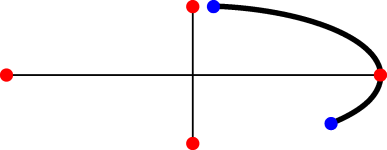
Note that the center point of the arc is painted in
BODY mode depending on the drawCenter property. When painted, it can be used as a handle to edit the object.
Snap targets
One of the arc corner points of the ILcdArc object can be returned on the condition
that it is touched. If the center point is painted (see isDrawCenter()) or when snapping
to invisible points is enabled (see isSnapToInvisiblePoints()), the center point can also
be returned. The point returned as a snap target is highlighted with the snapIcon.
Styling options
The visualization of the ILcdArc object is governed by the line style set to this painter.
Locating an ILcdArc in a view
Anchor point of an ILcdArc
The location of the anchor point can be set using setAnchorPointLocation(int) to the
middle of the arc bounds, the middle of the chord or the middle of the arc itself. By default,
the anchor point is located at the center point of the bounds, calculated by
boundsSFCT. Note that the center point of the ILcdArc
object is not taken into account.
When is an ILcdArc touched
Depending on the paint mode, an arc is touched when either the arc, the arc handles, the axis handles or the center point of the arc is touched. Note that the center point can only be touched if it is painted.
Visual bounds of an ILcdArc
The bounds of the ILcdArc object contains the contour of the arc and the center point
if it is painted.
Visually editing and creating an ILcd2DEditableArc
Modifying an ILcd2DEditableArc
This editor provides the following edit functionality for the different render modes:
RESHAPED: an axis handle is reshaped, depending on whether it is touched. The image below illustrate the editing behavior. The small black arrow indicates the path of the mouse cursor while reshaping the arc. The rotation angle and the length of the axis are updated. The gray dotted lines indicate that the start angle and arc angle of the arc remain unchanged.
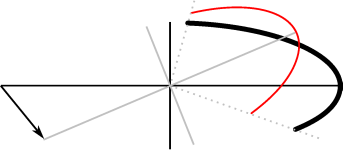
Moving an axis point. TRANSLATED: an arc handles or the whole arc is translated, depending on whether an arc handle or the arc segment is touched. The images below illustrate the editing behavior. The small black arrow indicates the path of the mouse cursor while translating the arc.
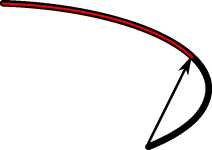
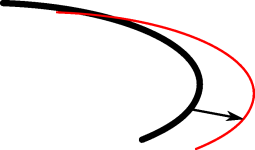
Moving an arc point.
Moving the arc segment.
Note that, if the center point or the axis handles of the arc are touched, the whole arc can be translated as if the arc segment was touched.
Creating an ILcd2DEditableArc
When initializing an arc via interaction through the view, a number of user interactions are required to
complete the initialization. This number depends on the creation mode and
it is either 2, 3 or 5 for the modes TWO_CLICK, THREE_CLICK or FIVE_CLICK.
The creationOrientation property defines the orientation of the arc
during creation.
Accepted snap targets
All points are accepted as snap target as long as:
- the point can be transformed to the reference of the
ILcdArcobject with themodel to model transformation, - the point is not the center point of the
ILcdArcobject set to this painter.
Additional properties
Caching
This painter implementation supports caching for objects implementing ILcdCache.
Caching can be turned on/off with the setPaintCache method.
Drawing the center point
The drawCenter and drawCenterWhenSelected
properties define when the center point needs to be painted. If the center point is painted, it can
be touched, moved,...
- See Also:
-
Field Summary
FieldsModifier and TypeFieldDescriptionstatic final intConstant value indicating that the end point of the arc segment of the arc is touched.static final intConstant value indicating that the start point of the arc segment of the arc is touched.static final intConstant value indicating that the body of the arc is touched.static final intConstant value indicating that the center point of the arc is touched.static final intConstant for a clockwise orientation when creating an arc.static final intConstant for a counter clockwise orientation when creating an arc.static final intConstant for the default orientation when creating an arc.static final intConstant value indicating that the anchor point should be chosen at the end of the curve if ILcdCurve is implemented.static final intConstant for the five click creation mode.static final intConstant value indicating that the anchor point should be chosen as the arc's focus point.static final intConstant value indicating that the end point of the major axis of the arc is touched.static final intConstant value indicating that the opposite end point of the major axis of the arc is touched.static final intConstant value indicating that the anchor point should be chosen on the arc, at half of its length.static final intConstant value indicating that the anchor point should be chosen in the middle of the arc's bounds, calculated byboundsSFCT.static final intConstant value indicating that the anchor point should be chosen in the middle of the chord determined by the start and end points.static final intConstant value indicating that the anchor point should be chosen at the middle of the curve if ILcdCurve is implemented.static final intConstant value indicating that the end point of the minor axis of the arc is touched.static final intConstant value indicating that the opposite end point of the minor axis of the arc is touched.static final intConstant value indicating that the anchor point should be chosen at the start of the curve if ILcdCurve is implemented.static final intConstant for the three click creation mode.static final intConstant for the two click creation mode.Fields inherited from class com.luciad.view.gxy.ALcdGXYPainter
defaultCreationFillStyle, defaultCreationLineStyle, defaultFillStyle, defaultLineStyle, fWorkBoundsFields inherited from interface com.luciad.view.gxy.ILcdGXYEditor
CREATING, END_CREATION, RESHAPED, START_CREATION, TRANSLATEDFields inherited from interface com.luciad.view.gxy.ILcdGXYPainter
CREATING, DEFAULT, HANDLES, RESHAPING, SELECTED, SNAPS, TRANSLATING -
Constructor Summary
ConstructorsConstructorDescriptionConstructs a defaultTLcdGXYArcPainterand sets the display name to "Arc". -
Method Summary
Modifier and TypeMethodDescriptionbooleanacceptSnapTarget(Graphics aGraphics, ILcdGXYContext aGXYContext) Determines whether a snap target should be accepted or not.voidanchorPointSFCT(Graphics aGraphics, int aRenderMode, ILcdGXYContext aGXYContext, Point aPointSFCT) Moves the specifiedaPointSFCTto the anchor point of theILcdArcobject.booleanappendAWTPath(ILcdGXYContext aGXYContext, int aRenderMode, ILcdAWTPath aAWTPathSFCT) Appends a discretized representation in view coordinates to the given path.booleanappendGeneralPath(ILcdGXYContext aGXYContext, int aRenderMode, ILcdGeneralPath aGeneralPathSFCT) Appends a discretized representation in world coordinates to the given path.protected voidboundsOfEditingLabelsSFCT(Graphics aGraphics, ILcdArc aArc, int aTouchedLocation, ILcdGXYContext aGXYContext, ILcd2DEditableBounds aBoundsSFCT) Called by theboundsSFCTmethod when editing anILcd2DEditableArc.voidboundsSFCT(Graphics aGraphics, int aRenderMode, ILcdGXYContext aGXYContext, ILcd2DEditableBounds aBoundsSFCT) Computes the bounds of the representation of anILcdArcin AWT coordinates.clone()MakesObject.clone()public.booleanedit(Graphics aGraphics, int aRenderMode, ILcdGXYContext aGXYContext) This implementation edits theILcdArcobject set to the painter.intReturns the location of the anchor point (by default: MIDDLE_OF_BOUNDS).Returns the icon for the center point's default representation, used ifisDrawCenter()returns true.Returns the icon for the center point's selected representation, used ifisDrawCenterWhenSelected()returns true.intReturns either 2, 3 or 5 depending on thecreation mode(TWO_CLICK,THREE_CLICKorFIVE_CLICK) as the number of required user interactions.intReturns the orientation used while creatingILcdArcobjects.getCursor(Graphics aGraphics, int aRenderMode, ILcdGXYContext aGXYContext) Returns aCursorthat clarifies the render mode and context this painter is operating in.getGXYEditor(Object aObject) Returns this instance as editor for editing the specifiedObject.Returns the line style used for painting the contour of theILcdArcobject.intReturns the minimum pixel distance the input device (a mouse, for example) must move before editing the shape.Returns the object that can currently be painted or edited by this painter/editor.booleanReturns whether caching is used when painting this painter's object.Returns the icon that is used to paint snap target points of the object set to this painter.booleanReturns whether the center point of the arc should be displayed.booleanReturns whether the center point of the arc should be displayed when it is painted in selected mode.booleanReturns whether the painter allows snapping to the invisible points of the shape.booleanisTouched(Graphics aGraphics, int aRenderMode, ILcdGXYContext aGXYContext) Depending on the rendering mode, returns whether the arc, the arc handles, the axis handles or the center point of the arc is touched.booleanDeprecated.This method has been deprecated.voidpaint(Graphics aGraphics, int aRenderMode, ILcdGXYContext aGXYContext) Displays the representation of the object in the given mode on the Graphics passed, taking into account the context passed.protected voidpaintEditingLabels(Graphics aGraphics, ILcdArc aArc, int aTouchedLocation, ILcdGXYContext aGXYContext) Called by thepaintmethod when editing anILcd2DEditableArc.voidsetAnchorPointLocation(int aAnchorPointLocation) Sets the preferred anchor point location.voidsetCenterIcon(ILcdIcon aIcon) Sets the icon for the center point's default representation, ifisDrawCenter()returns true.voidSets the icon for the center point's selected representation, ifisDrawCenterWhenSelected()returns true.voidsetCreationMode(int aCreationMode) Sets the mode to decide how to create anILcdArcobject.voidsetCreationOrientation(int aCreationOrientation) Sets the orientation used while creatingILcdArcobjects.voidsetDrawCenter(boolean aDrawCenter) Sets whether the center point of the arc should be displayed or not.voidsetDrawCenterWhenSelected(boolean aDrawCenterWhenSelected) Sets whether the center point of the arc should be displayed when it is painted in selected mode or not.voidsetLineStyle(ILcdGXYPainterStyle aLineStyle) Sets the line style to use when painting the contour of theILcdArcobject.voidsetMinimumEditDelta(int aDelta) Sets the minimum pixel distance the input device (a mouse, for example) must move before editing the shape.voidsetModelModelTransformationClass(Class aModel2ModelTransformationClass) Sets the transformation class that should be used when snapping to points that are defined in a different reference than the reference of this painter's object.voidSets the object to paint and edit.voidsetPaintCache(boolean aPaintCache) Turns caching of the representation of the object on or off.voidsetSnapIcon(ILcdIcon aSnapIcon) Sets the icon that marks snap targets of the object currently set to this painter.voidsetSnapToInvisiblePoints(boolean aSnapToInvisiblePoints) Sets whether the other shapes can snap to invisible points of this shape.voidsetTraceOn(boolean aTraceOn) Deprecated.This method has been deprecated.protected voidsetupGraphicsForLine(Graphics aGraphics, Object aObject, int aRenderMode, ILcdGXYContext aGXYContext) Called just before painting a line on the specifiedGraphicsobject.snapTarget(Graphics aGraphics, ILcdGXYContext aGXYContext) Returns the center point or one of the end points of theILcdArcif it is touched.booleansupportSnap(Graphics aGraphics, ILcdGXYContext aGXYContext) This implementation supports snapping, always returnstrue.Methods inherited from class com.luciad.view.gxy.ALcdGXYPainter
addPropertyChangeListener, firePropertyChangeEvent, firePropertyChangeEvent, getDisplayName, getGXYPainter, removePropertyChangeListener, setClassTraceOn, setDisplayNameMethods inherited from class java.lang.Object
equals, finalize, getClass, hashCode, notify, notifyAll, toString, wait, wait, waitMethods inherited from interface com.luciad.view.gxy.ILcdGXYEditor
getDisplayNameMethods inherited from interface com.luciad.view.gxy.ILcdGXYPainter
getDisplayNameMethods inherited from interface com.luciad.util.ILcdPropertyChangeSource
addPropertyChangeListener, removePropertyChangeListener
-
Field Details
-
CENTER
public static final int CENTERConstant value indicating that the center point of the arc is touched.- See Also:
-
BODY
public static final int BODYConstant value indicating that the body of the arc is touched.- See Also:
-
MAJOR_RADIUS_CORNER
public static final int MAJOR_RADIUS_CORNERConstant value indicating that the end point of the major axis of the arc is touched.- See Also:
-
MINOR_RADIUS_CORNER
public static final int MINOR_RADIUS_CORNERConstant value indicating that the end point of the minor axis of the arc is touched.- See Also:
-
MAJOR_RADIUS_OPPOSITE_CORNER
public static final int MAJOR_RADIUS_OPPOSITE_CORNERConstant value indicating that the opposite end point of the major axis of the arc is touched.- See Also:
-
MINOR_RADIUS_OPPOSITE_CORNER
public static final int MINOR_RADIUS_OPPOSITE_CORNERConstant value indicating that the opposite end point of the minor axis of the arc is touched.- See Also:
-
ARC_START_CORNER
public static final int ARC_START_CORNERConstant value indicating that the start point of the arc segment of the arc is touched.- See Also:
-
ARC_END_CORNER
public static final int ARC_END_CORNERConstant value indicating that the end point of the arc segment of the arc is touched.- See Also:
-
MIDDLE_OF_BOUNDS
public static final int MIDDLE_OF_BOUNDSConstant value indicating that the anchor point should be chosen in the middle of the arc's bounds, calculated byboundsSFCT. Note that the center point of theILcdArcobject is not taken into account.- See Also:
-
FOCUS_POINT
public static final int FOCUS_POINTConstant value indicating that the anchor point should be chosen as the arc's focus point. If this point cannot be calculated, theMIDDLE_OF_BOUNDSmethod is used to calculate the anchor point.- See Also:
-
MIDDLE_OF_CHORD
public static final int MIDDLE_OF_CHORDConstant value indicating that the anchor point should be chosen in the middle of the chord determined by the start and end points.- See Also:
-
MIDDLE_OF_ARC
public static final int MIDDLE_OF_ARCConstant value indicating that the anchor point should be chosen on the arc, at half of its length.- See Also:
-
MIDDLE_OF_CURVE
public static final int MIDDLE_OF_CURVEConstant value indicating that the anchor point should be chosen at the middle of the curve if ILcdCurve is implemented. Depending on the implementation of the arc, this method might give a different result then theMIDDLE_OF_ARCmethod. If ILcdCurve is not implemented, or if no valid anchor point can be found, theMIDDLE_OF_BOUNDSmethod is used.- See Also:
-
START_OF_CURVE
public static final int START_OF_CURVEConstant value indicating that the anchor point should be chosen at the start of the curve if ILcdCurve is implemented. If ILcdCurve is not implemented, or if no valid anchor point can be found, theMIDDLE_OF_BOUNDSmethod is used.- See Also:
-
END_OF_CURVE
public static final int END_OF_CURVEConstant value indicating that the anchor point should be chosen at the end of the curve if ILcdCurve is implemented. If ILcdCurve is not implemented, or if no valid anchor point can be found, theMIDDLE_OF_BOUNDSmethod is used.- See Also:
-
DEFAULT_ORIENTATION
public static final int DEFAULT_ORIENTATIONConstant for the default orientation when creating an arc. This constant is provided for backward compatibility as its behavior is not very consistent: it switches orientation at the 270 degrees azimuth mark, independent of the start angle of the arc.- See Also:
-
CLOCKWISE
public static final int CLOCKWISEConstant for a clockwise orientation when creating an arc.- See Also:
-
COUNTERCLOCKWISE
public static final int COUNTERCLOCKWISEConstant for a counter clockwise orientation when creating an arc.- See Also:
-
TWO_CLICK
public static final int TWO_CLICKConstant for the two click creation mode. The clicks define:- the position of the center point, and
- the semi-major axis and semi-minor axis length.
0,45and0after creation. The semi-major and semi-minor axes are equal.- See Also:
-
THREE_CLICK
public static final int THREE_CLICKConstant for the three click creation mode. The clicks define:- the position of the center point,
- the semi-major axis and semi-minor axis length and the rotation angle of the ellipse on which the arc resides, and
- the end angle (and thus the arc angle) of the arc.
0and semi-major and semi-minor axes are equal. For backwards compatibility reasons, this is the default creation mode.- See Also:
-
FIVE_CLICK
public static final int FIVE_CLICKConstant for the five click creation mode. The clicks define:- the position of the center point,
- the length of the semi-major axis and the rotation angle of the ellipse on which the arc resides,
- the length of the semi-minor axis,
- the start angle of the arc, and
- the end angle (and thus the arc angle) of the arc.
- See Also:
-
-
Constructor Details
-
TLcdGXYArcPainter
public TLcdGXYArcPainter()Constructs a defaultTLcdGXYArcPainterand sets the display name to "Arc".
-
-
Method Details
-
setTraceOn
public void setTraceOn(boolean aTraceOn) Deprecated.This method has been deprecated. It is recommended to use the standard Java logging framework directly.Enables tracing for this class instance. Calling this method with eithertrueorfalseas argument automatically turns off tracing for all other class instances for whichsetTraceOnhas not been called. If the argument isfalsethen only the informative, warning and error log messages are recorded.- Overrides:
setTraceOnin classALcdGXYPainter- Parameters:
aTraceOn- if true then all log messages are recorded for this instance. If false, then only the informative, warning and error log messages are recorded.
-
isTraceOn
public boolean isTraceOn()Deprecated.This method has been deprecated. It is recommended to use the standard Java logging framework directly.Returnstrueif tracing is enabled for this class.- Overrides:
isTraceOnin classALcdGXYPainter- Returns:
- true if tracing is enabled for this class, false otherwise.
-
setObject
Sets the object to paint and edit. The object should be an instance of
ILcdArcfor painting and an instance ofILcd2DEditableArcfor editing.This painter/editor can be used to paint the object without using the edit functionality. This method shall therefore only check if the object implements
ILcdArcand shall throw aClassCastExceptionif it does not.When this painter is used as editor with an object that does not implement the interface
ILcd2DEditableArc, theeditmethod shall throw the necessary exception.- Specified by:
setObjectin interfaceILcdGXYEditor- Specified by:
setObjectin interfaceILcdGXYPainter- Parameters:
aObject- The object to paint and edit.- Throws:
ClassCastException- when the object does not implementILcdArc.- See Also:
-
getObject
Returns the object that can currently be painted or edited by this painter/editor.- Specified by:
getObjectin interfaceILcdGXYEditor- Specified by:
getObjectin interfaceILcdGXYPainter- Returns:
- the object that can currently be painted or edited by this painter/editor.
- See Also:
-
setCreationMode
public void setCreationMode(int aCreationMode) Sets the mode to decide how to create anILcdArcobject. An arc can be created in the following modes. The default value isTWO_CLICK.TWO_CLICK, which enables setting the center point and the radius,THREE_CLICK, which enables setting the center point, the radius and the rotation angle. and the arc angle, orFIVE_CLICK, which enables setting the center point, the major axis extent and the rotation angle, the minor axis extent, the start angle of the arc, and the arc angle of the arc.
- Parameters:
aCreationMode- The mode deciding how to create anILcdArcobject.
-
setCreationOrientation
public void setCreationOrientation(int aCreationOrientation) Sets the orientation used while creating
ILcdArcobjects. The value passed should beDEFAULT_ORIENTATION,CLOCKWISEorCOUNTERCLOCKWISE. The default value isDEFAULT_ORIENTATIONfor backward compatibility reasons.This value will only be taken into account in creation modes where the choice of the start and arc angle are free (currently the three and five click creation modes).
- Parameters:
aCreationOrientation- A flag indicating the orientation of the arc during creation.- See Also:
-
getCreationOrientation
public int getCreationOrientation()Returns the orientation used while creatingILcdArcobjects.- Returns:
- the orientation used while creating
ILcdArcobjects. - See Also:
-
setPaintCache
public void setPaintCache(boolean aPaintCache) Turns caching of the representation of the object on or off. Caching greatly reduces the time to paint an object but requires more memory. The representation of an object can only be cached for objects which implementILcdCache. By default, caching is turned on.- Parameters:
aPaintCache- A flag indicating whether to use caching when painting an object.- See Also:
-
getPaintCache
public boolean getPaintCache()Returns whether caching is used when painting this painter's object.- Returns:
trueif caching is used to paint this painter's object,falseotherwise.- See Also:
-
setDrawCenter
public void setDrawCenter(boolean aDrawCenter) Sets whether the center point of the arc should be displayed or not. The default value of this property isfalse. This setting has an influence on the methodsboundsSFCT,isTouchedand snapping. Regardless of this setting, the center point is always displayed as a handle in HANDLES mode to allow editing.- Parameters:
aDrawCenter- A flag indicating whether the center point should be displayed or not.- See Also:
-
isDrawCenter
public boolean isDrawCenter()Returns whether the center point of the arc should be displayed.- Returns:
- whether the center point of the arc should be displayed.
- See Also:
-
setDrawCenterWhenSelected
public void setDrawCenterWhenSelected(boolean aDrawCenterWhenSelected) Sets whether the center point of the arc should be displayed when it is painted in selected mode or not. The default value of this property istrue. This setting has an influence on the methodsboundsSFCT,isTouchedand snapping. Regardless of this setting, the center point is always displayed as a handle in HANDLES mode to allow editing.- Parameters:
aDrawCenterWhenSelected- A flag indicating whether the center point should be displayed when it is painted in selected mode or not.- See Also:
-
isDrawCenterWhenSelected
public boolean isDrawCenterWhenSelected()Returns whether the center point of the arc should be displayed when it is painted in selected mode.- Returns:
- whether the center point of the arc should be displayed when it is painted in selected mode.
- See Also:
-
setCenterIcon
Sets the icon for the center point's default representation, ifisDrawCenter()returns true.- Parameters:
aIcon- the icon for the center point's default representation- See Also:
-
getCenterIcon
Returns the icon for the center point's default representation, used ifisDrawCenter()returns true.- Returns:
- the icon for the center point's default representation
-
setCenterIconWhenSelected
Sets the icon for the center point's selected representation, ifisDrawCenterWhenSelected()returns true.- Parameters:
aIcon- the icon for the center point's selected representation- See Also:
-
getCenterIconWhenSelected
Returns the icon for the center point's selected representation, used ifisDrawCenterWhenSelected()returns true.- Returns:
- the icon for the center point's selected representation
-
setSnapToInvisiblePoints
public void setSnapToInvisiblePoints(boolean aSnapToInvisiblePoints) Sets whether the other shapes can snap to invisible points of this shape. For anILcdArcobject, there's only one invisible point, being the center point of the arc when it is not drawn. The default value isfalse.- Parameters:
aSnapToInvisiblePoints- A flag indicating whether snapping to the invisible points is allowed.- See Also:
-
isSnapToInvisiblePoints
public boolean isSnapToInvisiblePoints()Returns whether the painter allows snapping to the invisible points of the shape.- Returns:
- whether the painter allows snapping to the invisible points of the shape.
- See Also:
-
setLineStyle
Sets the line style to use when painting the contour of theILcdArcobject. Note that this property can be set tonull.- Parameters:
aLineStyle- the line style to use when painting the contour of theILcdArcobject.- See Also:
-
getLineStyle
Returns the line style used for painting the contour of theILcdArcobject. Note that this method can returnnull.- Returns:
- the line style used for painting the contour of the
ILcdArcobject. - See Also:
-
setSnapIcon
Sets the icon that marks snap targets of the object currently set to this painter. This icon is painted when thepaintmethod is called with the render modeILcdGXYPainter.SNAPS.- Parameters:
aSnapIcon- The icon that should be used to paint snap target points.- See Also:
-
getSnapIcon
Returns the icon that is used to paint snap target points of the object set to this painter.- Returns:
- the icon that is used to paint snap target points of the object set to this painter.
- See Also:
-
setMinimumEditDelta
public void setMinimumEditDelta(int aDelta) Sets the minimum pixel distance the input device (a mouse, for example) must move before editing the shape. A larger value ensures that the object easily "snaps" back in place, a small value allows fine editing.- Parameters:
aDelta- the minimum pixel distance the input device should move in either the X or Y direction
-
getMinimumEditDelta
public int getMinimumEditDelta()Returns the minimum pixel distance the input device (a mouse, for example) must move before editing the shape. A larger value ensures that the object easily "snaps" back in place, a small value allows fine editing. The default value is 3 pixels.- Returns:
- the minimum pixel distance the input device should move in either the X or Y direction
-
getAnchorPointLocation
public int getAnchorPointLocation()Returns the location of the anchor point (by default: MIDDLE_OF_BOUNDS).- Returns:
- one of
MIDDLE_OF_BOUNDS,FOCUS_POINT,MIDDLE_OF_CHORD,MIDDLE_OF_ARC,MIDDLE_OF_CURVE,START_OF_CURVE,END_OF_CURVE.
-
setAnchorPointLocation
public void setAnchorPointLocation(int aAnchorPointLocation) Sets the preferred anchor point location.- Parameters:
aAnchorPointLocation- one ofMIDDLE_OF_BOUNDS,FOCUS_POINT,MIDDLE_OF_CHORD,MIDDLE_OF_ARC,MIDDLE_OF_CURVE,START_OF_CURVE,END_OF_CURVE.
-
setupGraphicsForLine
protected void setupGraphicsForLine(Graphics aGraphics, Object aObject, int aRenderMode, ILcdGXYContext aGXYContext) Called just before painting a line on the specified
Graphicsobject. It can be redefined in order to set specificGraphicsproperties likeColor, etc...This implementation calls
ILcdGXYPainterStyle.setupGraphics(java.awt.Graphics, java.lang.Object, int, com.luciad.view.gxy.ILcdGXYContext)on the lineStyle property if a line style has been set to this instance.- Parameters:
aGraphics- The graphics to paint the object on.aObject- The object to paint.aRenderMode- The mode to render the object in.aGXYContext- The context to render the object in.
-
paint
Displays the representation of the object in the given mode on the Graphics passed, taking into account the context passed.This implementation will use the specified render mode to determine how the object needs to be rendered. The object is rendered as shown in the images of the class documentation.
- Specified by:
paintin interfaceILcdGXYPainter- Parameters:
aGraphics- The graphics to paint the object on.aRenderMode- The mode to render the object in.aGXYContext- The context to render the object in.
-
appendAWTPath
Description copied from interface:ILcdGXYPathPainterAppends a discretized representation in view coordinates to the given path.- Specified by:
appendAWTPathin interfaceILcdGXYPathPainter- Parameters:
aGXYContext- the graphics contextaRenderMode- the rendering modeaAWTPathSFCT- the path to append to- Returns:
- true if a discretization of the shape could be successfully appended to the path
-
appendGeneralPath
public boolean appendGeneralPath(ILcdGXYContext aGXYContext, int aRenderMode, ILcdGeneralPath aGeneralPathSFCT) Description copied from interface:ILcdGXYPathPainterAppends a discretized representation in world coordinates to the given path.- Specified by:
appendGeneralPathin interfaceILcdGXYPathPainter- Parameters:
aGXYContext- the graphics contextaRenderMode- the rendering modeaGeneralPathSFCT- the path to append to- Returns:
- true if a discretization of the shape could be successfully appended to the path
-
paintEditingLabels
protected void paintEditingLabels(Graphics aGraphics, ILcdArc aArc, int aTouchedLocation, ILcdGXYContext aGXYContext) Called by the
paintmethod when editing anILcd2DEditableArc. It draws labels indicating the values of properties being changed. For example, the coordinates of the center point of the arc, the major or minor axis extent, the start angle, etc ... This method is empty and therefore does not draw the labels but it can be redefined for specific needs.The
aTouchedLocationargument indicates which part of the arc is being edited. For example,MAJOR_RADIUS_CORNERcorresponds to the end point of the major axis of the arc. It should be one of the following constants:CENTER,BODY,MAJOR_RADIUS_CORNER,MINOR_RADIUS_CORNER,MAJOR_RADIUS_OPPOSITE_CORNER,MINOR_RADIUS_OPPOSITE_CORNER,ARC_START_CORNER,ARC_END_CORNER- Parameters:
aGraphics- The graphics to paint the object on.aArc- The arc that is being edited.aTouchedLocation- The part of the arc that is being edited.aGXYContext- The context to render the object in.
-
boundsSFCT
public void boundsSFCT(Graphics aGraphics, int aRenderMode, ILcdGXYContext aGXYContext, ILcd2DEditableBounds aBoundsSFCT) throws TLcdNoBoundsException Computes the bounds of the representation of anILcdArcin AWT coordinates. The bounds will include the center point of the arc depending on whether it is rendered or not. This in turn depends on the painter mode passed and the values of the propertiesdrawCenteranddrawCenterWhenSelected.- Specified by:
boundsSFCTin interfaceILcdGXYPainter- Parameters:
aGraphics- The graphics to paint the object on.aRenderMode- The mode to render the object in.aGXYContext- The context to render the object in.aBoundsSFCT- The bounds to update.- Throws:
TLcdNoBoundsException- if no bounds can be determined for the representation of the object. This can be when the object does not have a representation in the given context, for example when it is located in a part of the world which is not visible in the projection as set in the views world reference.- See Also:
-
boundsOfEditingLabelsSFCT
protected void boundsOfEditingLabelsSFCT(Graphics aGraphics, ILcdArc aArc, int aTouchedLocation, ILcdGXYContext aGXYContext, ILcd2DEditableBounds aBoundsSFCT) Called by the
boundsSFCTmethod when editing anILcd2DEditableArc. It calculates the bounds of the labels indicating the values of properties being changed. For example, the coordinates of the center point of the arc, the major or minor axis extent, the start angle, etc ... Since by default, no labels are painted, this implementation is empty and theaBoundsSFCTargument remains unchanged.Note that the
ILcd2DEditableBoundsobject already contains the bounds of the edited object. Upon exit of this method, this object should be set to the union of the bounds of the edited object and the labels painted while editing.The
aTouchedLocationargument indicates which part of the arc is being edited. For example,MAJOR_RADIUS_CORNERcorresponds to the end point of the major axis of the arc. It should be one of the following constants:CENTER,MAJOR_RADIUS_CORNER,MINOR_RADIUS_CORNER,MAJOR_RADIUS_OPPOSITE_CORNER,MINOR_RADIUS_OPPOSITE_CORNER,ARC_START_CORNER,ARC_END_CORNER- Parameters:
aGraphics- The graphics to paint the object on.aArc- The arc that is being edited.aTouchedLocation- The part of the arc that is being edited.aGXYContext- The context to render the object in.aBoundsSFCT- The bounds in view coordinates to be updated.
-
isTouched
Depending on the rendering mode, returns whether the arc, the arc handles, the axis handles or the center point of the arc is touched. Note that the center point can only be touched if it is painted. The coordinate for which the check is done is derived from the context passed as argument.- Specified by:
isTouchedin interfaceILcdGXYPainter- Parameters:
aGraphics- The graphics to paint the object on.aRenderMode- The mode to render the object in.aGXYContext- The context in which the object is rendered.- Returns:
- whether the arc, the arc handles, the axis handles or the center point of the arc is touched.
- See Also:
-
getCursor
Returns aCursorthat clarifies the render mode and context this painter is operating in. When no specificCursoris required,nullis returned.- Specified by:
getCursorin interfaceILcdGXYPainter- Overrides:
getCursorin classALcdGXYPainter- Parameters:
aGraphics- The graphics on which the object is painted.aRenderMode- The mode to render the object in.aGXYContext- The context in which the object is rendered.- Returns:
- a cursor to indicate the type of operating mode and context. Returns
nullif no particular cursor is required.
-
getGXYEditor
Returns this instance as editor for editing the specifiedObject. If thisObjectis not the same as theObjectset to this painter, thesetObject(Object)method is called to update the object set to the painter.- Specified by:
getGXYEditorin interfaceILcdGXYEditorProvider- Parameters:
aObject- the object to be edited.- Returns:
- this instance as editor for editing the specified
Object.
-
edit
This implementation edits the
ILcdArcobject set to the painter. The object needs to implement the interfaceILcd2DEditableArcotherwise aClassCastExceptionwill be thrown.In
ILcdGXYEditor.TRANSLATEDrender mode, theILcdArcobject is edited as follows:- While touching an arc handle, the arc handle point gets translated.
- While touching an axis handle, the object gets translated as a whole.
- While touching the center point, the object gets translated as a whole.
- While touching the arc, the object gets translated as a whole.
In
ILcdGXYEditor.RESHAPEDrender mode, theILcdArcobject is edited as follows:- While touching an axis handle, the length of the corresponding axis will change. Also the rotation angle of the axis will be affected. The start angle and the arc angle are unaffected.
The creation render mode behavior is defined by the
creation mode. Further changes have to be done within edition mode.- In the
TWO_CLICKmode, the first point determines the center point of the arc and the second the radius of the arc circle. The start angle of the arc will be0degrees and the arc angle extent45degrees counter-clockwise. - In the
THREE_CLICKmode, the first point determines the center point of the arc, the second the radius and the rotation angle of the arc circle, and the third the end angle (and thus the arc angle) of the arc. The start angle of the arc angle will be0degrees. - In the
FIVE_CLICKmode, the first point determines the center point of the arc, the second the length of the semi-major axis and the rotation angle of the arc, the third the length of the semi-minor axis, the fourth the start angle of the arc, and the fifth the end angle (and thus the arc angle) of the arc.
If, in all render modes, a snap target is found for a moved or created point, the snap target location is used for the moved/created point.
- Specified by:
editin interfaceILcdGXYEditor- Parameters:
aGraphics- The graphics to edit the object on.aRenderMode- The mode to render the object in.aGXYContext- The context to render the object in.- Returns:
- true if the object has changed when this method returns, false otherwise.
- Throws:
ClassCastException- if the painter's object does not implementILcd2DEditableArc.- See Also:
-
getCreationClickCount
public int getCreationClickCount()Returns either 2, 3 or 5 depending on thecreation mode(TWO_CLICK,THREE_CLICKorFIVE_CLICK) as the number of required user interactions.- Specified by:
getCreationClickCountin interfaceILcdGXYEditor- Returns:
- either 2, 3 or 5 depending on the
creation mode. - See Also:
-
setModelModelTransformationClass
Sets the transformation class that should be used when snapping to points that are defined in a different reference than the reference of this painter's object. The transformation will be instantiated and setup to transform points from the model of the snap layer to points in the model which contains the current object of this painter. The default value is the
TLcdGeoReference2GeoReferenceclass.This property allows the painter to snap to points defined in a different model reference.
Instances of this specified class should implement
ILcdModelModelTransformation, otherwise the snapping functionality to different model references will not work.- Parameters:
aModel2ModelTransformationClass- the transformation used as described above.
-
acceptSnapTarget
Determines whether a snap target should be accepted or not. A snap target is accepted if the following conditions are met:
- The current object is an
ILcd2DEditableArc. - The snap target is an
ILcdPointwhose coordinates are expressed in the same coordinate system as the current objects coordinate system or the model to model transformation can transform the point to a point in the objects coordinate system. - The snap object is not the center point of the current object. If this is wanted, override the function and return true if the snap object is the center point.
- One of the axis corner points or the center point is touched or when both minor and
major axis are
0. This enables snapping when creating an arc.
- Specified by:
acceptSnapTargetin interfaceILcdGXYEditor- Parameters:
aGraphics- the graphics on which the snap target should be checked.aGXYContext- the context in which the snap target should be checked.- Returns:
trueif the above conditions are met,falseotherwise.- See Also:
- The current object is an
-
snapTarget
Returns the center point or one of the end points of the
ILcdArcif it is touched. If no point was touched,nullwill be returned. Note that the center point is only returned if the center point is drawn (seeisDrawCenter()) or when snapping to invisible points is enabled (seeisSnapToInvisiblePoints()).- Specified by:
snapTargetin interfaceILcdGXYPainter- Overrides:
snapTargetin classALcdGXYPainter- Parameters:
aGraphics- the graphics on which is worked.aGXYContext- the context of the snapping.- Returns:
- the center point or one of the end points of the
ILcdArcif it is touched,nullotherwise. - See Also:
-
supportSnap
This implementation supports snapping, always returnstrue.- Specified by:
supportSnapin interfaceILcdGXYPainter- Overrides:
supportSnapin classALcdGXYPainter- Parameters:
aGraphics- the graphics on which is worked.aGXYContext- the context of the snapping.- Returns:
true.
-
anchorPointSFCT
public void anchorPointSFCT(Graphics aGraphics, int aRenderMode, ILcdGXYContext aGXYContext, Point aPointSFCT) throws TLcdNoBoundsException Moves the specified
aPointSFCTto the anchor point of theILcdArcobject.- Specified by:
anchorPointSFCTin interfaceILcdGXYPainter- Overrides:
anchorPointSFCTin classALcdGXYPainter- Parameters:
aGraphics- The graphics to paint the object on.aRenderMode- The mode to render the object in.aGXYContext- The context to render the object in.aPointSFCT- The point that needs to be updated.- Throws:
TLcdNoBoundsException- if theILcdArcobject doesn't have a valid anchor point, e.g. if it is always invisible in the current projection.- See Also:
-
clone
Description copied from interface:ILcdCloneableMakes
When for example extending fromObject.clone()public.java.lang.Object, it can be implemented like this:public Object clone() { try { return super.clone(); } catch ( CloneNotSupportedException e ) { // Cannot happen: extends from Object and implements Cloneable (see also Object.clone) throw new RuntimeException( e ); } }- Specified by:
clonein interfaceILcdCloneable- Specified by:
clonein interfaceILcdGXYEditorProvider- Specified by:
clonein interfaceILcdGXYPainterProvider- Overrides:
clonein classALcdGXYPainter- Returns:
- a clone of this painter provider.
- See Also:
-