2026.1.01
ImprovementLuciadCPillar
LCP-1808
symbol-spacing styling property in MbTilesFeatureLayerMbTilesFeatureLayerMbTilesFeatureLayer.
ImprovementLuciadCPillar
LCP-1783
ImprovementLuciadCPillar
LCP-1794
It is now possible to configure the APP-6A and APP-6B "Antitank Ditch" symbols to be painted using the "Under Construction"
stroke pattern.
To paint these symbols using the "Under Construction" stroke pattern, set the MilitarySymbol::Modifier::TypeLabelMilitarySymbol::Modifier::TypeLabelMilitarySymbol::Modifier::TypeLabel modifier to "U" or "Under Construction".
ImprovementLuciadCPillar
LCP-1804
ImprovementLuciadCPillar
LCP-1747
Space symbol set.
Bug fixLuciadCPillar
Map::setReferenceMap::setReferenceMap::setReference, before it was
painted again: adding or removing a layer could fail, and a resize or a change like
Map::setDisplayScaleMap::setDisplayScaleMap::setDisplayScale could be lost. Map::getCameraMap::getCameraMap::getCamera could also return
the camera for the previous reference, and Map::setCameraMap::setCameraMap::setCamera could fail, for example in an
IMapObserverIMapObserverIMapObserver that reacts to the reference change, or when the map is painted on the UI thread.
Bug fixLuciadCPillar
LCP-1805
Map::HeightProvider::retrieveHeightAtMap::HeightProvider::retrieveHeightAtMap::HeightProvider::retrieveHeightAt returned no height or a wrong
height for a view location after Map::setReferenceMap::setReferenceMap::setReference was called.
Bug fixLuciadCPillar
LCP-1797
TileSet3DLayer::setTransformationTileSet3DLayer::setTransformationTileSet3DLayer::setTransformation would not be applied correctly
to tilesets containing Gaussian splats.
Bug fixLuciadCPillar
LCP-1791
QMapWidget) now calls
Map::deliverNotificationsMap::deliverNotificationsMap::deliverNotifications after each paint. Previously, map events such as camera and busy
changes were not delivered.
Bug fixLuciadCPillar
GeodesyCalculations::intersectLineSegmentsGeodesyCalculations::intersectLineSegmentsGeodesyCalculations::intersectLineSegments could return a line segment instead of a point for
two rhumb lines that share an end point and leave it in different directions, when these directions differed by
a multiple of about 6.28 degrees.
Bug fixLuciadCPillar
GeodesyCalculations::intersectLineSegmentsGeodesyCalculations::intersectLineSegmentsGeodesyCalculations::intersectLineSegments could hang for rhumb lines that cross the date
line.
Bug fixLuciadCPillar
GeodesyCalculations::distance2DGeodesyCalculations::distance2DGeodesyCalculations::distance2D for rhumb lines now includes the north-south part of the
distance for points whose latitudes differ by less than 1e-8 degree (about a millimeter).
Bug fixLuciadCPillar
GeodesyCalculations::interpolateGeodesyCalculations::interpolateGeodesyCalculations::interpolate for geodesic lines is now accurate for points on either side
of the date line. Previously the result could be meters off the geodesic for points a kilometer apart, and
centimeters off for points 100 kilometers apart. This also affected other computations on geodesic lines that cross
the date line, such as their bounds.
Bug fixLuciadCPillar
LCP-1786
Bug fixLuciadCPillar
FeatureModelBuilderFeatureModelBuilderFeatureModelBuilder now prevents creating a model with duplicate feature IDs: of the features with
the same ID, it keeps only the first one. This also fixes an issue where a model with a spatial index returned the wrong
features for a query with bounds, or threw an exception after such a feature was removed.
Bug fixLuciadCPillar
LCP-1820
GeodesyCalculations::distance3DGeodesyCalculations::distance3DGeodesyCalculations::distance3D with rhumb line interpolation returned
the geodesic distance when both points have a height of 0.
Bug fixLuciadCPillar
LCP-1819
TransformationTransformationTransformation between two topocentric references with the same
geodetic datum but different origins returned the coordinates unchanged.
Bug fixLuciadCPillar
FeatureModelBuilderFeatureModelBuilderFeatureModelBuilder model returned all
matching features instead of none.
Bug fixLuciadCPillar
LCP-1815
Bug fixLuciadCPillar
LCP-1815
FeatureModelBuilderFeatureModelBuilderFeatureModelBuilder model was used after the model
was destroyed. The updater now reports each change to IFeatureUpdaterCallback::onFailureIFeatureUpdaterCallback::onFailureIFeatureUpdaterCallback::onFailure instead.
Bug fixLuciadCPillar
LCP-1815
FeatureModelBuilderFeatureModelBuilderFeatureModelBuilder model with feature ids, a sort order and a
limit could return the wrong features: the limit was applied before sorting.
Bug fixLuciadCPillar
LCP-1815
IFeatureModelIFeatureModelIFeatureModel removed a feature and quickly added it again with a
FeatureChangeFeatureChangeFeatureChange that has only the feature id.
Bug fixLuciadCPillar
LCP-1815
FeatureModelBuilderFeatureModelBuilderFeatureModelBuilder model was partly applied when
one of its changes was invalid. The updater now throws before applying any change.
Bug fixLuciadCPillar
LCP-1815
FeatureModelBuilderFeatureModelBuilderFeatureModelBuilder model: an
IFeatureUpdaterCallback::onFailureIFeatureUpdaterCallback::onFailureIFeatureUpdaterCallback::onFailure implementation that used the model, for example to query it,
never returned.
Bug fixLuciadCPillar
LCP-1815
FeatureCanvas::drawIcon3DFeatureCanvas::drawIcon3DFeatureCanvas::drawIcon3D: every painted 3D icon
kept some memory in use until the application stopped.
Bug fixLuciadCPillar
LCP-1815
Bug fixLuciadCPillar
LCP-1815
FeatureChangeFeatureChangeFeatureChange for a feature without id to
LuciadCPillar, for example to IFeatureUpdaterCallback.OnFeatureAdded, threw an
InvalidOperationException. FeatureChange.GetHashCode threw for such a
change as well, and comparing two null instances with == returned
false.
Bug fixLuciadCPillar
LCP-1801
true when calling Layer::isBusyLayer::isBusyLayer::isBusy.
Bug fixLuciadCPillar
LCP-1800
TransformationTransformationTransformation between two grid references that only differ in
false easting, for example EPSG:25832 and EPSG:4647, was not correct.
Bug fixLuciadCPillar
LCP-1799
CoordinateReferenceProvider::createCoordinateReferenceProvider::createCoordinateReferenceProvider::create failed with an unexpected exception
for the EPSG code of a compound reference, for example EPSG:7415, instead of reporting the code as
unsupported.
Bug fixLuciadCPillar
LCP-1796
LonLatGridLonLatGridLonLatGrid's deltaLon would always
be the same as deltaLat, even if set to a different value in the builder.
Also fixed an issue where a
LonLatGrid::AdvancedBuilderLonLatGrid::AdvancedBuilderLonLatGrid::AdvancedBuilder would ignore the
originLon/originLat if no settings were added.
Bug fixLuciadCPillar
LCP-1811
Bug fixLuciadCPillar
LCP-1788
Bug fixLuciadCPillar
LCP-1780
MbTilesModelDecoderMbTilesModelDecoderMbTilesModelDecoder would not correctly infer whether the dataset
contains raster or vector tiles.
Bug fixLuciadCPillar
LCP-1764
Upgrade considerationLuciadCPillar
The hostile text modifier now accepts only two values:
ENY (the default) and an empty value.
You can use the modifier to disable the ENY indicator: setting it to an empty value
removes the annotation from both the icon label and the stroke decoration of tactical graphics. Previously,
symbols with a hostile affiliation were always annotated with ENY, regardless of the
modifier value.
The change affects all supported military symbology standards.
Upgrade considerationLuciadCPillar
LCP-1809
openssl library has been updated to version 3.5.9 to
address security vulnerabilities
(CVE-2026-84782,
CVE-2026-84784,
CVE-2026-54873,
CVE-2026-72897,
CVE-2026-35189,
CVE-2026-75804,
CVE-2026-75806,
CVE-2026-42772,
CVE-2026-75805,
CVE-2026-35191,
CVE-2026-54875,
CVE-2026-54872,
CVE-2026-77696).
Upgrade considerationLuciadCPillar
LCP-1790
libcurl library has been updated to version 8.22.0 to
address security vulnerabilities
(CVE-2026-80231,
CVE-2026-80230,
CVE-2026-13608,
CVE-2026-80229,
CVE-2026-18924,
CVE-2026-82208,
CVE-2026-82209,
CVE-2026-19931,
CVE-2026-80255).
2026.1
2026.1
New featureLuciadCPillar
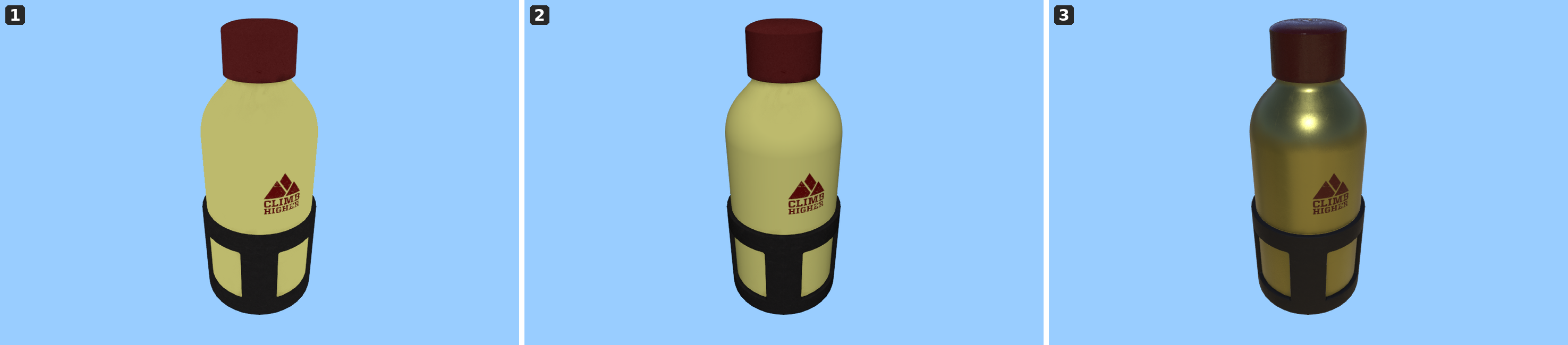
ShadingModelShadingModelShadingModel on its style.
PbrShadingModelPbrShadingModelPbrShadingModel: physically based rendering (PBR), using the map's light and its reflection map. This is the default, so glTF assets and OGC 3D Tiles are shaded physically without extra configuration.SimpleShadingModelSimpleShadingModelSimpleShadingModel: simple diffuse lighting from the map's light, without PBR materials or reflections.- No shading model: the object keeps its plain albedo and is not affected by the map's light.
Set the shading model through MeshStyleMeshStyleMeshStyle for OGC 3D Tiles and through
FeatureCanvas::drawIcon3DFeatureCanvas::drawIcon3DFeatureCanvas::drawIcon3D for 3D icons.
See the Configure shading models article for more information.
New featureLuciadCPillar
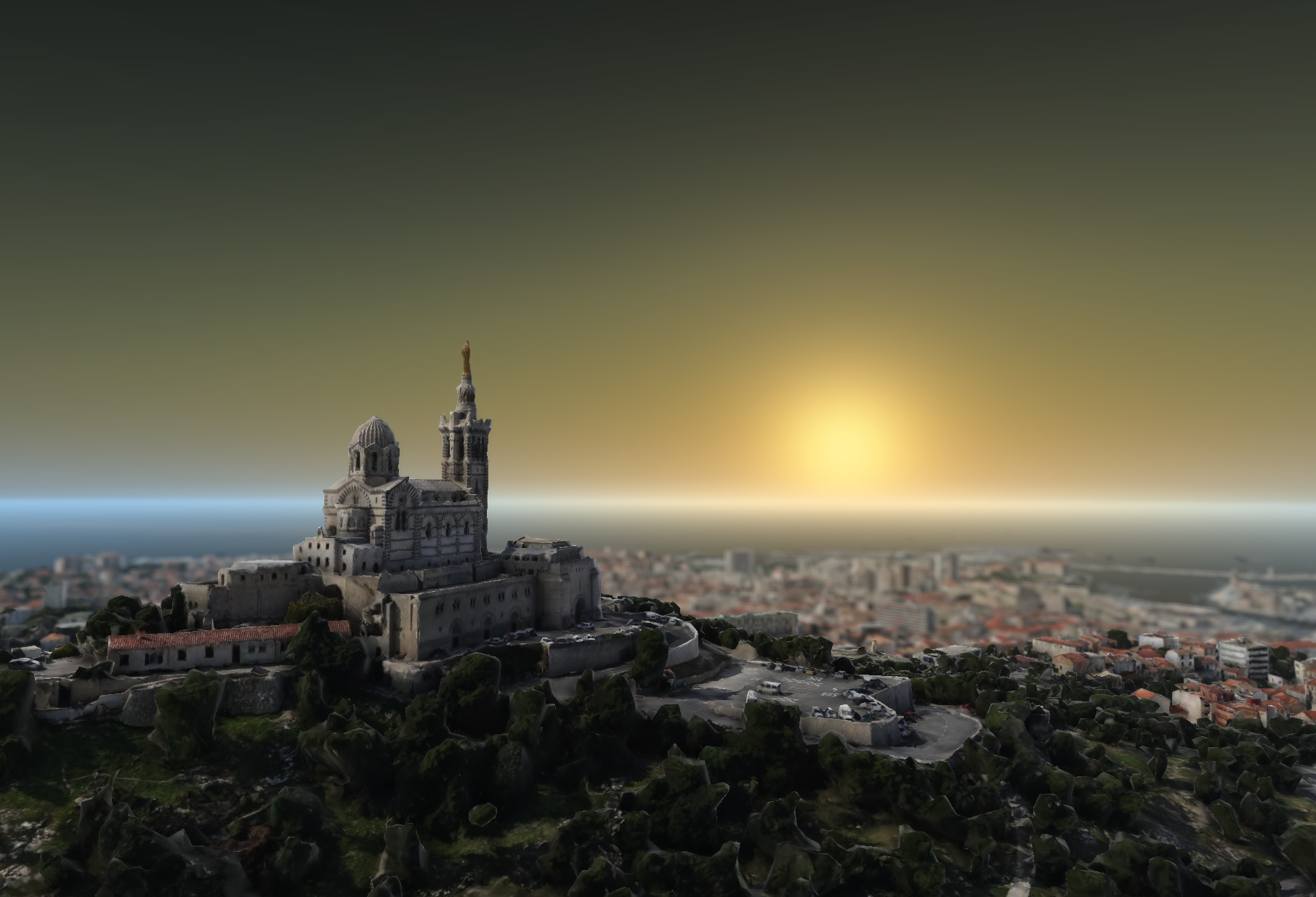
- Light: configurable scene lighting using a headlight, a fixed directional light, or sunlight at a given time.
- Atmosphere: this effect offers a physically-based Rayleigh/Mie scattering sky
(
ScatteringAtmosphereModelScatteringAtmosphereModelScatteringAtmosphereModel) alongside the existing gradient sky (GradientAtmosphereModelGradientAtmosphereModelGradientAtmosphereModel). - Depth of Field: an effect that blurs the scene outside a focus plane.
- Fog: an effect that fades geometry into a fog color with distance and altitude, with an optional sun-glow tint.
- Bloom: an effect that makes shapes and objects carry a
BloomStyleBloomStyleBloomStyleglow, controlled by a map-wide strength and softness. - Environment map: an effect that supports a skybox and image-based reflections that physically-based rendering (PBR) objects, such as 3D icons and OGC 3D Tiles, reflect and are lit by.
How effects are configured has also changed: each effect is now set through an immutable model created with a fluent builder, instead of individual property setters. For the effects that already existed before version 2026.1, this is a source-incompatible change.
See the Configure Map Effects guide for the full API and per-effect guidance.
New featureLuciadCPillar
WfsModelDecoderOptions::Builder::outputFormatWfsModelDecoderOptions::Builder::outputFormatWfsModelDecoderOptions::Builder::outputFormat, for example
"application/json". The output formats advertised by a server are available through
WfsFeatureType::getOutputFormatsWfsFeatureType::getOutputFormatsWfsFeatureType::getOutputFormats. If no output format is set, the server default (GML)
is used. For more information, see the Decode and visualize WFS data article.
New featureLuciadCPillar
GeoLocationGeoLocationGeoLocation on the ITileSet3DModelITileSet3DModelITileSet3DModel.
See this guide for more details.
New featureLuciadCPillar
MapNavigatorMapNavigatorMapNavigator can now move the camera to a given eye position and orientation with a new
look-from action. Create one with MapNavigator::newLookFromActionMapNavigator::newLookFromActionMapNavigator::newLookFromAction.
This can for example be used to fly the camera to a known viewpoint.
New featureLuciadCPillar
LuciadCPillar can now decode and visualize Gaussian splats. Gaussian splatting is a novel scene-representation and 3D rendering technique that uses a large amount of tiny 3D Gaussian primitives ("splats") to create photorealistic views of real-world scenes.
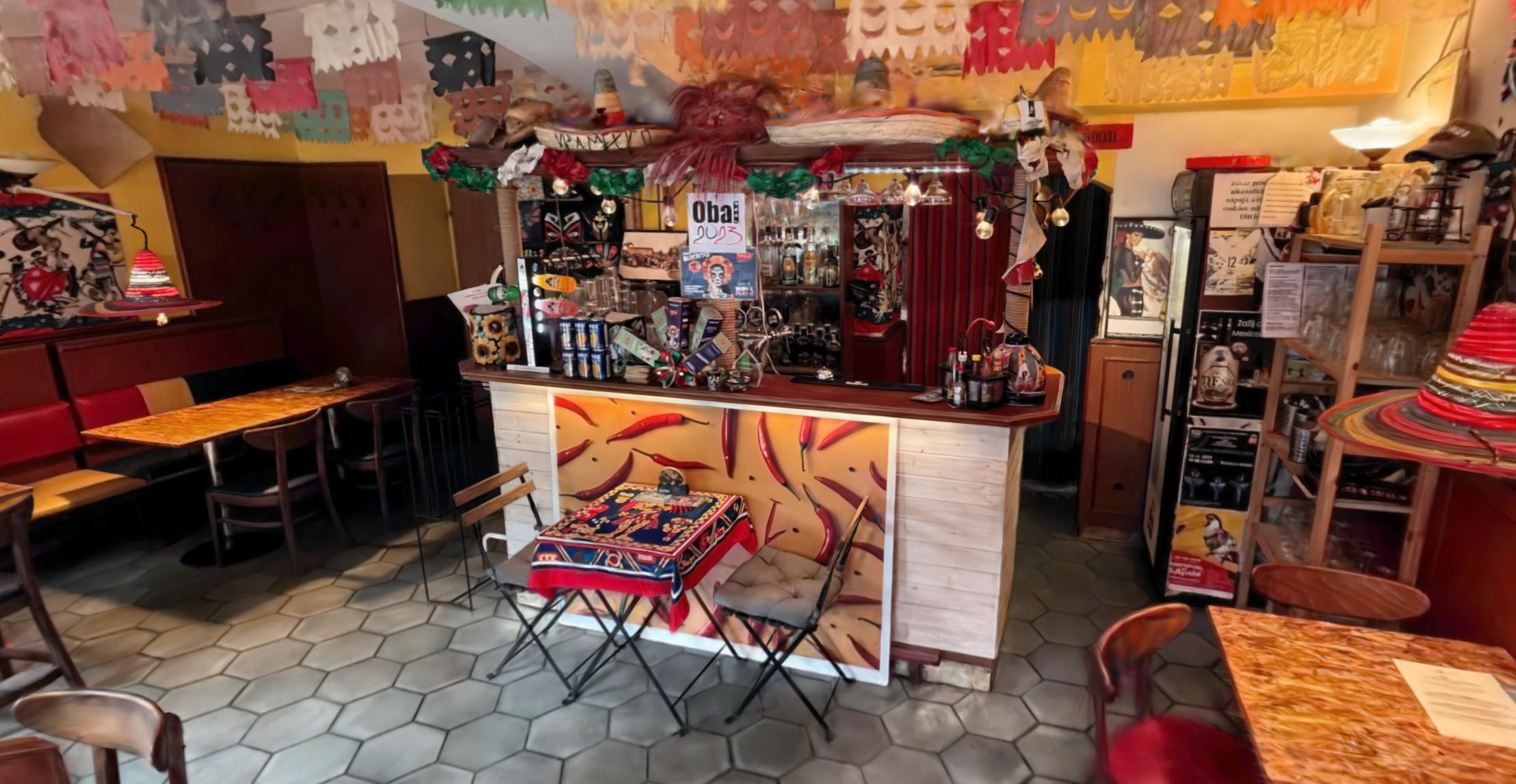
LuciadCPillar can consume Gaussian splats as OGC 3D Tiles with glTF payloads that make use of the
KHR_gaussian_splatting or KHR_gaussian_splatting_compression_spz_2
extension of the glTF specification.
You can visualize a Gaussian splatting dataset by decoding it with Ogc3DTilesModelDecoderOgc3DTilesModelDecoderOgc3DTilesModelDecoder and
passing the resulting model to a TileSet3DLayerTileSet3DLayerTileSet3DLayer.
Use TileSet3DLayer::Builder::gaussianSplatsStyleTileSet3DLayer::Builder::gaussianSplatsStyleTileSet3DLayer::Builder::gaussianSplatsStyle (or TileSet3DLayer::setGaussianSplatsStyleTileSet3DLayer::setGaussianSplatsStyleTileSet3DLayer::setGaussianSplatsStyle)
with a GaussianSplatsStyleGaussianSplatsStyleGaussianSplatsStyle to customize the styling of the Gaussian splats, using expressions for example,
and to tweak other performance-related settings.
New featureLuciadCPillar
JsonDataAnnotationJsonDataAnnotationJsonDataAnnotation marks a string-typed DataPropertyDataPropertyDataProperty as containing
JSON text, so that a plain string property can be distinguished from a property with a JSON string as its value.
New featureLuciadCPillar
DataPropertyDataPropertyDataProperty can now carry metadata in the form of DataAnnotationDataAnnotationDataAnnotation instances.
Attach them with DataProperty::Builder::addAnnotationDataProperty::Builder::addAnnotationDataProperty::Builder::addAnnotation and read them through
DataProperty::getAnnotationsDataProperty::getAnnotationsDataProperty::getAnnotations. DataPropertyPathDataPropertyPathDataPropertyPath gained
getTargetProperty to retrieve the property at the end of a path, so that a property
and its annotations are reachable from a path.
New featureLuciadCPillar
FeatureFeatureFeature can now retrieve composite values as DataObjectDataObjectDataObject.
For more information, see the Describing the feature structure in a data model article.
New featureLuciadCPillar
DataPropertyDataPropertyDataProperty can now describe a list of values. Set its collection type to DataCollectionKind::ListDataCollectionKind::ListDataCollectionKind::List
for a list-typed property. FeatureFeatureFeature gained the matching accessors, together with a getListSize method.
For more information, see the Describing the feature structure in a data model article.
New featureLuciadCPillar
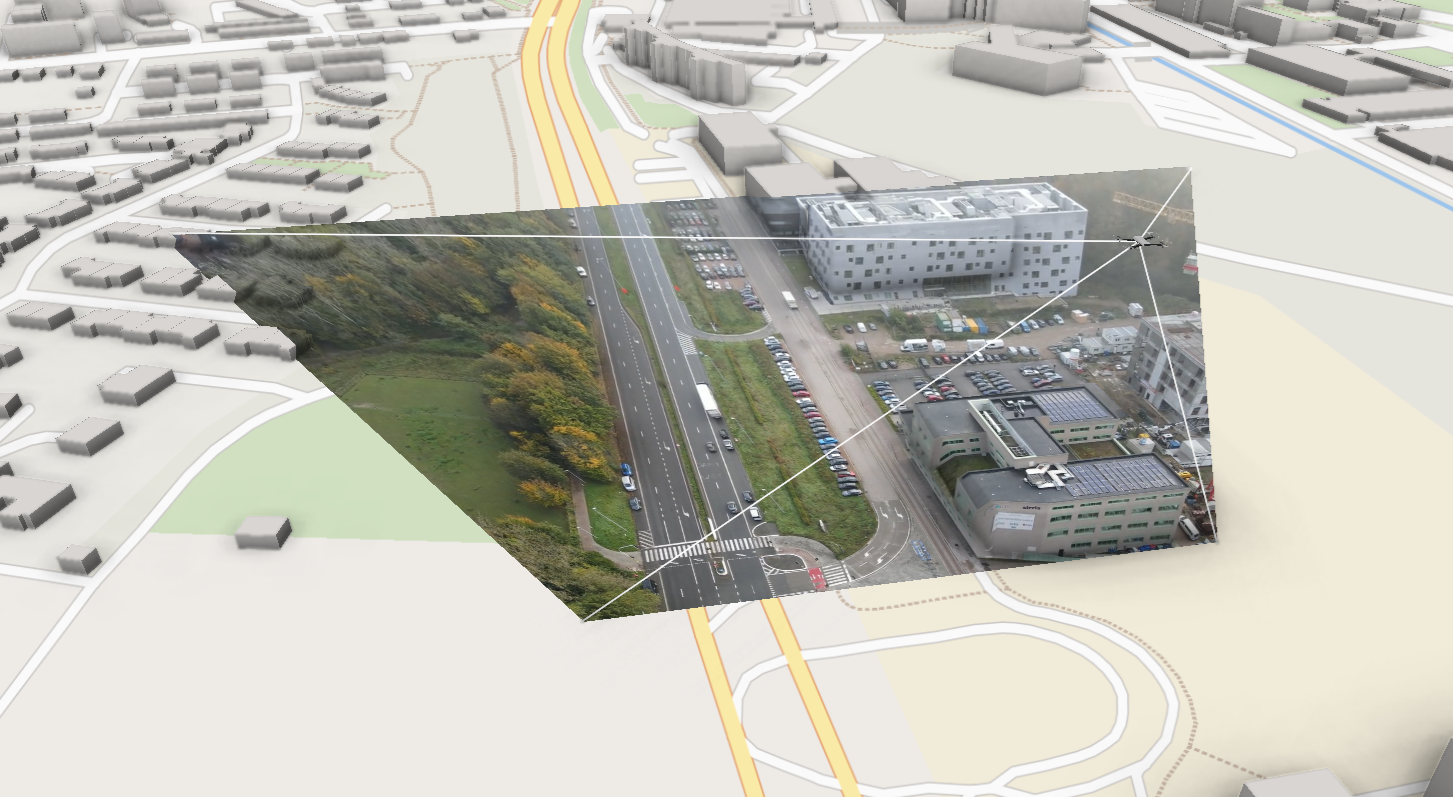
LuciadCPillar can now project a static image, a continuous stream of video frames, or 360-degree panoramas onto the map.
To show such projections, you create a ProjectedImageryLayerProjectedImageryLayerProjectedImageryLayer backed by an IProjectedImageryModelIProjectedImageryModelIProjectedImageryModel,
such as the ready-made ProjectedVideoModelProjectedVideoModelProjectedVideoModel for a live video source, or PanoramaModelPanoramaModelPanoramaModel
for 360-degree panoramas, and add it to the LayerListLayerListLayerList of the map.
For more details about using this feature, see this guide.
New featureLuciadCPillar
GeoJsonModelDecoderGeoJsonModelDecoderGeoJsonModelDecoder.
For more information, see the Decode and visualize GeoJSON data article.
You can use the data formats sample to load a GeoJSON file.
New featureLuciadCPillar
To perform a WMS GetFeatureInfo request, you need a WmsGetFeatureInfoContextWmsGetFeatureInfoContextWmsGetFeatureInfoContext, obtained from a
WmsRasterLayerWmsRasterLayerWmsRasterLayer.
To perform a WMTS GetFeatureInfo request, you need a WmtsGetFeatureInfoContextWmtsGetFeatureInfoContextWmtsGetFeatureInfoContext, obtained from a
WmtsRasterLayerWmtsRasterLayerWmtsRasterLayer.
New featureLuciadCPillar
Map::setReferenceMap::setReferenceMap::setReference: to change the Map's referenceMap::propertyReferenceMap::propertyReferenceMap::propertyReference: to detect changes to the Map's reference
ImprovementLuciadCPillar
ImprovementLuciadCPillar
You can now ask the map to repaint with Map::invalidateMap::invalidateMap::invalidate.
An example where this would help is a Map::IRendererCallbackMap::IRendererCallbackMap::IRendererCallback that updates the camera on
every paint. Such a callback can leave the camera alone once the view is at rest, which lets the map stop painting,
and call Map::invalidateMap::invalidateMap::invalidate on new user input to get it painting again.
ImprovementLuciadCPillar
LCP-370
HttpClientHttpClientHttpClient implementation now always performs SSL verification.
In the class documentation you can find out where it looks for the certificate authority (CA) file
for each of the supported platforms and how you can use a custom CA file location.
ImprovementLuciadCPillar
Image::decodeImage::decodeImage::decode, either from a buffer of encoded bytes or from a file path.
JPEG, PNG, TIFF, WebP and Radiance HDR images are supported.
ImprovementLuciadCPillar
FeatureModelBuilderFeatureModelBuilderFeatureModelBuilder can now assemble the model metadata itself through the new
title, reference and dataModel convenience methods,
which makes modelMetadata and featureModelMetadata optional.
ImprovementLuciadCPillar
Luciad.Net.Http.HttpClient, the HTTP
client that LuciadCPillar itself provides, instead of System.Net.WebRequest, which .NET 8 marks as
obsolete.
ImprovementLuciadCPillar
ViewControl has moved out of Luciad.CPillar.CSharp.Integration.Wpf into a new
Luciad.CPillar.CSharp.Integration.WinForms.
ImprovementLuciadCPillar
DataType::BuilderDataType::BuilderDataType::Builder now has a property shortcut for each primitive type, so declaring a feature type no
longer requires building a DataPropertyDataPropertyDataProperty for every property:
addGeometryProperty, addIntProperty, addLongProperty,
addFloatProperty, addDoubleProperty, addStringProperty and
addBooleanProperty.
addGeometryProperty(name, mainGeometry) additionally attaches the
GeometryDataAnnotationGeometryDataAnnotationGeometryDataAnnotation when mainGeometry is true, which
removes the need for an IDataAnnotationFactoryIDataAnnotationFactoryIDataAnnotationFactory in the common case of a feature type with a single
geometry. Pass false for the additional geometry properties of a type that has several geometries. A data type
has at most one main geometry.
The shortcuts add scalar properties of a primitive type. Keep using
DataType::Builder::addPropertyDataType::Builder::addPropertyDataType::Builder::addProperty for anything else, such as list-valued properties, properties carrying
their own annotations, or properties of which the value type is another data type.
ImprovementLuciadCPillar
LCP-213
csharp/AllSamplesCSharp.sln, together with all sample project files, so you can open and build
the samples directly. See the installation instructions
for details.
ImprovementLuciadCPillar
ComplexStrokeLineStyleComplexStrokeLineStyleComplexStrokeLineStyle can now be sized in meters instead of pixels, and its patterns can be
scaled with a factor. Use ComplexStrokeLineStyle::Builder::inMetersComplexStrokeLineStyle::Builder::inMetersComplexStrokeLineStyle::Builder::inMeters to interpret the pattern
sizes and offsets as meters, and ComplexStrokeLineStyle::Builder::scaleComplexStrokeLineStyle::Builder::scaleComplexStrokeLineStyle::Builder::scale to apply a scale
factor to them.
ImprovementLuciadCPillar
CoordinateReferenceProviderCoordinateReferenceProviderCoordinateReferenceProvider class now has a few accessors that return commonly used coordinate
references directly.
ImprovementLuciadCPillar
FeatureFeatureFeature values by property name, without building a
DataPropertyPathDataPropertyPathDataPropertyPath for each one. The getValue, value,
resetValue and getListSize methods on FeatureFeatureFeature and its
builder gained overloads that take a property name. For repeated access to the same property,
DataType::getPropertyPathForDataType::getPropertyPathForDataType::getPropertyPathFor resolves a name to a reusable
DataPropertyPathDataPropertyPathDataPropertyPath.
See Describing the feature structure in a data model for more details.
ImprovementLuciadCPillar
LCP-1715
nuget.exe on your
PATH, nor the -DCMAKE_PROGRAM_PATH CMake parameter that pointed to it.
Turning the samples into NuGet packages does not need one either. The
generateNugetPackagesOfSamples.bat script and the per sample command in the
installation instructions now use
dotnet pack, so the .NET SDK that builds the samples is all you need. The script also reports a
failed package instead of skipping it silently.
ImprovementLuciadCPillar
PixelFormat::Bgra8888PixelFormat::Bgra8888PixelFormat::Bgra8888 has been added as a supported pixel format.
ImprovementLuciadCPillar
FeatureQueryFeatureQueryFeatureQuery API now provides an asBuilder method that
returns a builder initialized with an existing query's settings, to create a modified copy of a query.
ImprovementLuciadCPillar
Map::setAutoAdjustDepthRangeEnabledMap::setAutoAdjustDepthRangeEnabledMap::setAutoAdjustDepthRangeEnabled with
false to turn that off, and set the planes yourself with the new
PerspectiveCamera::Builder::nearFarPerspectiveCamera::Builder::nearFarPerspectiveCamera::Builder::nearFar or OrthographicCamera::Builder::nearFarOrthographicCamera::Builder::nearFarOrthographicCamera::Builder::nearFar.
ImprovementLuciadCPillar
TileSet3DLayer::setTransformationTileSet3DLayer::setTransformationTileSet3DLayer::setTransformation, which can be used
to translate, scale or rotate tilesets in 3D space.
ImprovementLuciadCPillar
WebGpuContext::setRenderTargetWebGpuContext::setRenderTargetWebGpuContext::setRenderTarget can now draw the map on top of what is already in the
render target, instead of always clearing it first. The overload that takes a depth texture gained two
parameters, clearColor and clearDepth, both true
by default. Passing false makes sure the target's current color and depth isn't cleared.
The map is then blended over the existing color, and correctly hides and is hidden by whatever is
already in the depth buffer.
This makes it possible to combine LuciadCPillar with graphics produced by another renderer in the same textures, so the map and that content occlude each other correctly where they overlap.
ImprovementLuciadCPillar
MbTilesFeatureLayerMbTilesFeatureLayerMbTilesFeatureLayer now uses the style declared in
the MBTiles dataset by default (if one is present, and if no other style was given to
MbTilesFeatureLayer::Builder::styleMbTilesFeatureLayer::Builder::styleMbTilesFeatureLayer::Builder::style).
This is an extension to the MBTiles format introduced by LuciadFusion.
ImprovementLuciadCPillar
LCP-1694
ExpressionExpressionExpression API now supports null literals, allowing you
to filter on certain properties being null in an IFeatureModelIFeatureModelIFeatureModel.
See ExpressionValue::createNullExpressionValue::createNullExpressionValue::createNull.
ImprovementLuciadCPillar
ImprovementLuciadCPillar
LCP-1640
TileMatrixSetLimits).
ImprovementLuciadCPillar
Bug fixLuciadCPillar
LCP-1752
Bug fixLuciadCPillar
Fixed an issue where Map::getCameraMap::getCameraMap::getCamera and the view transformation returned by
Map::getViewMapTransformationMap::getViewMapTransformationMap::getViewMapTransformation used slightly different camera positions while
the map was being navigated. Combining their results could then be inconsistent. Map::getMapScaleMap::getMapScaleMap::getMapScale,
Map::getMapBoundsMap::getMapBoundsMap::getMapBounds, Map::getVisibleAreaMap::getVisibleAreaMap::getVisibleArea and
Map::queryFeaturesMap::queryFeaturesMap::queryFeatures could momentarily disagree with the camera in the same way.
Map::getCameraMap::getCameraMap::getCamera, the view transformation and these queries now consistently reflect the same
view of the map, so their results can be safely combined, also while the map is being navigated.
Bug fixLuciadCPillar
Bug fixLuciadCPillar
LCP-702
Map::getCameraMap::getCameraMap::getCamera did not reflect the near and far planes that the map
adjusts automatically while rendering to keep good depth precision. It returned the near and far the camera was
last set with, even when the map rendered with a different, tightened range. Map::getCameraMap::getCameraMap::getCamera
now returns the near and far the map actually rendered with, and a camera change event is fired when the automatic
adjustment changes them.
Bug fixLuciadCPillar
LCP-1701
Transformation::createTransformation::createTransformation::create would throw
a RuntimeExceptionRuntimeExceptionRuntimeException for invalid transformations, rather than
a InvalidArgumentExceptionInvalidArgumentExceptionInvalidArgumentException as documented.
Bug fixLuciadCPillar
ComplexStrokeOrientation::CameraFacingComplexStrokeOrientation::CameraFacingComplexStrokeOrientation::CameraFacing are now evaluated in screen space.
As a result, patterns (for example the dashes of a dashed line) keep a constant on-screen size regardless of the camera position.
Previously, the pattern was perspective-deformed with distance.
Upgrade considerationLuciadCPillar
A number of control measure Line symbols in APP-6D and MIL-STD 2525D no longer display the generic
PL ("phase line") label. Previously these symbols were labeled twice:
once with PL followed by the first
uniqueDesignation modifier, and once with the abbreviation specific to
the symbol followed by the second uniqueDesignation modifier. They are
now labeled only with their own abbreviation, followed by the
first uniqueDesignation modifier.
The change affects the following symbols. All of them belong to symbol set
25 (Control Measure); the symbol code is given for each symbol.
- APP-6D
- Light Line:
110200 - Final Coordination Line:
140700 - Limit Of Advance:
140900 - Line Of Departure:
141100 - Line Of Contact:
140200 - Probable Line Of Deployment:
141200 - Bridgehead Line (BL):
141400 - Holding Line:
141500 - Release Line:
141600
- Light Line:
- MIL-STD 2525D
- Light Line:
110200 - Final Coordination Line:
140700 - Limit Of Advance:
140900 - Line Of Departure / Line Of Contact:
141100 - Line Of Contact:
140200 - Probable Line Of Deployment:
141200 - Bridgehead Line (BL):
141400 - Holding Line (HL):
141500 - Release Line:
141600
- Light Line:
Upgrade considerationLuciadCPillar
ErrorInfoErrorInfoErrorInfo no longer relies on std::error_code: it now stores a
luciad::ErrorCodeluciad::ErrorCodeluciad::ErrorCode directly, which is always available.
Error messages of the OGC service formats (WMS, WMTS, WFS and LTS) are now prefixed with the format-specific error code,
for example CapabilitiesSourceError - Error while connecting to WMTS url '...'.
Upgrade considerationLuciadCPillar
MapMapMap have changed. By default, the GPU memory limit is now
2000 MB instead of 1000 MB. The CPU memory limit remains unchanged at 500 MB. You can still create maps with the
old limit by calling Map::Builder::maxMemoryUsageHintMap::Builder::maxMemoryUsageHintMap::Builder::maxMemoryUsageHint.
See the Managing memory usage guide on how to configure LuciadCPillar's memory management.
Upgrade considerationLuciadCPillar
getRequiredFeatures, WebGpuContextWebGpuContextWebGpuContext now also
has a getRequiredLimits method, which returns the WGPULimits
required by LuciadCPillar to function properly. You must satisfy these limits by including them in the device
descriptor when creating your WGPUDevice. All samples demonstrate how this should be done.
Upgrade considerationLuciadCPillar
- Read the current settings with
getModel() - Build a changed copy and apply it with
setModel(...) - Turn the effect on or off with
setEnabled(...)
The individual property setters these effects used to expose, such as
AmbientOcclusionEffect::setPower(...), have been removed. Those properties are now
configured on the model passed to setModel(...), through the matching method on its builder.
The atmosphere changes the most: its sky and horizon colors now live in a
GradientAtmosphereModelGradientAtmosphereModelGradientAtmosphereModel, and the effect's model is the polymorphic
AtmosphereModelAtmosphereModelAtmosphereModel base type, which also has the new
ScatteringAtmosphereModelScatteringAtmosphereModelScatteringAtmosphereModel variant.
Eye dome lighting's window (a pixel count) is now unsigned rather than a signed
int: on EyeDomeLightingModelEyeDomeLightingModelEyeDomeLightingModel it is a uint32_t in
C++, surfacing as uint in C# and long in Java/Kotlin.
See the Configure map effects guide for the full API and per-effect guidance.
Upgrade considerationLuciadCPillar
.NET 8 (net8.0-windows) instead of
.NET Framework 4.7.2. The LuciadCPillar C# API itself is unchanged.
This changes the requirements for the samples: building them now requires the .NET 8 SDK, and running them requires the .NET 8 Desktop Runtime. See the system requirements for details.
The Luciad.CPillar.SDK binding is not affected: it still targets
netstandard2.0, so it can be used from both .NET Framework and .NET applications.
The reusable sample libraries (Luciad.CPillar.CSharp.Integration.Wpf,
Luciad.CPillar.CSharp.Samples.Common and
Luciad.CPillar.CSharp.Samples.Wpf.Common) target both net472 and
net8.0-windows. You can therefore still reference the sample integration code (such as the WPF
WpfMapControl) from a .NET Framework 4.7.2 project, and the sample source remains compatible with
.NET Framework 4.7.2.
The C# language version used to build the samples has been raised from 7.0 to
7.3.
Upgrade considerationLuciadCPillar
D3DImage), instead
of hosting the map in a separate child window. This removes the WPF airspace limitation. The LuciadCPillar API
itself is unchanged.
The airspace limitation came from hosting the map in a separate Win32 child window (through a
WindowsFormsHost), which Windows composites as an opaque rectangle on top of every WPF
pixel in that area. Because of that, no WPF element (a popup, tooltip, adorner, overlay or panel) could appear
over the map. The reworked integration composites the map inside WPF's own visual tree, so WPF content
can now be drawn on top of the map.
As an illustration, the WPF samples now place components directly on top of the map, such as the coordinate readout (the location control) that previously had to sit in a bar below the map.
The new WpfMapControl is a drop-in replacement for the previous one. It keeps the same
public API and the same WpfMapControlViewModel as its DataContext,
so application code that uses it does not need to change.
The previous WindowsFormsHost based integration still works and will keep working, but it
is no longer included in the shipped samples.
To adopt the new integration, replace your copy of the integration_wpf sample library with
the updated version (the one whose WpfMapControl renders through a
D3DImage) and rebuild. No changes to your application code are required.
Upgrade considerationLuciadCPillar
For Qt Quick, QQuickMapItem is a drop-in replacement: application code that uses it does
not need to change.
For Qt Widgets, the new QMapWidget replaces the old QMapWindow and
works fundamentally differently: it is now a QWidget (a QRhiWidget),
whereas QMapWindow was a QVulkanWindow. To upgrade, add the
QMapWidget directly to your widget layout, instead of hosting a
QMapWindow through QWidget::createWindowContainer. See the updated
sample_qt_widget for the new usage.
The previous integration approach keeps working in this release, but it relies on behavior that is no longer
guaranteed and may stop working in a future release. We recommend migrating to the reworked sample integration
libraries (integration_common, integration_qt_quick and
integration_qt_widgets).
Upgrade considerationLuciadCPillar
libyuv-android library version 0.44.0 to
convert video frames decoded by the Media3 library to LuciadCPillar images.
More information is available here.
Upgrade considerationLuciadCPillar
Upgrade considerationLuciadCPillar
LCP-1601, LCP-1650, LCP-1692, LCP-1702, LCP-1704, LCP-1716, LCP-1743, LCP-1745
| Library | New Version |
|---|---|
| GDAL | 3.13.1+1 |
| PROJ | 9.7.0 |
| libgeotiff | 1.7.4 |
| libzip | 1.11.4 |
| libexpat | 2.8.3 |
| libcurl | 8.21.0 |
| libtiff | 4.7.2 |
| sqlite3 | 3.53.3 |
| openssl | 3.5.8 |
| dawn | 7977_8+1 |