Class TLcdGXYOffsetIconPainter
- All Implemented Interfaces:
ILcdCloneable,ILcdPropertyChangeSource,ILcdGXYEditor,ILcdGXYEditorProvider,ILcdGXYLabelEditor,ILcdGXYLabelEditorProvider,ILcdGXYLabelPainter,ILcdGXYLabelPainter2,ILcdGXYLabelPainterProvider,ILcdGXYMultiLabelPainter,ILcdGXYPainter,ILcdGXYPainterProvider,Serializable,Cloneable
ILcdGXYPainter that paints objects at a certain offset.
This typically applies to objects which are painted as icons. This can be useful to avoid clutter in areas on the map where there
are a lot of domain object clustered together, by moving the representations away from each
other.
The offset icon is painted as a label, so that existing label decluttering algorithms can be
reused to declutter the icons. It paints this label when the label
index and sublabel index are both 0.
This painter is
- an
ILcdGXYPainter, to draw the anchor points (where the icon would normally be located). The painting of this anchor point is delegated to theILcdGXYPainterspecified in the constructor. - an
ILcdGXYLabelPainterto draw the offset icon as a label and to draw the labels of the delegate label painter. The painting of the offset icon is delegated to theILcdGXYPainterspecified in the constructor. The painting of the other labels is delegated to theILcdGXYLabelPainterspecified in the constructor, if there is one. - an
ILcdGXYEditorso that the domain object can be moved. This editing is delegated to theILcdGXYEditorspecified in the constructor. - an
ILcdGXYLabelEditorso that the domain object can be moved when the label is moved and so that the icon offset can be changed using the mouse. This label editing is not delegated.
Following image illustrates the usage of the delegate painters:
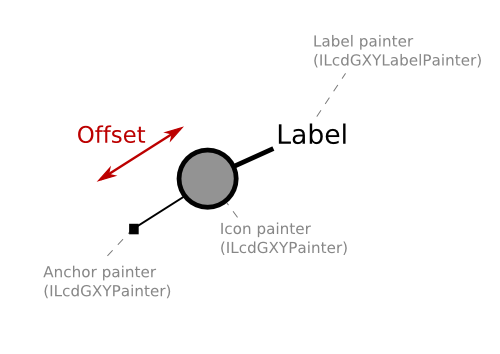
The offset icon is always painted as the label specified by the label index 0 and
the sublabel index 0.
This class supports snapping:
- It can provide snap targets: when the location in the context specifies a position near the anchor point or near the offset icon, the focus point of the set object is returned as snap target.
- It can snap to other snap targets: the snapping behaviour is delegated to the
ILcdGXYEditorspecified in the constructor of this class. When the context contains a snapping target accepted by that editor, the editor will snap the domain object to that snap target.
This painter must be used as ILcdGXYPainter, ILcdGXYEditor,
ILcdGXYLabelPainter and ILcdGXYLabelEditor for correct
operation.
This painter is also a provider for all of these interfaces. It always returns itself as painter, editor, label painter and label editor.
Remarks:
- This painter passes
( null, null )to the delegate label painter'sgetLabelCountmethod when this offset icon painter is configured to paint all labels as sublabels (cfr.TLcdGXYOffsetIconPainter) ; the delegate label painter should take this possibility into account. - This painter does not cooperate well with the interactive labels of
TLcdGXYStampLabelPainter. The interactive labels will be positioned as if there was no offset, which results in erratic behavior. - As the offset icons are painted as labels, make sure to set
setLabeled(true)on the layer. - If the icons should be selectable, a controller that allows selecting labels is needed:
TLcdGXYSelectController2. - As labels are painted on top of the bodies (regular objects), the offset icons can appear on top of objects that would otherwise be painted below.
- If the offset icons should be editable, a call to
setLabelsEditable(true)on the layer is required because the offset icons are treated as labels. - For the same reason, a controller that allows editing labels is needed:
TLcdGXYEditController2.
- Since:
- 7.2
- See Also:
-
Field Summary
FieldsModifier and TypeFieldDescriptionstatic final intInteger code to place label at center of the anchor point.static final intInteger code to place label at east of the anchor point.static intMaximum number of available locations.static final intInteger code to place label at north of the anchor point.static final intInteger code to place label at north east of the anchor point.static final intInteger code to place label at north west of the anchor point.static final intInteger code to place label at south of the anchor point.static final intInteger code to place label at south east of the anchor point.static final intInteger code to place label at south west of the anchor point.static final intInteger code to place label at west of the anchor point.Fields inherited from interface com.luciad.view.gxy.ILcdGXYEditor
CREATING, END_CREATION, RESHAPED, START_CREATION, TRANSLATEDFields inherited from interface com.luciad.view.gxy.ILcdGXYLabelEditor
CREATING, END_CREATION, RESHAPED, START_CREATION, TRANSLATEDFields inherited from interface com.luciad.view.gxy.ILcdGXYLabelPainter
DEFAULT, SELECTEDFields inherited from interface com.luciad.view.gxy.ILcdGXYLabelPainter2
BODY, CREATING, HANDLES, RESHAPING, SNAPS, TRANSLATINGFields inherited from interface com.luciad.view.gxy.ILcdGXYPainter
BODY, CREATING, DEFAULT, HANDLES, RESHAPING, SELECTED, SNAPS, TRANSLATING -
Constructor Summary
ConstructorsConstructorDescriptionTLcdGXYOffsetIconPainter(ILcdGXYPainter aDelegateAnchorPainter, ILcdGXYPainter aDelegateOffsetIconPainter, ILcdGXYEditor aDelegateOffsetEditor, ILcdGXYLabelPainter aDelegateLabelPainter) Creates an offset icon painter that delegates its operations to the specified painters and editor.TLcdGXYOffsetIconPainter(ILcdGXYPainter aDelegateAnchorPainter, ILcdGXYPainter aDelegateOffsetIconPainter, ILcdGXYEditor aDelegateOffsetEditor, ILcdGXYLabelPainter aDelegateLabelPainter, boolean aMapAllToSublabels) Creates an offset icon painter that delegates its operations to the specified painters and editor. -
Method Summary
Modifier and TypeMethodDescriptionbooleanacceptSnapTarget(Graphics aGraphics, ILcdGXYContext aGXYContext) Returns whether the object set to the editor can be edited so that (part of) the object snaps to the object passed as snap target in the context.booleanacceptSnapTargetForLabel(Graphics aGraphics, ILcdGXYContext aGXYContext) Returns whether the label specified bysetObject,setLabelIndexandsetSubLabelIndexaccepts the snap target in the givenILcdGXYContext.voidanchorPointSFCT(Graphics aGraphics, int aMode, ILcdGXYContext aGXYContext, Point aPointSFCT) Moves the Point passed to the location (in view coordinates, pixels) of the anchor point of the representation of the object in the given mode taking into account the given context.voidboundsSFCT(Graphics aGraphics, int aMode, ILcdGXYContext aGXYContext, ILcd2DEditableBounds aBoundsSFCT) Sets the supplied bounds (in view coordinates, pixels) so that it encompasses the representation of the object in the given mode taking into account the given context.clone()Returns a new instance of thisALcdGXYLabelPainter.booleanedit(Graphics aGraphics, int aMode, ILcdGXYContext aGXYContext) Defines how an object shall be edited by this editor, taking into account the mode and the context passed.booleaneditLabel(Graphics aGraphics, int aMode, ILcdGXYContext aGXYContext) Adapts the setTLcdLabelLocationaccording to the information present in aGXYContext.intReturns the number user interactions required to complete the initialization of an object set to this editor.getCursor(Graphics aGraphics, int aMode, ILcdGXYContext aGXYContext) Returns a cursor that clarifies the mode and context the painter is operating in.Returns the delegate anchor painter that was specified in the constructor.Returns the delegate label painter that was specified in the constructor.Returns the delegate editor that was specified in the constructor.Returns the delegate icon painter that was specified in the constructor.This default implementation returns the display name set withsetDisplayName, ortoString()if this was set tonull.protected ILcdPointReturns the focus point of the set object if it is anILcdShape.getGXYEditor(Object aObject) Finds anILcdGXYEditorthat can be used to edit the object passed.getGXYLabelEditor(Object aObject) Returns a validILcdGXYLabelEditorfor editing the labels of aObject.getGXYLabelPainter(Object aObject) Finds anILcdGXYLabelPainterthat can be used to label the object passed.getGXYPainter(Object aObject) Finds anILcdGXYPainterthat can be used to paint or locate the object passed.intgetLabelCount(Graphics aGraphics, ILcdGXYContext aGXYContext) Return the number of labels for the currently set object.intReturns the number of points required to initialize the label of the setObject.getLabelCursor(Graphics aGraphics, int aMode, ILcdGXYContext aGXYContext) Returns aCursorto indicate the type of editingaModeandaGXYContext.Returns the painter style that is used when drawing the pin.int[]Returns the list of possible positions to place the labels.intgetPossibleLocationCount(Graphics aGraphics) Returns the number of possible locations where thisILcdGXYLabelPaintercan paint/draw the labels of the set domainObject.intReturns how many pixels the label must be removed from the anchor point of the domain object when labels are not placed freely (i.e.Returns theILcdIconto paint snap target points of the object set to this painter.intgetSubLabelCount(int aLabelIndex) Returns the number of sublabels for the set object and the given label index.booleanReturns whether this painter will paint the labels of the delegate label painter.booleanReturns whether this painter paints the offset icons.booleanisLabelTouched(Graphics aGraphics, int aMode, ILcdGXYContext aGXYContext) Tests if the label specified bysetObject,setLabelIndexandsetSubLabelIndexis touched at view location(specified by aGXYContext.getX()andaGXYContext.getY()), considering the mode and theILcdGXYContextinstance.booleanReturns whether this editor makes a label sticky when it edits this label.booleanisTouched(Graphics aGraphics, int aMode, ILcdGXYContext aGXYContext) Checks if the representation of the object in the given mode is touched at the location as defined in the supplied context.booleanReturns whether or not this painter draws a line (the "pin") from the offset icon to the anchor point of the domain object.voidlabelAnchorPointSFCT(Graphics aGraphics, int aMode, ILcdGXYContext aGXYContext, Point aPointSFCT) SetsaPointSFCTto the anchor point of the label specified bysetObject,setLabelIndexandsetSubLabelIndex.doublelabelBoundsSFCT(Graphics aGraphics, int aMode, ILcdGXYContext aGXYContext, Rectangle aRectangleSFCT) Calculates the bounds of the label that can be painted.labelSnapTarget(Graphics aGraphics, ILcdGXYContext aGXYContext) Returns anObjectthat can be used as snapping target when graphically editing anotherObjector label than the one this ILcdGXYLabelPainter2 represents.voidpaint(Graphics aGraphics, int aMode, ILcdGXYContext aGXYContext) Displays the representation of the object in the given mode on the Graphics passed, taking into account the supplied context.voidpaintLabel(Graphics aGraphics, int aMode, ILcdGXYContext aGXYContext) Paints the label specified bysetObject,setLabelIndexandsetSubLabelIndexonaGraphics.static voidsetClassTraceOn(boolean aClassTraceOn) Deprecated.This method has been deprecated.voidsetDisplayLabels(boolean aDisplayLabels) Configures whether the regular labels should be painted.voidsetDisplayOffsetIcons(boolean aDisplayOffsetIcons) Configures whether this painter should paint the offset icons.voidsetMakeLabelsStickyOnEdit(boolean aMakeLabelsStickyOnEdit) Determines whether this editor makes a label sticky when it edits this label.voidsetPinStyle(ILcdGXYPainterStyle aPinStyle) Sets the painter style to be used when painting the pin.voidsetPositionList(int[] aPositionList) Sets a new position list.voidsetShiftLabelPosition(int aShift) Sets how many pixels the label must be removed from the anchor point of the domain object when labels are not placed freely (i.e.voidsetSnapIcon(ILcdIcon aSnapIcon) Sets theILcdIconto paint snap target points of the object set to this painter.voidsetWithPin(boolean aWithPin) Specifies whether or not a line (the "pin") should be drawn from the offset icon to the anchor point of the domain object.snapTarget(Graphics aGraphics, ILcdGXYContext aGXYContext) Returns an object that can be used as snapping target when graphically editing an object.booleansupportLabelSnap(Graphics aGraphics, ILcdGXYContext aGXYContext) Returns whether this label painter supports snapping for the label specified bysetObject,setLabelIndexandsetSubLabelIndex, considering the givenILcdGXYContextinstance.booleansupportSnap(Graphics aGraphics, ILcdGXYContext aGXYContext) Returns whether the painter can provide a snap target based on the representation of the object in the given context.Methods inherited from class com.luciad.view.gxy.ALcdGXYLabelPainter
addPropertyChangeListener, firePropertyChangeEvent, getLabelIndex, getLabelLocation, getLocationIndex, getObject, getSubLabelIndex, removePropertyChangeListener, setDisplayName, setLabelIndex, setLabelLocation, setLocationIndex, setObject, setSubLabelIndexMethods inherited from class java.lang.Object
equals, finalize, getClass, hashCode, notify, notifyAll, toString, wait, wait, waitMethods inherited from interface com.luciad.view.gxy.ILcdGXYEditor
getObject, setObjectMethods inherited from interface com.luciad.view.gxy.ILcdGXYLabelEditor
getLabelIndex, getLabelLocation, getObject, getSubLabelIndex, setLabelIndex, setLabelLocation, setObject, setSubLabelIndexMethods inherited from interface com.luciad.view.gxy.ILcdGXYLabelPainter
getLocationIndex, getObject, setLocationIndexMethods inherited from interface com.luciad.view.gxy.ILcdGXYLabelPainter2
getLabelLocation, setLabelLocation, setObjectMethods inherited from interface com.luciad.view.gxy.ILcdGXYMultiLabelPainter
getLabelIndex, getSubLabelIndex, setLabelIndex, setSubLabelIndexMethods inherited from interface com.luciad.view.gxy.ILcdGXYPainter
getObject, setObjectMethods inherited from interface com.luciad.util.ILcdPropertyChangeSource
addPropertyChangeListener, removePropertyChangeListener
-
Field Details
-
SOUTH_EAST
public static final int SOUTH_EASTInteger code to place label at south east of the anchor point.- See Also:
-
NORTH_WEST
public static final int NORTH_WESTInteger code to place label at north west of the anchor point.- See Also:
-
NORTH_EAST
public static final int NORTH_EASTInteger code to place label at north east of the anchor point.- See Also:
-
SOUTH_WEST
public static final int SOUTH_WESTInteger code to place label at south west of the anchor point.- See Also:
-
EAST
public static final int EASTInteger code to place label at east of the anchor point.- See Also:
-
WEST
public static final int WESTInteger code to place label at west of the anchor point.- See Also:
-
NORTH
public static final int NORTHInteger code to place label at north of the anchor point.- See Also:
-
SOUTH
public static final int SOUTHInteger code to place label at south of the anchor point.- See Also:
-
CENTER
public static final int CENTERInteger code to place label at center of the anchor point.- See Also:
-
MAXIMUM_AVAILABLE_LOCATIONS
public static int MAXIMUM_AVAILABLE_LOCATIONSMaximum number of available locations.
-
-
Constructor Details
-
TLcdGXYOffsetIconPainter
public TLcdGXYOffsetIconPainter(ILcdGXYPainter aDelegateAnchorPainter, ILcdGXYPainter aDelegateOffsetIconPainter, ILcdGXYEditor aDelegateOffsetEditor, ILcdGXYLabelPainter aDelegateLabelPainter) Creates an offset icon painter that delegates its operations to the specified painters and editor. If
aDelegateLabelPainterThisis not an instance ofILcdGXYLabelPainter2, this offset icon painter will be configured to use sublabels. The overloading constructor can be used if you want to set this option explicitly.- See Also:
-
TLcdGXYOffsetIconPainter
public TLcdGXYOffsetIconPainter(ILcdGXYPainter aDelegateAnchorPainter, ILcdGXYPainter aDelegateOffsetIconPainter, ILcdGXYEditor aDelegateOffsetEditor, ILcdGXYLabelPainter aDelegateLabelPainter, boolean aMapAllToSublabels) Creates an offset icon painter that delegates its operations to the specified painters and editor.
The
aMapAllToSublabelsflag determines how the label- and sublabel indices are mapped from the delegate label painter to this label painter. This is especially useful for decluttering behavior, which can differ for labels and sublabels. Please refer topaintLabelfor a table visualizing this mapping.- Parameters:
aDelegateAnchorPainter- TheILcdGXYPainterthat will be used to paint the anchor. This parameter must not benullaDelegateOffsetIconPainter- TheILcdGXYPainterthat will be used to paint the offset representation. This will typically be some sort of icon painter. This parameter must not benull.aDelegateOffsetEditor- TheILcdGXYEditorthat will be used to edit the domain object on user interaction. This editor must not benullif this painter will be used as an editor.aDelegateLabelPainter- TheILcdGXYLabelPainterthat will be used to paint the regular labels. This parameter may benullif no regular labels need to be painted.aMapAllToSublabels- Iftrue, thegetLabelCountmethod will always return1. All labels ofaDelegateLabelPainterand their sublabels are drawn as sublabels of this one label, together with the label representing the offset icon. Iffalse, only the label indices will be shifted to compensate for the offset icon, but the sublabel indices will remain the same.
-
-
Method Details
-
getDelegateAnchorPainter
Returns the delegate anchor painter that was specified in the constructor.- Returns:
- The delegate anchor painter that was specified in the constructor. This cannot be
null. - See Also:
-
getDelegateOffsetIconPainter
Returns the delegate icon painter that was specified in the constructor.- Returns:
- The delegate icon painter that was specified in the constructor. This cannot be
null. - See Also:
-
getDelegateOffsetEditor
Returns the delegate editor that was specified in the constructor.- Returns:
- The delegate editor that was specified in the constructor. This can be
null. - See Also:
-
getDelegateLabelPainter
Returns the delegate label painter that was specified in the constructor.- Returns:
- The delegate label painter that was specified in the constructor. This can be
null. - See Also:
-
isMakeLabelsStickyOnEdit
public boolean isMakeLabelsStickyOnEdit()Returns whether this editor makes a label sticky when it edits this label. The default isfalse- Returns:
trueif this label editor makes a label sticky when it edits this label,falseotherwise.- See Also:
-
setMakeLabelsStickyOnEdit
public void setMakeLabelsStickyOnEdit(boolean aMakeLabelsStickyOnEdit) Determines whether this editor makes a label sticky when it edits this label.- Parameters:
aMakeLabelsStickyOnEdit-trueif the label should be made sticky,falseotherwise.- See Also:
-
isWithPin
public boolean isWithPin()Returns whether or not this painter draws a line (the "pin") from the offset icon to the anchor point of the domain object.- Returns:
trueif the pin is drawn,falseif not.
-
setWithPin
public void setWithPin(boolean aWithPin) Specifies whether or not a line (the "pin") should be drawn from the offset icon to the anchor point of the domain object.- Parameters:
aWithPin-trueif the pin should be drawn,falseif not.
-
setPinStyle
Sets the painter style to be used when painting the pin. ItssetupGraphicsmethod will be called right before the pin is drawn.- Parameters:
aPinStyle- The pin style to use when drawing the pin. This must not benull.
-
getPinStyle
Returns the painter style that is used when drawing the pin.- Returns:
- The painter style that is used when drawing the pin. This is never
null.
-
getSnapIcon
Returns the
ILcdIconto paint snap target points of the object set to this painter. This icon is only used when the mouse is near the offset icon. Otherwise the snapping functionality is delegated to the anchor painter.- Returns:
- The
ILcdIconto paint snap the snap target when the context indicates a location near the offset icon. - See Also:
-
setSnapIcon
Sets the
ILcdIconto paint snap target points of the object set to this painter. This icon is only used when the mouse is near the offset icon. Otherwise the snapping functionality is delegated to the anchor painter.- Parameters:
aSnapIcon- TheILcdIconto paint snap the snap target when the context indicates a location near the offset icon.- See Also:
-
getDisplayName
Description copied from class:ALcdGXYLabelPainterThis default implementation returns the display name set withsetDisplayName, ortoString()if this was set tonull.- Specified by:
getDisplayNamein interfaceILcdGXYEditor- Specified by:
getDisplayNamein interfaceILcdGXYLabelEditor- Specified by:
getDisplayNamein interfaceILcdGXYLabelPainter2- Specified by:
getDisplayNamein interfaceILcdGXYPainter- Overrides:
getDisplayNamein classALcdGXYLabelPainter- Returns:
- the display name of this
ILcdGXYLabelPainter2
-
getLabelCount
Return the number of labels for the currently set object. The default implementation returns
1. Override this method if you need to support multiple labels.If this label painter is configured to paint all labels as sublabels (cfr
the
 constructor
) this will always return1. Otherwise this method will return the number of labels as specified by the delegate label painter, plus1for the offset icon.Please refer to
paintLabelfor documention on how the label- and sublabel indices set on this label painter are mapped to the label- and sublabel indices of the delegate label painter.- Specified by:
getLabelCountin interfaceILcdGXYLabelEditor- Specified by:
getLabelCountin interfaceILcdGXYMultiLabelPainter- Overrides:
getLabelCountin classALcdGXYLabelPainter- Parameters:
aGraphics- TheGraphicsinstance on which the labels would be painted.aGXYContext- The context containing information about the layer and the view for which the label would be drawn.- Returns:
- The number of labels for the set object. This should be greater than
0.
-
getSubLabelCount
public int getSubLabelCount(int aLabelIndex) Returns the number of sublabels for the set object and the given label index. The default implementation returns
1. Override this method if you need to support multiple sublabels.If this label painter is configured to paint all labels as sublabels (cfr
the constructor) this will return the sum of all the sublabels of all the labels as specified by the delegate label painter, plus one for the offset icon.Otherwise it returns
1whenaLabelIndexis0, for the offset icon, or thesubLabelCountof the label with indexaLabelIndex - 1as specified by the delegate label painter.- Specified by:
getSubLabelCountin interfaceILcdGXYLabelEditor- Specified by:
getSubLabelCountin interfaceILcdGXYMultiLabelPainter- Overrides:
getSubLabelCountin classALcdGXYLabelPainter- Parameters:
aLabelIndex- The label index for which you need to know the number of sublabels.- Returns:
- The number of sublabels. This should be greater than
0. - See Also:
-
getLabelCursor
Description copied from class:ALcdGXYLabelPainterReturns aCursorto indicate the type of editingaModeandaGXYContext.This default implementation always returns
null. Override this method if you want to display custom cursors.- Specified by:
getLabelCursorin interfaceILcdGXYLabelPainter2- Overrides:
getLabelCursorin classALcdGXYLabelPainter- Parameters:
aGraphics- TheGraphicsinstance on which the label is painted.aMode- The mode to consider. SeeILcdGXYLabelPainter2.paintLabel(java.awt.Graphics, int, ILcdGXYContext)for more information.aGXYContext- TheILcdGXYContextcontaining extra information, such as the layer, the view and the mouse position.- Returns:
- a
Cursorto indicate the type of editingaModeandaGXYContext. Returnsnullif no particularCursoris required.
-
isLabelTouched
Tests if the label specified bysetObject,setLabelIndexandsetSubLabelIndexis touched at view location(specified by aGXYContext.getX()andaGXYContext.getY()), considering the mode and theILcdGXYContextinstance.Before calling this method, the domain object, the label index, the sublabel index and the location of the label should be set using the respective methods.
If the label index and sublabel index are both
0, this method tests whether the offset icon is touched, otherwise the delegate label painter is used to determine whether the specified label is touched.Please refer to
paintLabelfor documentation on which information is passed to the delegate painters.- Specified by:
isLabelTouchedin interfaceILcdGXYLabelPainter2- Parameters:
aGraphics- TheGraphicsinstance on which the label is painted.aMode- the mode to consider. This is a bitwise combinations of several constants. SeeILcdGXYLabelPainter2.paintLabel(java.awt.Graphics, int, com.luciad.view.gxy.ILcdGXYContext)for more information.aGXYContext- theILcdGXYContextto consider.- Returns:
- true if the representation of the Object returned by getObject() is touched, false otherwise
- See Also:
-
labelAnchorPointSFCT
public void labelAnchorPointSFCT(Graphics aGraphics, int aMode, ILcdGXYContext aGXYContext, Point aPointSFCT) throws TLcdNoBoundsException Sets
aPointSFCTto the anchor point of the label specified bysetObject,setLabelIndexandsetSubLabelIndex.If the location index is less than 0, the label anchor point is unambiguously determined by the
label location. The actual label is to be painted somewhere around this anchor point. This method is typically called to compare the result with the label bounds, thus determining the exact relation between thelabeland itslocation.Before calling this method, the domain object, the label index, the sublabel index and the location of the label should be set using the respective methods.
If the label index and sublabel index are both
0, this method sets aPointSFCT to the anchor point of the offset icon; otherwise the delegate label painter is used to determine the anchor point.Please refer to
paintLabelfor documentation on which information is passed to the delegate painters.- Specified by:
labelAnchorPointSFCTin interfaceILcdGXYLabelPainter2- Parameters:
aGraphics- TheGraphicsinstance on which the label is painted.aMode- The mode to consider. This can be a bitwise combination of several constants. SeeILcdGXYLabelPainter2.paintLabel(java.awt.Graphics, int, com.luciad.view.gxy.ILcdGXYContext)for more information.aGXYContext- TheILcdGXYContextthat can be used to retrieve extra information.aPointSFCT- The point which will be updated to reflect the location of the anchor point.- Throws:
TLcdNoBoundsException- if the Object doesn't have any valid anchor point, e.g. if it is always invisible in the current projection.- See Also:
-
labelBoundsSFCT
public double labelBoundsSFCT(Graphics aGraphics, int aMode, ILcdGXYContext aGXYContext, Rectangle aRectangleSFCT) throws TLcdNoBoundsException Calculates the bounds of the label that can be painted. The bounds are set as a side effect in
aRectangleSFCT, the orientation ofaRectangleSFCTis returned as an angle.The bounds represent the upper left point of the label, and a width and a height. The rotation value represents the rotation of the label bounds around the upper left point.
The domain object, the label index, the sublabel index and the location of the label for which the bounds are retrieved should be set before calling this method using the respective methods.
Note that if this label painter is used in conjunction with a labeling algorithm, the bounds should preferably be independent of the location, as this will yield the best results.
If the label index and sublabel index are both
0, this method setsaRectangleSFCTto the bounds of the offset icon; otherwise the delegate label painter is used to determine the bounds.Please refer to
paintLabelfor documentation on which information is passed to the delegate painters.- Specified by:
labelBoundsSFCTin interfaceILcdGXYLabelPainter- Specified by:
labelBoundsSFCTin interfaceILcdGXYLabelPainter2- Parameters:
aGraphics- theaGraphicsto consider.aMode- the representation mode of the label.aGXYContext- theILcdGXYContextthe drawing depends on.aRectangleSFCT- theRectanglecontaining the bounds of the label in view / graphics coordinates as side effect.- Returns:
- the angle orientation of the rectangle around the labels in RADIANs, clockwise, 0 at 3 o'clock.
- Throws:
TLcdNoBoundsException- if the Object doesn't have any valid bounds, e.g. if it is always invisible in the current projection.- See Also:
-
paintLabel
Paints the label specified by
setObject,setLabelIndexandsetSubLabelIndexonaGraphics.aGXYContextshould contain theILcdGXYViewfor which the label is painted andILcdGXYLayerto which the object belongsThe implementation of this method shall define how to paint the specified label in the given mode, considering
aGXYContextand the setTLcdLabelLocation.The domain object, label index, sublabel index and the label location should be set before calling this method using the respective methods.
This interface extends the original contract of the paintLabel method to allow for more modes. Where in the super interface the mode could only be one of
ILcdGXYLabelPainter.DEFAULTorILcdGXYLabelPainter.SELECTED, the mode now can be a bitwise combination of several constantsWhen the label- and sublabel index are both
0, the offset icon is painted. This icon is painted by the delegate offset icon painter. The graphics and the context passed to thisILcdGXYPainterare modified to take the offset into account, given by the setTLcdLabelLocation.If any other combination of label- and sublabel index is set, this combination is mapped to the corresponding label- and sublabel index of the delegate label painter, as explained in the table below. The graphics and the context given to the delegate label painters are modified to take the offset into account, as well as the label location. The label location given to the delegate label painter is modified so that it cancels the offset of the icon. This allows the label painter to keep painting a line to the anchor point of the domain object.
In this case the offset is retrieved from theILcdGXYEditableLabelsLayerin the given context: it is specified by the label location of the label with label- and sublabel index0.The table below visualizes the mapping from label- and sublabel indices of the delegate label painter to the label- and sublabel indices of this label painter. In this table the example is given of a delegate label painter that has two labels: one with two sublabels, and the second with three sublabels.
Delegate label painter Mapping with aMapAllToSublabels == falseMapping with aMapAllToSublabels == trueLabel index Sublabel index Label index Sublabel index Label index Sublabel index Offset icon 0 0 0 0 0 0 1 0 1 1 1 2 1 0 2 0 3 1 1 4 2 2 5 - Specified by:
paintLabelin interfaceILcdGXYLabelPainter- Specified by:
paintLabelin interfaceILcdGXYLabelPainter2- Parameters:
aGraphics- The graphics object to paint the label onaMode- A bitwise combination ofaGXYContext- the drawing context for the label- See Also:
-
supportLabelSnap
Description copied from class:ALcdGXYLabelPainterReturns whether this label painter supports snapping for the label specified by
setObject,setLabelIndexandsetSubLabelIndex, considering the givenILcdGXYContextinstance. When the label painter supports snap for the specified label and context, it can return a snap target for this label and context.Before calling this method, the domain object, the label index, the sublabel index and the location of the label should be set using the respective methods.
This default implementation returns
false. Override this method if you want to support snapping.- Specified by:
supportLabelSnapin interfaceILcdGXYLabelPainter2- Overrides:
supportLabelSnapin classALcdGXYLabelPainter- Parameters:
aGraphics- the Graphics on which is worked.aGXYContext- the ILcdGXYContext of the snapping.- Returns:
trueif this label painter supports snapping for the specified label.- See Also:
-
getPossibleLocationCount
Description copied from interface:ILcdGXYLabelPainterReturns the number of possible locations where thisILcdGXYLabelPaintercan paint/draw the labels of the set domainObject.The domain
Objectfor which the location count is retrieved should be set before calling this method using theILcdGXYLabelPainter.setObject(java.lang.Object)method.- Specified by:
getPossibleLocationCountin interfaceILcdGXYLabelPainter- Parameters:
aGraphics- the Graphics the label will be painted on.- Returns:
- the number of possible locations where this
ILcdGXYLabelPaintercan paint/draw the labels of the set Object. - See Also:
-
acceptSnapTargetForLabel
Description copied from interface:ILcdGXYLabelEditorReturns whether the label specified by
setObject,setLabelIndexandsetSubLabelIndexaccepts the snap target in the givenILcdGXYContext.The snap target is the
Objectreturned byaGXYContext.getSnapTarget(), and is on theILcdGXYLayerreturned byaGXYContext.getSnapTargetLayer().- Specified by:
acceptSnapTargetForLabelin interfaceILcdGXYLabelEditor- Parameters:
aGraphics- TheGraphicson which the label is painted.aGXYContext- TheILcdGXYContextcontaining the snapping information.- Returns:
trueif the label accepts the snap target,falseotherwise.- See Also:
-
editLabel
Adapts the set
TLcdLabelLocationaccording to the information present in aGXYContext. If the method returnstrue, theTLcdLabelLocationwas modified, iffalseis returned, it wasn't changed.The implementation of this method shall define how to edit the label specified by the set domain
Object, label index and sublabel index, considering the given mode andaGXYContext. These should all be set before calling this method. Note that ifaModeis one of the creating modes, the (sub) label indices are irrelevant.In case
aMode == ILcdGXYLabelEditor.TRANSLATED:
When the set label- and sublabel index indicate the offset icon, this method will translate the domain object (ie. not the label position) using the delegate editor specified in the constructor. The set label location will not be changed, unless its label edit mode indicatesabsolute placement.
If the set label- and sublabel index indicate another label, the set label location will only be changed if its label edit mode indicates absolute placement.In case
aMode == ILcdGXYLabelEditor.RESHAPED:
The set label location will be adjusted according to the given context. This means that for the offset icon the offset will be changed, and for the regular labels their position will be changed.- Specified by:
editLabelin interfaceILcdGXYLabelEditor- Parameters:
aGraphics- TheGraphicson which the label is painted.aMode- the mode to consider when editing aObject: aMode shall be a combination ofILcdGXYLabelEditor.TRANSLATED,ILcdGXYLabelEditor.RESHAPED,ILcdGXYLabelEditor.START_CREATION,ILcdGXYLabelEditor.CREATING,ILcdGXYLabelEditor.END_CREATION.
aGXYContext- contains the information to consider when editing the set Object.- Returns:
- true if the label of the set Object has changed, false otherwise.
- See Also:
-
getLabelCreationClickCount
public int getLabelCreationClickCount()Description copied from interface:ILcdGXYLabelEditorReturns the number of points required to initialize the label of the setObject.- Specified by:
getLabelCreationClickCountin interfaceILcdGXYLabelEditor- Returns:
- the number of points required to initialize the label of the set
Objector -1 if this is undefined like for a polyline or a polygon. 0 means graphical creation of labels is not supported.
-
anchorPointSFCT
public void anchorPointSFCT(Graphics aGraphics, int aMode, ILcdGXYContext aGXYContext, Point aPointSFCT) throws TLcdNoBoundsException Description copied from interface:ILcdGXYPainterMoves the Point passed to the location (in view coordinates, pixels) of the anchor point of the representation of the object in the given mode taking into account the given context.The anchor point is an important point of the representation, typically the point which would be used when the object would be represented as a single point. The anchor point is mostly used to attach extra information to the representation of an object, for example, using labels. A typical implementation of this method for painters which can handle
ILcdShapeobjects is the location of the focus point of the shape.- Specified by:
anchorPointSFCTin interfaceILcdGXYPainter- Parameters:
aGraphics- the Graphics on which the representation of the object is paintedaMode- the mode the object is painted in (see class documentation)aGXYContext- the context for which the representation of the object is painted. It contains amongst others the transformations from model to world and world to view.aPointSFCT- the point that has to be moved to the location of the anchor point of the representation of the object. This point must not be taken into account when the method has thrown a TLcdNoBoundsException.- Throws:
TLcdNoBoundsException- if no anchor point can be determined for the representation of the object. This can be when the object does not have a representation in the given context, for example when it is located in a part of the world which is not visible in the projection as set in the views world reference.- See Also:
-
boundsSFCT
public void boundsSFCT(Graphics aGraphics, int aMode, ILcdGXYContext aGXYContext, ILcd2DEditableBounds aBoundsSFCT) throws TLcdNoBoundsException Sets the supplied bounds (in view coordinates, pixels) so that it encompasses the representation of the object in the given mode taking into account the given context.If this method returns without exception the bounds argument must encompass the representation of the object. A point outside the bounds will not be contained within the painted object.
The bounds returned in this method can be seen as the equivalent in the view space of the bounds in the model space for
ILcdBoundedobjects.This painter delegates this call to the delegate anchor painter specified in the
constructor.- Specified by:
boundsSFCTin interfaceILcdGXYPainter- Parameters:
aGraphics- the Graphics on which the representation of the object is paintedaMode- the mode the object is represented in (see class documentation). For example, an object may be represented differently in SELECTED mode compared to DEFAULT mode. The returned bounds of the representation must take this different representation into account.aGXYContext- the context for which the representation of the object is painted. It contains amongst others the transformations from model to world and world to view.aBoundsSFCT- the bounds that must be adapted to encompass the representation of the object in the given mode and context. These bounds must not be taken into account when the method has thrown an exception.- Throws:
TLcdNoBoundsException- if no bounds can be determined for the representation of the object. This can happen when the object does not have a representation in the given context, for example when it is located in a part of the world which is not visible in the current view.- See Also:
-
getCursor
Description copied from interface:ILcdGXYPainterReturns a cursor that clarifies the mode and context the painter is operating in. For example, when the mode isTRANSLATING, the cursor could be the MOVE cursor. When no specific cursor is required implementations must return null.- Specified by:
getCursorin interfaceILcdGXYPainter- Parameters:
aGraphics- the Graphics on which the representation of the object is paintedaMode- the rendering mode to return the cursor for.aGXYContext- the context in which the rendering occurs.- Returns:
- a
Cursorto indicate the type of operatingaModeandaGXYContext. Returnsnullif no particularCursoris required.
-
isTouched
Checks if the representation of the object in the given mode is touched at the location as defined in the supplied context.The location that must be taken into account to check whether the representation is touched can be retrieved from the context passed with the methods
ILcdGXYContext.getX()andILcdGXYContext.getY(). If the check is part of an ongoing operation of user interaction, for example, when the mouse is being dragged, the location of the start of the operation can also be taken into account using the methodsILcdGXYContext.getDeltaX()andILcdGXYContext.getDeltaY(). The context contains the transformations required to convert this location into the equivalent location in model space. Implementations of this interface usually follow either of the following patterns:- transform the location of the interaction back to model space and compare the coordinates with the object in model space.
- transform the location to world space and compare with a world representation of the object. This forces the painter into caching a world representation of the object. Caching a view representation of an object is not very practical as it would have to change whenever the view's scale changes or when it is panned. A world representation of an object only changes when the view's XYWorldReference changes, which happens less frequently.
As the mode influences the way an object is represented, it must also be taken into account when checking whether that representation is being touched. When the mode contains CREATING, RESHAPING or TRANSLATING which indicate that the object must be represented in a state for an ongoing operation, the location of the start of the operation may be taken into account as mentioned above. The painting result can take into account multiple locations, to respond to, for example, multi-touch input. When the mode contains SELECTED, the painter should also check if the non-selected representation is touched, since these are always painted on top of each other.
The
boundsSFCTis often used to speed up the performance of this method as a location outside these bounds can never touch the representation of the object.Note that this method does not give an indication of what part of the object is touched. It is up to the painter implementations to provide methods to make this distinction. The method does also not indicate what sensitivity must be applied when checking if an object is touched. It is up to the implementation to decide what should be the maximum distance between the location given in the context and the closest relevant point or area of the representation of the object.
This painter delegates this call to the delegate anchor painter specified in the
constructor.- Specified by:
isTouchedin interfaceILcdGXYPainter- Parameters:
aGraphics- the Graphics on which the representation of the object is paintedaMode- the mode the object is represented inaGXYContext- contains the location of the interaction and the transformations to convert this location into model coordinates- Returns:
- true if the representation of the object in the given mode is touched by the location as defined in the context passed, false otherwise
- See Also:
-
paint
Displays the representation of the object in the given mode on the Graphics passed, taking into account the supplied context.The visual representation of an object depends on the context. Depending on the context (e.g. is the location covered by the view), an object may or may not have a representation. The context contains:
- transformations which allow to compute the location in view space of points and bounds given in model, space
- a pen which can connect points with a line or create arcs around a point,
- the view for which the object's representation must be painted. This can be useful when the painted object depends on the scale of the view, or the presence of other layers in the view.
- the current location(s) of the mouse or input device and the last location(s) the mouse or input device was pressed.
The mode passed in this method indicates what part of the object must be painted, whether it should be painted as selected or not, and whether user interaction (via mouse movements) must be taken into account.
When the mode passed contains either TRANSLATING, RESHAPING or CREATING, this method is also responsible for interpreting interaction on the representation of an object and modifying the representation of the object accordingly. The painter is not responsible for modifying the object itself, this is done by a corresponding
ILcdGXYEditor. Implementations ofILcdGXYPainterandILcdGXYEditorinterfaces must be consistent for an object: the painter must display the result of the user interaction on the object, while the editor is responsible for modifying the object as a result of the user interaction. A good practice to ensure a consistent implementation is to implement both theILcdGXYPainterandILcdGXYEditorinterfaces in a single class.When the mode passed includes SNAPS, the part of the representation which corresponds to the object returned as snap target by the method
snapTargetmust be painted in order to provide the user with a visual indication of the snap target.The Graphics passed in this method can be different from the Graphics returned by a view due to techniques such as double buffering (as applied in Swing). Basic drawing operations must always be performed on the Graphics passed as an argument in this method.
This painter delegates this call to the delegate anchor painter specified in the
constructor.- Specified by:
paintin interfaceILcdGXYPainter- Parameters:
aGraphics- the Graphics on which the representation of the object is paintedaMode- the mode the object is represented in (see class documentation).aGXYContext- theILcdGXYContextthe drawing depends on.
-
getFocusPoint
Returns the focus point of the set object if it is anILcdShape. Override this method if you want this painter to be able to work with domain objects that are noILcdShape.- Returns:
- The focus point of the set object if it is an
ILcdShape,nullotherwise.
-
snapTarget
Returns an object that can be used as snapping target when graphically editing an object. For example, an object which is beneath the current mouse position (as given in the context).This method must only be called when
supportSnapreturns true for the given context.If the set object is an
ILcdShapeand the offset icon is touched (taking the given context into account), this method returns thefocus pointof the set shape as the snap target. Otherwise it lets the delegate anchor painter handle this call.- Specified by:
snapTargetin interfaceILcdGXYPainter- Parameters:
aGraphics- the Graphics on which the representation of the object is paintedaGXYContext- the context in which this object is represented and in which the editing of an object occurs.- Returns:
- an object that can be used as snapping target when graphically editing an object. It must be defined in the same model reference as the object set to this painter.
- See Also:
-
labelSnapTarget
Description copied from class:ALcdGXYLabelPainterReturns anObjectthat can be used as snapping target when graphically editing anotherObjector label than the one this ILcdGXYLabelPainter2 represents. The returnedObjectcan be theObjectthis ILcdGXYLabelPainter2 represents or any other (e.g. anILcdPointif getObject() is anILcdPointList).This default implementation always returns
null. Override this method if you want to support snapping.- Specified by:
labelSnapTargetin interfaceILcdGXYLabelPainter2- Overrides:
labelSnapTargetin classALcdGXYLabelPainter- Parameters:
aGraphics- the Graphics on which is worked.aGXYContext- the ILcdGXYContext of the snapping.- Returns:
- an
Objectthat can be used as snapping target when graphically editing anotherObjector label than the one this ILcdGXYLabelPainter2 represents (returned by getObject()). This object can benull.
-
supportSnap
Returns whether the painter can provide a snap target based on the representation of the object in the given context.This painter supports snapping if the
getFocusPointmethod returns a non-nullvalue, or if the delegate anchor painter supports snapping.- Specified by:
supportSnapin interfaceILcdGXYPainter- Parameters:
aGraphics- the Graphics on which the representation of the object is paintedaGXYContext- the context in which this object is represented and in which the editing of an object occurs.- Returns:
- true if an object can be returned that can be used to snap to in the given context, false otherwise.
-
acceptSnapTarget
Description copied from interface:ILcdGXYEditorReturns whether the object set to the editor can be edited so that (part of) the object snaps to the object passed as snap target in the context. If the snap target is accepted, a call to theeditmethod with this context passed should edit the object so that (part of) the object snaps to the object passed as snap target in the context.The context contains information on the user interaction at hand: the current location of the user interaction, given by its
XandYcoordinates, and thedistance in X directionanddistance in Y directionover which the user interaction is taking place. For example,getXandgetYmay contain the current mouse location whilegetDeltaXandgetDeltaYcontain the distance over which the mouse has been dragged. The context also contains the candidatesnap targetand thelayer the snap target is contained in.- Specified by:
acceptSnapTargetin interfaceILcdGXYEditor- Parameters:
aGraphics- the Graphics on which the representation of the object is paintedaGXYContext- the context containing the information on the user interaction and the snap target.- Returns:
- whether the object set to the editor can be edited so that (part of) the object snaps to the object passed as snap target in the context.
- See Also:
-
edit
Defines how an object shall be edited by this editor, taking into account the mode and the context passed.The mode passed indicates how the interaction should be interpreted. It can be one of the following:
TRANSLATEDRESHAPED
START_CREATIONCREATINGEND_CREATION
The first two modes designate that the object should be modified, the last three modes are passed when initializing an object. From an implementation point of view there is no difference between TRANSLATED and RESHAPED. These constants only differ in semantics. For
ILcdShapeobjects TRANSLATED can be seen as the mode that will be passed when the shape as a whole is moved. RESHAPED is used more often for moving part of a shape.The context contains information on the user interaction at hand. The methods
getXandgetYcontain the location(s) of the user interaction. The methodsgetDeltaXandgetDeltaYcontain the distance(s) over which the user interaction is taking place. For example,getXandgetYmay contain the current mouse location whilegetDeltaXandgetDeltaYcontain the distance over which the mouse has been dragged. The editing behavior can take into account multiple locations, to respond to, for example, multi-touch input.When a snap target is accepted, the implementation of this method should take that fact into account when editing or initializing an object.
This call is delegated to the delegate anchor editor specified in the
constructor. The specified mode is modified so theILcdGXYEditor.RESHAPEDconstant is replaced by theILcdGXYEditor.TRANSLATEDconstant.- Specified by:
editin interfaceILcdGXYEditor- Parameters:
aGraphics- the Graphics on which the representation of the object is paintedaMode- indicates how the user interaction should be interpreted. Is one of the following:TRANSLATED,RESHAPED,START_CREATION,CREATING,END_CREATION.
aGXYContext- contains information on the user interaction and the transformations to transform from view space to the object model space.- Returns:
- true if the object has changed when this method returns, false otherwise.
- See Also:
-
getCreationClickCount
public int getCreationClickCount()Description copied from interface:ILcdGXYEditorReturns the number user interactions required to complete the initialization of an object set to this editor. For example, for a circle this can be two: one to determine the center point of the circle and one to determine the radius of the circle. A negative number indicates that there is no upper limit to the number of user interactions. For example, for a polyline this could be -2: it requires a minimum of two clicks to establish a polyline, but there is no upper limit on the number of polyline points.- Specified by:
getCreationClickCountin interfaceILcdGXYEditor- Returns:
- the number of user interactions required to initialize the object set to this editor.
-
getGXYPainter
Description copied from interface:ILcdGXYPainterProviderFinds anILcdGXYPainterthat can be used to paint or locate the object passed.The painter provider is responsible for setting the object to the painter before returning the painter. An implementation should therefore have the following structure:
public ILcdGXYPainter getGXYPainter(Object aObject) { ILcdGXYPainter painter = ... // find the painter for the object if (painter != null) { painter.setObject(aObject); } return painter; }- Specified by:
getGXYPainterin interfaceILcdGXYPainterProvider- Parameters:
aObject- the object to find a painter for- Returns:
- a painter that can be used to paint or locate the object; or null if no painter could be found for the given object, or the object could not be set on the retrieved painter.
-
getGXYEditor
Description copied from interface:ILcdGXYEditorProviderFinds anILcdGXYEditorthat can be used to edit the object passed.The editor provider is responsible for setting the object to the editor before returning the editor. An implementation should therefore have the following structure:
public ILcdGXYEditor getGXYEditor(Object aObject) { ILcdGXYEditor editor = ... // find the editor for the object editor.setObject( aObject ); return editor; }- Specified by:
getGXYEditorin interfaceILcdGXYEditorProvider- Parameters:
aObject- the object to find an editor for- Returns:
- an editor that can be used to edit the object.
-
getGXYLabelPainter
Description copied from interface:ILcdGXYLabelPainterProviderFinds anILcdGXYLabelPainterthat can be used to label the object passed.The label painter provider is responsible for setting the object to the label painter before returning the label painter. An implementation should therefore have the following structure:
public ILcdGXYLabelPainter getGXYLabelPainter(Object aObject) { ILcdGXYLabelPainter labelPainter = ... // find the label painter for the object if (labelPainter != null) { labelPainter.setObject(aObject); } return labelPainter; }- Specified by:
getGXYLabelPainterin interfaceILcdGXYLabelPainterProvider- Parameters:
aObject- the object to find a label painter for- Returns:
- a label painter that can be used to label the object; or null if no label painter could be found for the given object, or the object could not be set on the retrieved label painter.
-
getGXYLabelEditor
Description copied from interface:ILcdGXYLabelEditorProviderReturns a valid
ILcdGXYLabelEditorfor editing the labels of aObject. The returnedILcdGXYLabelEditormust haveaObjectset on it. The TLcdLabelLocation must not yet be set on it.- Specified by:
getGXYLabelEditorin interfaceILcdGXYLabelEditorProvider- Parameters:
aObject- the Object for which to obtain aILcdGXYLabelEditor.- Returns:
- a valid
ILcdGXYLabelEditorfor editing the labels ofaObjectwithaObjectset on it. - See Also:
-
setDisplayLabels
public void setDisplayLabels(boolean aDisplayLabels) Configures whether the regular labels should be painted. If this property is
false, the labels of the delegate label painter are not painted. This is useful when adjusting the layer to respect its labeled property: since the offset icon is painted as a label, the layer should always be labeled. You can extend layer implementation to always paint labels, but let this label painter then respect the labeled property of this layer.- Parameters:
aDisplayLabels-falseif you do not want the labels of the delegate label painter to be drawn,trueotherwise.
-
isDisplayLabels
public boolean isDisplayLabels()Returns whether this painter will paint the labels of the delegate label painter.
- Returns:
trueif the labels are painted, false otherwise.- See Also:
-
isDisplayOffsetIcons
public boolean isDisplayOffsetIcons()Returns whether this painter paints the offset icons. Please refer tosetDisplayLabelsfor how this property can be useful.- Returns:
trueif this painter paints the offset icons,falseotherwise
-
setDisplayOffsetIcons
public void setDisplayOffsetIcons(boolean aDisplayOffsetIcons) Configures whether this painter should paint the offset icons.
- Parameters:
aDisplayOffsetIcons-trueif this painter should paint the offset icons,falseotherwise.
-
clone
Description copied from class:ALcdGXYLabelPainterReturns a new instance of thisALcdGXYLabelPainter. The label location of the clone is a clone of the label location of the original. No other objects are cloned.- Specified by:
clonein interfaceILcdCloneable- Specified by:
clonein interfaceILcdGXYEditorProvider- Specified by:
clonein interfaceILcdGXYLabelEditor- Specified by:
clonein interfaceILcdGXYLabelEditorProvider- Specified by:
clonein interfaceILcdGXYLabelPainter- Specified by:
clonein interfaceILcdGXYLabelPainter2- Specified by:
clonein interfaceILcdGXYLabelPainterProvider- Specified by:
clonein interfaceILcdGXYPainterProvider- Overrides:
clonein classALcdGXYLabelPainter- Returns:
- A new instance of this
ALcdGXYLabelPainterof which the label location is a deep clone. - See Also:
-
setPositionList
public void setPositionList(int[] aPositionList) Sets a new position list. This list is only used when the labels are not placed freely.
- Parameters:
aPositionList- the list of possible positions to place the labels.- See Also:
-
getPositionList
public int[] getPositionList()Returns the list of possible positions to place the labels.- Returns:
- the list of possible positions to place the labels.
- See Also:
-
setShiftLabelPosition
public void setShiftLabelPosition(int aShift) Sets how many pixels the label must be removed from the anchor point of the domain object when labels are not placed freely (i.e.
getLabelLocation().getLocationIndex() != -1). If the position of the label iseastorwest, this shift is applied in horizontal direction; if the position isnorthorsouth, this shift is applied in vertical direction. In case ofnorth east,south east,south westornorth west, this shift is applied in both directions. If the location of the label iscenter, the shift is ignored.The default for this value is
20pixels.- Parameters:
aShift- the distance, expressed in pixels, that the label must be removed from the domain object.- See Also:
-
getShiftLabelPosition
public int getShiftLabelPosition()Returns how many pixels the label must be removed from the anchor point of the domain object when labels are not placed freely (i.e.getLabelLocation().getLocationIndex() != -1).- Returns:
- the distance, expressed in pixels, that the label must be removed from the domain object.
- See Also:
-
setClassTraceOn
public static void setClassTraceOn(boolean aClassTraceOn) Deprecated.This method has been deprecated. It is recommended to use the standard Java logging framework directly.Enables tracing for all instances of this class. If the argument istruethen all log messages are recorded, otherwise only the informative, warning and error messages are recorded.- Parameters:
aClassTraceOn- if true then all log messages are recorded, otherwise only the informative, warning and error messages are recorded.
-