Class DepthOfFieldEffect
- All Implemented Interfaces:
AutoCloseable
This mimics the behavior of a camera lens with a wide aperture: objects at the focus distance appear sharp, while objects closer to or farther from the camera are progressively blurred.
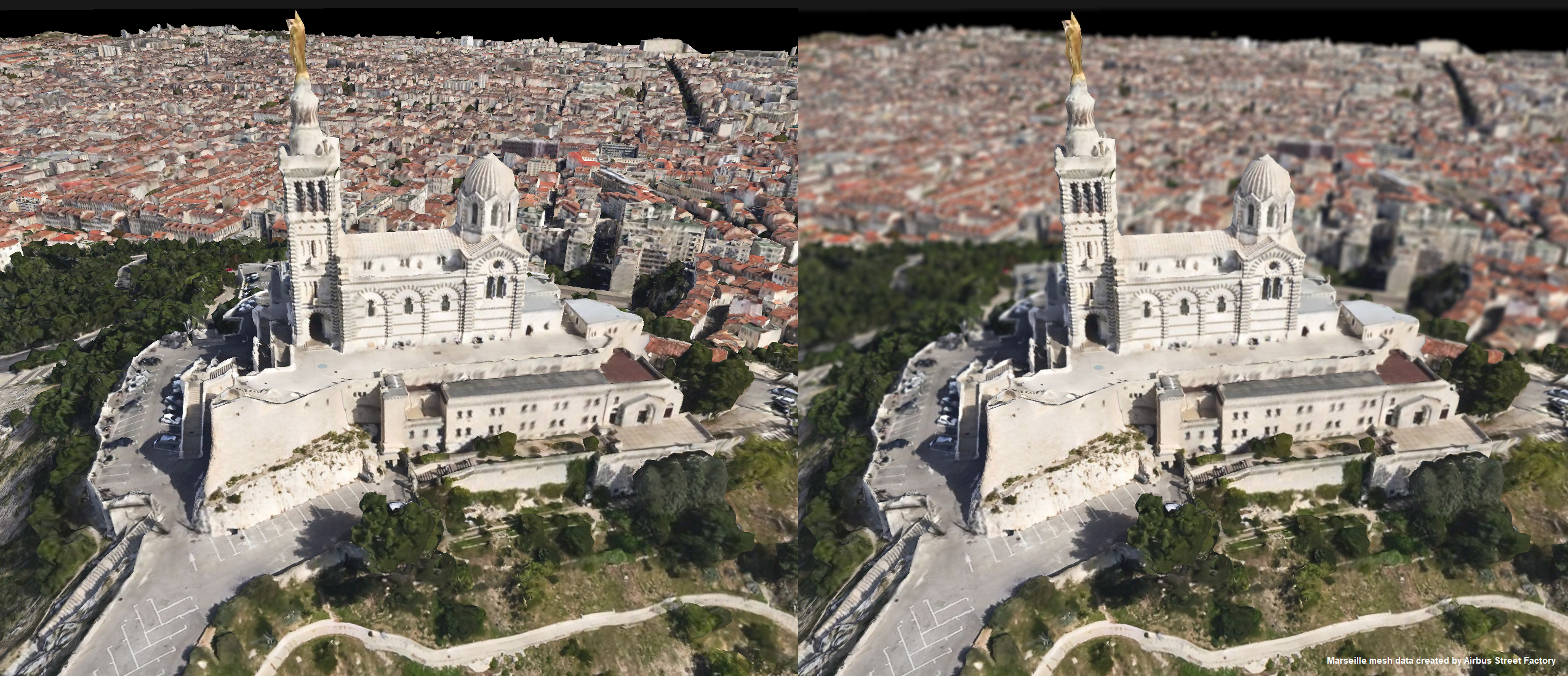
Depth of field is typically used to draw attention to a specific part of the scene, or to increase the visual quality of a 3D view. Its parameters are held by an immutable DepthOfFieldModel.
Read the parameters with getModel and change them by building a new model and passing it to setModel.
Note that depth of field is only applied in 3D views.
You cannot create a DepthOfFieldEffect. Instead, you can retrieve it from GraphicsEffects#getDepthOfField.
See the Configure Map Effects article for an overview of the available map effects.
- Since:
- 2026.1
-
Method Summary
Modifier and TypeMethodDescriptionvoidclose()protected voidfinalize()getModel()Returns the depth-of-field model.booleanReturns whether the depth-of-field effect is enabled.voidsetEnabled(boolean enabled) Sets whether the depth-of-field effect is enabled.voidsetModel(DepthOfFieldModel model) Sets the depth-of-field model.
-
Method Details
-
finalize
protected void finalize() -
close
public void close()- Specified by:
closein interfaceAutoCloseable
-
isEnabled
public boolean isEnabled()Returns whether the depth-of-field effect is enabled.- Returns:
- whether the depth-of-field effect is enabled.
-
setEnabled
public void setEnabled(boolean enabled) Sets whether the depth-of-field effect is enabled.The default is false.
- Parameters:
enabled- true to enable the depth-of-field effect or false to disable it.
-
getModel
Returns the depth-of-field model.- Returns:
- the depth-of-field model.
-
setModel
Sets the depth-of-field model.- Parameters:
model- the depth-of-field model.- Throws:
NullPointerException- when the model is anullvalue.
-