Package com.luciad.maps.effects
Class BloomEffect
java.lang.Object
com.luciad.maps.effects.BloomEffect
- All Implemented Interfaces:
AutoCloseable
Graphics effect which enables bloom for shapes and objects that have a
BloomStyle.
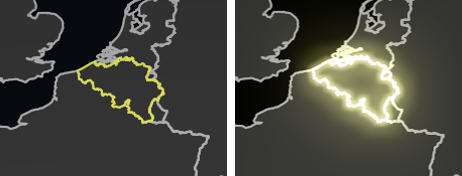
The effect is enabled by default.
Bloom can be used to increase the perceived brightness of an object. See the map effects article on how to use bloom.
You cannot create a BloomEffect. Instead, you can retrieve it from GraphicsEffects#getBloom.
- Since:
- 2026.1
-
Method Summary
Modifier and TypeMethodDescriptionvoidclose()protected voidfinalize()getModel()Returns the bloom model.booleanReturns whether the bloom effect is enabled.voidsetEnabled(boolean enabled) Sets whether the bloom effect is enabled.voidsetModel(BloomModel model) Sets the bloom model.
-
Method Details
-
finalize
protected void finalize() -
close
public void close()- Specified by:
closein interfaceAutoCloseable
-
isEnabled
public boolean isEnabled()Returns whether the bloom effect is enabled.- Returns:
- whether the bloom effect is enabled.
-
setEnabled
public void setEnabled(boolean enabled) Sets whether the bloom effect is enabled.The default is
true.- Parameters:
enabled- true to enable the bloom effect or false to disable it.
-
getModel
Returns the bloom model.The default is a bloom model with all the default values as described in the
builder.- Returns:
- the bloom model.
-
setModel
Sets the bloom model.- Parameters:
model- the new bloom model.- Throws:
NullPointerException- if the model isnull.
-