Google 3D Tiles is a photorealistic globe-covering dataset. It follows the OGC 3D Tiles format 1.0 specification, and has a GLB payload.
It contains detailed textured 3D mesh data with high-resolution imagery for over 2000 cities.
To find out the exact coverage of the 3D data, open
Google Earth and activate the 3D Coverage layer.
The uncovered areas contain 3D-textured elevation-like mesh data.
|
Loading and using Google 3D Tiles in LuciadCPillar will give you a Google Earth look and feel, but the Google Map Tiles API for Photorealistic 3D Tiles may provide tiles at a lower resolution than what you experience in Google products. |
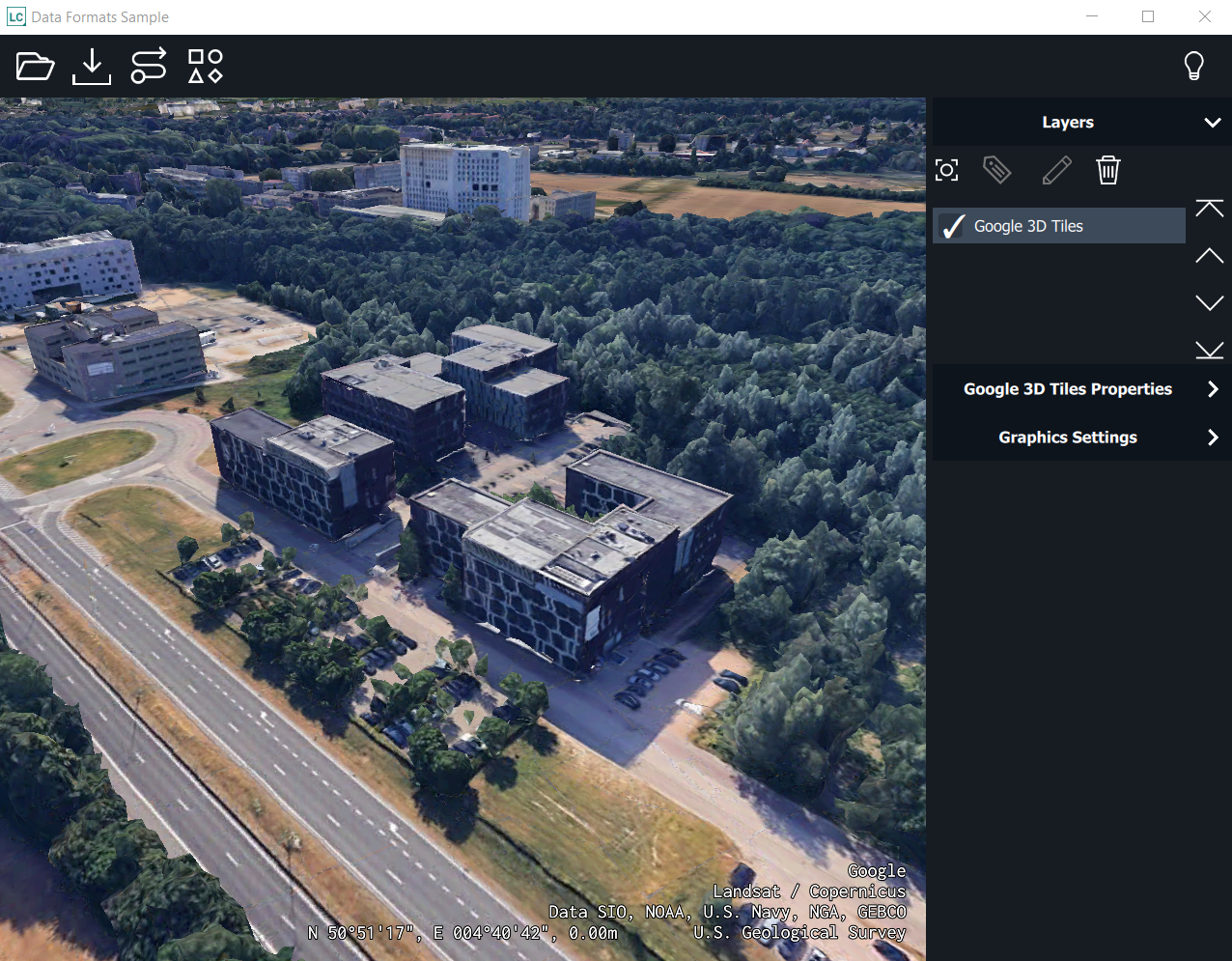
Visualize Google 3D Tiles
To show Google 3D Tiles on a LuciadCPillar map, you must access the Google 3D Tiles API to create a session, create a model for the Google 3D Tiles data, and visualize that model in a map layer.
Create a session
To start working with Google 3D Tiles, you must get an API key from Google. With this key, you can fetch a session ID and a root URL as illustrated in Program: Get a rootURL and sessionID to start working with Google 3D Tiles.
|
Each root tile request counts against your daily quota. Further requests don’t count. The root request results in a session, which is valid for two hours. We advise to re-use this session by saving the necessary information as a local environment variable onto your system or to a file. This way you’ll be able to automatically renew the sessionID when it expires. |
Expand for Program: Get a rootURL and sessionID to start working with Google 3D Tiles:
struct Google3DTilesInfo {
  bool valid = false;
  std::string apiKey;
  std::string rootUrl;
  std::string sessionId;
  long long int validUntil = -1;
};

const long long SessionValiditySeconds = std::chrono::seconds(2 * 60 * 60).count();

/**
 * Calling this method counts against your daily quota.
 * You should consider using a local storage (file) solution to store your
 * Google3DTilesInfo. If the key in that info is the same as the one provided here,
 * you can check the validity of the sessionID, and only request a new one if the
 * saved one has expired.
 */
luciad::expected<HttpResponse, ErrorInfo> getGoogleResponse(const std::string& apiKey) {
  std::string apiKeyVerifyUrl = "https://tile.googleapis.com/v1/3dtiles/root.json?key=${apiKey}";
  apiKeyVerifyUrl = StringUtils::replace(apiKeyVerifyUrl, "${apiKey}", apiKey);

  auto httpClient = HttpClient::newBuilder().build();
  auto request = HttpRequest::newBuilder().uri(apiKeyVerifyUrl).build();
  return httpClient->send(request);
}

Google3DTilesInfo getGoogle3DTilesInfo(const std::string& apiKey) {
  if (apiKey.empty()) {
    return Google3DTilesInfo{};
  }

  auto response = getGoogleResponse(apiKey);
  auto responseBody = response->getBody();

  if (responseBody.has_value()) {
    auto byteBuffer = responseBody->getData();

    rapidjson::Document document;
    document.Parse<rapidjson::kParseStopWhenDoneFlag>((const char*)byteBuffer.data(), byteBuffer.size());

    // When requesting information with an invalid apiKey, the document will not have a "root" member.
    if (!document.HasParseError() && document.IsObject() && document.HasMember("root")) {
      auto result = Google3DTilesInfo{};
      result.valid = true;
      result.apiKey = apiKey;

      // The root-url-extension (with session id) can be found at:
      // docRoot["root"]["children"][0]["children"][0]["content"]["uri"]
      // it will look like "/v1/3dtiles/datasets/CgA/files/<rootID>.json?session=<sessionID>"
      auto uri = (std::string)(document["root"]["children"][0]["children"][0]["content"]["uri"].GetString());
      std::string sessionQuery = "?session=";
      auto sessionQueryPosition = uri.find(sessionQuery);
      auto sessionPosition = sessionQueryPosition + sessionQuery.size();
      result.sessionId = uri.substr(sessionPosition, uri.size() - sessionPosition);

      // Now we prepare the root-url for further processing
      std::string baseURL = "https://tile.googleapis.com";
      auto rootUrlExtension = uri.substr(0, sessionQueryPosition);
      result.rootUrl = baseURL;
      result.rootUrl += rootUrlExtension;

      // Add the validity time (2 hours as of now)
      auto currentTime = std::chrono::system_clock::now();
      auto timeSinceEpochSeconds = std::chrono::duration_cast<std::chrono::seconds>(currentTime.time_since_epoch()).count();
      result.validUntil = timeSinceEpochSeconds + SessionValiditySeconds;

      return result;
    }
  }
  return Google3DTilesInfo{};
}
public class Google3DTilesInfo
{
public Boolean valid = false;
public long validUntil = -1;
public string apiKey = "";
public string rootUrl = "";
public string sessionId = "";
}
static readonly int SESSION_VALIDITY_SECONDS = 2 * 60 * 60;
/**
* Calling this method counts against your daily quota.
* You should consider using a local storage (file) solution to store your
* Google3DTilesInfo. If the key in that info is the same as the one provided here,
* you can check the validity of the sessionID, and only request a new one if the
* saved one has expired.
*/
public static HttpResponse GetGoogleResponse(string apiKey)
{
string apiKeyVerifyUrl = "https://tile.googleapis.com/v1/3dtiles/root.json?key=${apiKey}";
apiKeyVerifyUrl = apiKeyVerifyUrl.Replace("${apiKey}", apiKey);
var httpClient = HttpClient.NewBuilder().Build();
var request = HttpRequest.NewBuilder().Uri(apiKeyVerifyUrl).Build();
return httpClient.Send(request);
}
public static Google3DTilesInfo GetGoogle3DTilesInfo(string apiKey)
{
if (apiKey.Length == 0)
{
return new Google3DTilesInfo();
}
try
{
var response = GetGoogleResponse(apiKey);
var body = response.Body;
if (body == null || response.StatusCode != 200)
{
return new Google3DTilesInfo();
}
Google3DTilesInfo result = new Google3DTilesInfo
{
valid = true,
apiKey = apiKey
};
// The root-url-extension (with session id) can be found at:
// docRoot["root"]["children"][0]["children"][0]["content"]["uri"]
// it will look like "/v1/3dtiles/datasets/CgA/files/<rootID>.json?session=<sessionID>"
// After json-parsing, the uri could be found like this:
// string uri = (String)(document["root"]["children"][0]["children"][0]["content"]["uri"].GetString());
// But, we can also find the uri without actual JSON-parser
string json = Encoding.UTF8.GetString(body.Data.Data);
int startOfUriIdx = json.IndexOf("uri") + 6;
int endOfUriIdx = json.IndexOf('"', startOfUriIdx);
string uri = json.Substring(startOfUriIdx, endOfUriIdx - startOfUriIdx);
string sessionQuery = "?session=";
int sessionQueryPosition = uri.IndexOf(sessionQuery);
int sessionIdIdx = sessionQueryPosition + sessionQuery.Length;
result.sessionId = uri.Substring(sessionIdIdx);
// Now we prepare the root-url for further processing
string baseURL = "https://tile.googleapis.com";
string rootUrlExtension = uri.Substring(0, sessionQueryPosition);
result.rootUrl = baseURL + rootUrlExtension;
// Add the validity time
DateTime Jan1970 = new DateTime(1970, 1, 1, 0, 0, 0, DateTimeKind.Utc);
TimeSpan javaSpan = DateTime.UtcNow - Jan1970;
long currentTimeInSeconds = (long)javaSpan.TotalMilliseconds / 1000;
result.validUntil = currentTimeInSeconds + SESSION_VALIDITY_SECONDS;
return result;
}
catch (IOException)
{
return new Google3DTilesInfo();
}
}static class Google3DTilesInfo {
boolean valid = false;
long validUntil = -1;
String apiKey = "";
String rootUrl = "";
String sessionId = "";
}
static int SESSION_VALIDITY_SECONDS = 2 * 60 * 60;
/**
* Calling this method counts against your daily quota.
* You should consider using a local storage (file) solution to store your
* Google3DTilesInfo. If the key in that info is the same as the one provided here,
* you can check the validity of the sessionID, and only request a new one if the
* saved one has expired.
*/
static HttpResponse getGoogleResponse(String apiKey) throws IOException {
String apiKeyVerifyUrl = "https://tile.googleapis.com/v1/3dtiles/root.json?key=${apiKey}";
apiKeyVerifyUrl = apiKeyVerifyUrl.replace("${apiKey}", apiKey);
HttpClient httpClient = HttpClient.newBuilder().build();
HttpRequest request = HttpRequest.newBuilder().uri(apiKeyVerifyUrl).build();
return httpClient.send(request);
}
static Google3DTilesInfo getGoogle3DTilesInfo(String apiKey) {
if (apiKey.isEmpty()) {
return new Google3DTilesInfo();
}
try {
HttpResponse response = getGoogleResponse(apiKey);
DataEntity body = response.getBody();
if (body == null) {
return new Google3DTilesInfo();
}
Google3DTilesInfo result = new Google3DTilesInfo();
result.valid = true;
result.apiKey = apiKey;
// The root-url-extension (with session id) can be found at:
// docRoot["root"]["children"][0]["children"][0]["content"]["uri"]
// it will look like "/v1/3dtiles/datasets/CgA/files/<rootID>.json?session=<sessionID>"
// After json-parsing, the uri could be found like this:
// String uri = (String)(document["root"]["children"][0]["children"][0]["content"]["uri"].GetString());
// But, we can also find the uri without actual JSON-parser
String json = new String(body.getData().getData());
int startOfUriIdx = json.indexOf("uri") + 6;
int endOfUriIdx = json.indexOf('"', startOfUriIdx);
String uri = json.substring(startOfUriIdx, endOfUriIdx);
String sessionQuery = "?session=";
int sessionQueryPosition = uri.indexOf(sessionQuery);
int sessionIdIdx = sessionQueryPosition + sessionQuery.length();
result.sessionId = uri.substring(sessionIdIdx);
// Now we prepare the root-url for further processing
String baseURL = "https://tile.googleapis.com";
String rootUrlExtension = uri.substring(0, sessionQueryPosition);
result.rootUrl = baseURL + rootUrlExtension;
// Add the validity time
result.validUntil = (System.currentTimeMillis() / 1000) + SESSION_VALIDITY_SECONDS;
return result;
} catch (IOException e) {
return new Google3DTilesInfo();
}
}|
The snippets in this section include calls to functions that are explained later in this article. |
Create a custom HttpClient
To be able to auto-renew the sessionID, you could create your own custom HttpClientHttpClientHttpClient, that catches failing
requests, renews the sessionID and resends it. This is illustrated in Program: Create custom Google HttpClient.
Expand for Program: Create custom Google HttpClient:
class GoogleHttpClient final : public IHttpClient {
public:
  explicit GoogleHttpClient(std::string apiKey) : _apiKey(std::move(apiKey)), _httpClient(HttpClient::newBuilder().build()) {
    _googleInfo = getGoogle3DTilesInfo(_apiKey);
    _httpClient->setHttpRequestOptions(getGoogleRequestOptions());
  }

  std::string getRootURL() const {
    return _googleInfo.rootUrl;
  }

  luciad::expected<HttpResponse, ErrorInfo> send(const HttpRequest& request, const CancellationToken& token) override {
    auto response = _httpClient->send(request, token);

    // Check if the response is successful, if not, check if the sessionID needs renewal (no longer valid)
    if (response.has_value() && response->getStatusCode() != 200 && !isGoogleInfoValid()) {
      // renew the sessionID and try again
      _googleInfo = getGoogle3DTilesInfo(_apiKey);
      _httpClient->setHttpRequestOptions(getGoogleRequestOptions());
      response = _httpClient->send(request, token);
    }

    return response;
  }

private:
  HttpRequestOptions getGoogleRequestOptions() const {
    auto googleRequestOptionBuilder = HttpRequestOptions::newBuilder();
    googleRequestOptionBuilder.queryParameter("key", _googleInfo.apiKey);
    googleRequestOptionBuilder.queryParameter("session", _googleInfo.sessionId);
    return googleRequestOptionBuilder.build();
  }

  bool isGoogleInfoValid() const {
    auto currentTime = std::chrono::system_clock::now();
    auto currentTimeS = (std::chrono::duration_cast<std::chrono::seconds>(currentTime.time_since_epoch())).count();
    return currentTimeS < _googleInfo.validUntil;
  }

  std::string _apiKey;
  Google3DTilesInfo _googleInfo;
  std::shared_ptr<HttpClient> _httpClient;
};
public class GoogleHttpClient : IHttpClient
{
private readonly string _apiKey;
private Google3DTilesInfo _googleInfo;
private readonly HttpClient _httpClient;
public GoogleHttpClient(string apiKey)
{
_apiKey = apiKey;
_googleInfo = GetGoogle3DTilesInfo(_apiKey);
_httpClient = HttpClient.NewBuilder().Build();
_httpClient.HttpRequestOptions = GetGoogleRequestOptions(_googleInfo);
}
public string GetRootUrl()
{
return _googleInfo.rootUrl;
}
public HttpResponse Send(HttpRequest request, CancellationToken token)
{
var response = _httpClient.Send(request, token);
if (response.StatusCode != 200 && !IsGoogleInfoValid(_googleInfo))
{
// renew the sessionID and try again
_googleInfo = GetGoogle3DTilesInfo(_apiKey);
_httpClient.HttpRequestOptions = GetGoogleRequestOptions(_googleInfo);
response = _httpClient.Send(request, token);
}
return response;
}
static Boolean IsGoogleInfoValid(Google3DTilesInfo google3DTilesInfo)
{
DateTime Jan1970 = new DateTime(1970, 1, 1, 0, 0, 0, DateTimeKind.Utc);
TimeSpan javaSpan = DateTime.UtcNow - Jan1970;
long currentTimeInSeconds = (long)javaSpan.TotalMilliseconds / 1000;
return google3DTilesInfo.valid && currentTimeInSeconds < google3DTilesInfo.validUntil;
}
private HttpRequestOptions GetGoogleRequestOptions(Google3DTilesInfo google3DTilesInfo)
{
return HttpRequestOptions.NewBuilder()
.QueryParameter("key", google3DTilesInfo.apiKey)
.QueryParameter("session", google3DTilesInfo.sessionId)
.Build();
}
};static class GoogleHttpClient implements IHttpClient {
private final String _apiKey;
private final HttpClient _httpClient;
private Google3DTilesInfo _googleInfo;
GoogleHttpClient(String apiKey) {
_apiKey = apiKey;
_googleInfo = getGoogle3DTilesInfo(apiKey);
_httpClient = HttpClient.newBuilder().build();
_httpClient.setHttpRequestOptions(getGoogleRequestOptions());
}
public String getRootUrl() {
return _googleInfo.rootUrl;
}
@Override
public @NotNull HttpResponse send(@NotNull HttpRequest request, @NotNull CancellationToken token) throws IOException {
HttpResponse response = _httpClient.send(request, token);
if (response.getStatusCode() != 200 && !isGoogleInfoValid()) {
// renew the sessionID and try again
_googleInfo = getGoogle3DTilesInfo(_apiKey);
_httpClient.setHttpRequestOptions(getGoogleRequestOptions());
response = _httpClient.send(request, token);
}
return response;
}
private HttpRequestOptions getGoogleRequestOptions() {
return HttpRequestOptions.newBuilder()
.queryParameter("key", _apiKey)
.queryParameter("session", _googleInfo.sessionId)
.build();
}
private boolean isGoogleInfoValid() {
return _googleInfo.valid && (System.currentTimeMillis() / 1000) < _googleInfo.validUntil;
}
}Create the model
You can use the custom GoogleHttpClient to build an OGC3DTilesModel as illustrated in Program: Create a model with the correct request parameters.
Expand for Program: Create a model with the correct request parameters:
luciad::expected<std::shared_ptr<ITileSet3DModel>, ErrorInfo> createGoogle3dTilesModel(std::string apiKey) {
  // Create a custom GoogleHttpClient that auto-renews the session if needed
  auto googleHttpClient = std::make_shared<GoogleHttpClient>(GoogleHttpClient(std::move(apiKey)));

  // Create the model
  auto options = Ogc3DTilesModelDecoder::Options::newBuilder().httpClient(googleHttpClient).build();
  return Ogc3DTilesModelDecoder::decode(googleHttpClient->getRootURL(), options);
}
public static ITileSet3DModel CreateGoogle3dTilesModel(string apiKey)
{
// Create a custom GoogleHttpClient that auto-renews the session if needed
GoogleHttpClient googleHttpClient = new GoogleHttpClient(apiKey);
// Create the model
var options = Ogc3DTilesModelDecoder.Options.NewBuilder()
.HttpClient(googleHttpClient)
.Build();
return Ogc3DTilesModelDecoder.Decode(googleHttpClient.GetRootUrl(), options);
}static ITileSet3DModel createGoogle3dTilesModel(String apiKey) throws IOException {
// Create a custom GoogleHttpClient that auto-renews the session if needed
GoogleHttpClient googleHttpClient = new GoogleHttpClient(apiKey);
// Create the model
Ogc3DTilesModelDecoder.Options options = Ogc3DTilesModelDecoder.Options.newBuilder()
.httpClient(googleHttpClient).build();
return Ogc3DTilesModelDecoder.decode(googleHttpClient.getRootUrl(), options);
}Create the layer
To visualize the Google 3D Tiles model, you must create a TileSet3DLayerTileSet3DLayerTileSet3DLayer for it. When you are creating that layer, you can set several layer properties.
For optimal layer behavior, you must define a quality factorquality factorquality factor of 0.125, as illustrated in Program: Create a layer for your Google 3D Tiles model.
Expand for Program: Create a layer for your Google 3D Tiles model:
auto model = createGoogle3dTilesModel("<yourAPIKey>");
auto layer = TileSet3DLayer::newBuilder().title("Google 3D Tiles").model(*model).qualityFactor(0.125).build();
var model = Google3DTilesUtil.CreateGoogle3dTilesModel("<yourAPIKey>");
TileSet3DLayer.NewBuilder().Title("Google 3D Tiles").Model(model).QualityFactor(0.125).Build();ITileSet3DModel model = Google3DTilesUtil.createGoogle3dTilesModel("<yourAPIKey>");
TileSet3DLayer.newBuilder().title("Google 3D Tiles").model(model).qualityFactor(0.125).build();Configure the map for Google 3D Tiles
The Google 3D Tiles dataset is globe-covering and has the correct elevation baked in its meshes. Because of the particular nature of this dataset, you must take specific measures when you add it to the LuciadCPillar map.
By default, LuciadCPillar visualizes a 3D map with a globe of a certain color.
This colored globe, an ellipsoid, intersects with your Google 3D Tiles data.
To alleviate that problem, you can override the default color with any fully transparent colorfully transparent colorfully transparent color (alpha == 0).
|
As soon as you start loading layers with imagery data, they are draped on the globe, and the globe will no longer be transparent. These layers will break through your Google 3D Tiles data. |
Convenience methods for working with Google 3D Tiles
Google API key validation
You can use this code to check the validity of a Google API key. Program: Validate the Google API key:
Expand for Program: Validate the Google API key:
enum class ApiKeyStatus { NeedKey, Valid, Invalid };

ApiKeyStatus verifyApiKey(const std::string& apiKey) {
  if (apiKey.empty()) {
    return ApiKeyStatus::NeedKey;
  }

  auto response = getGoogleResponse(apiKey);

  if (response.has_value() && response->getStatusCode() == 200) {
    return ApiKeyStatus::Valid;
  } else {
    return ApiKeyStatus::Invalid;
  }
}
public enum ApiKeyStatus { NeedKey, Valid, Invalid }
public static ApiKeyStatus VerifyApiKey(string apiKey)
{
if (apiKey.Length == 0)
{
return ApiKeyStatus.NeedKey;
}
try
{
HttpResponse response = GetGoogleResponse(apiKey);
if (response.StatusCode == 200)
{
return ApiKeyStatus.Valid;
}
else
{
return ApiKeyStatus.Invalid;
}
}
catch (IOException)
{
return ApiKeyStatus.Invalid;
}
}enum ApiKeyStatus {NeedKey, Valid, Invalid}
static ApiKeyStatus verifyApiKey(@NotNull String apiKey) {
if (apiKey.isEmpty()) {
return ApiKeyStatus.NeedKey;
}
try {
HttpResponse response = getGoogleResponse(apiKey);
if (response.getStatusCode() == 200) {
return ApiKeyStatus.Valid;
} else {
return ApiKeyStatus.Invalid;
}
} catch (IOException e) {
return ApiKeyStatus.Invalid;
}
}Add the Google attributions
Google requires you to show the correct attributions and a logo as an overlay on the map.
Overlay tileset attributions
The attributions for Google 3D Tiles vary depending on the tiles that you have in your view. Each loaded tile has its own copyright information. The Google Map Tiles API policies specify that you must collect, sort, and aggregate all that information. LuciadCPillar does that for you automatically.
Get the attributions on screen
LuciadCPillar exposes the attributions on a map through MapAttributionsMapAttributionsMapAttributions. You can get attributions from all layers, or request the attributions of a specific layer. For more information, see How to provide and retrieve attribution data