This tutorial shows you how to insert external WebGPU content into your map. As an example, it inserts content that is rendered through the three.js library and API.
Just like LuciadRIA, three.js can make use of WebGPU to display computer graphics in web browsers. In this tutorial, we use the WebGPU rendering output of the LuciadRIA map, and plug in some three.js animation content.
|
You can often use regular LuciadRIA layers and API instead of a post-render hook to include such content. It’s recommended to do so whenever possible. For example, to visualize non-animated 3D models, you can use the 3D icons API. |
Hooking into the render loop
LuciadRIA exposes its WebGPU rendering context through RIAMap events named PostRender.
You can hook into these events by adding a listener, as Program: Configuring a PostRender callback on the map. shows.
The callback is then invoked once every frame, immediately after the rendering of the map layers.
PostRender callback on the map.
riaMap.on("PostRender", (colorTexture, depthTexture) => {
  // This callback gets called every frame, after the LuciadRIA layers have been rendered.
  // Use the provided textures to render your desired external graphics.
});
The callback on those events gets 2 textures as parameters:
-
colorTexture: the color texture that contains the color output of LuciadRIA rendering -
depthTexture: the depth texture that contains the depth output of LuciadRIA rendering
You can use these textures in combination with external content that doesn’t originate from LuciadRIA layers on the map. The rest of this article walks you through an example, and shows you the steps to add external content in the form of animated 3D computer graphics rendered by three.js.
Integrate three.js graphics in LuciadRIA
First of all, make sure to declare three.js as a dependency in npm. Also declare its type definitions for TypeScript. For this tutorial, we start from a simple LuciadRIA 3D map, and navigate to a specific location.
const map = new RIAMap("map", {reference: "EPSG:4978"});

//Add some WMS background data to the map
const server = "https://sampleservices.luciad.com/wms";
const dataSetName = "4ceea49c-3e7c-4e2d-973d-c608fb2fb07e";
WMSTileSetModel.createFromURL(server, [{layer: dataSetName}])
    .then(model => map.layerTree.addChild(new RasterTileSetLayer(model)));

// pick a location to place the animated 3D model
const wgs84Reference = getReference("EPSG:4326");
const originLLH = createPoint(wgs84Reference, [-122.39318, 37.78975, 0]); // somewhere in San Francisco

// point the camera at this location
map.camera = (map.camera as PerspectiveCamera).lookAt({
  ref: originLLH,
  distance: 200,
  yaw: 0,
  pitch: -30,
  roll: 0
});
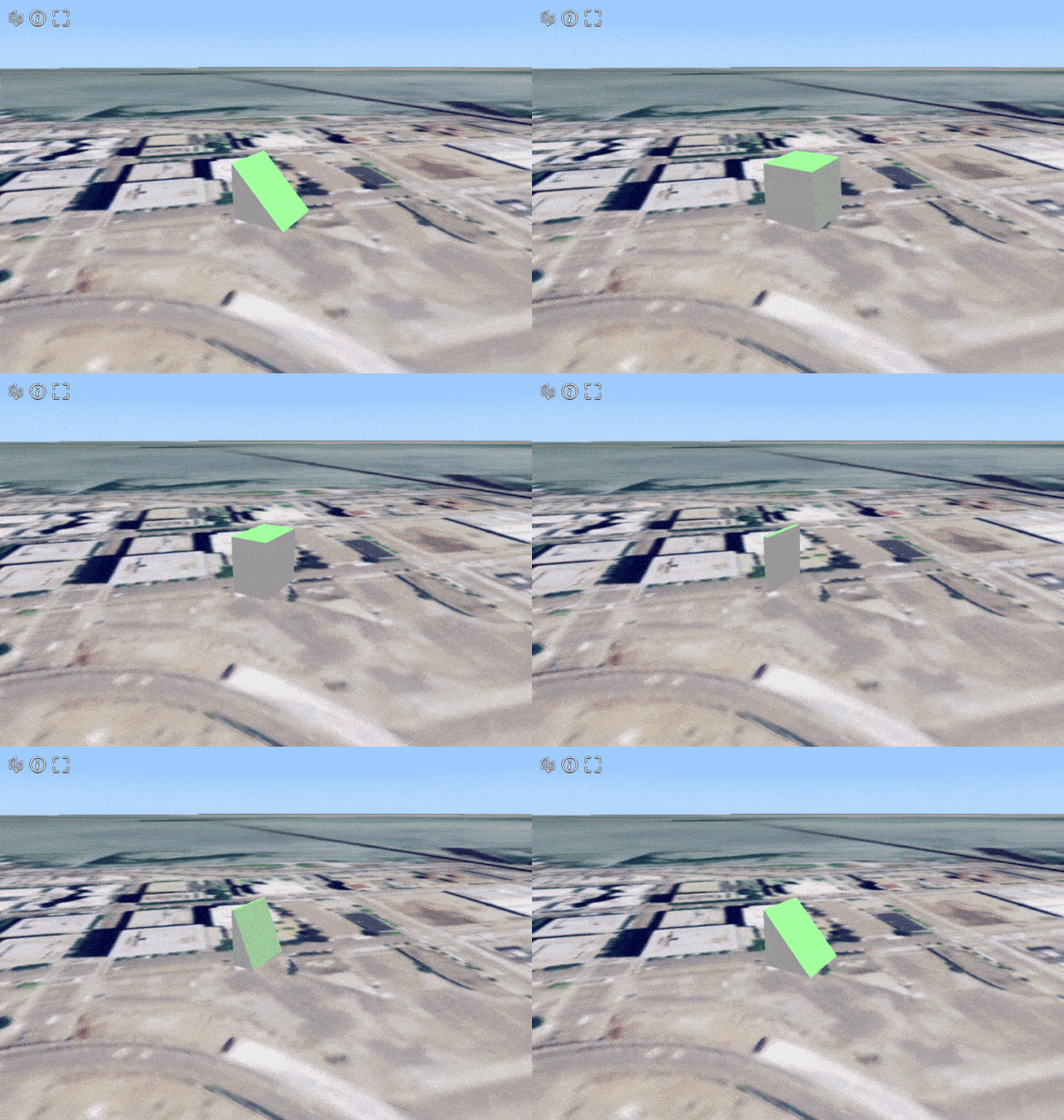
At this location, we visualize an animated glTF model named AnimatedMorphCube.
You can find this model, along with other sample models, in this github repository.
Set the scene
We start off by defining a new class that’s responsible for rendering the model through three.js.
You can decode the glTF model with the GLTFLoader from the three.js example code.
The three.js examples also include loaders for other file formats.
After decoding the model, we add it to the scene, and create an AnimationMixer to manage the animation.
We also apply a rotation on the model around the X axis.
Georeference the model explains the reason for this rotation.
class MyAnimatedModelRenderer {
  private _map: RIAMap;

  private _scene = new THREE.Scene();
  private _clock = new THREE.Clock(); // the clock is used to track time for the animation mixer
  private _mixer: THREE.AnimationMixer | null = null;

  constructor(map: RIAMap) {
    this._map = map;

    // Let three.js know that we consider the Z axis to represent 'up'
    THREE.Object3D.DEFAULT_UP = new THREE.Vector3(0, 0, 1);

    // A full screen quad to render the color and depth textures  from the RIA map
    this._quadMesh = new THREE.QuadMesh(null); // material is set later, in createThreeJSMaterial()

    // Add some lighting to the scene
    this._scene.add(new THREE.AmbientLight(0xffffff, 1.0));
    this._scene.add(new THREE.DirectionalLight(0x00ff00, 1.0));

    // Decode and add the gltf model to the scene
    const gltfLoader = new GLTFLoader();
    gltfLoader.load('AnimatedMorphCube.glb', (gltf: GLTF) => {
      const model = gltf.scene;
      model.scale.setScalar(10); // increase the size of the model
      model.rotateX(Math.PI / 2); // rotate the model so it's straight up
      const bbox = new THREE.Box3().setFromObject(model);
      model.translateY(-bbox.min.y); // translate the model so it's above the surface

      // Start the first animation, if there are any
      if (gltf.animations.length > 0) {
        this._mixer = new THREE.AnimationMixer(model);
        const animation = gltf.animations[0];
        this._mixer.clipAction(animation).play();
      }

      this._scene.add(model);
    });

  }

}
Georeference the model
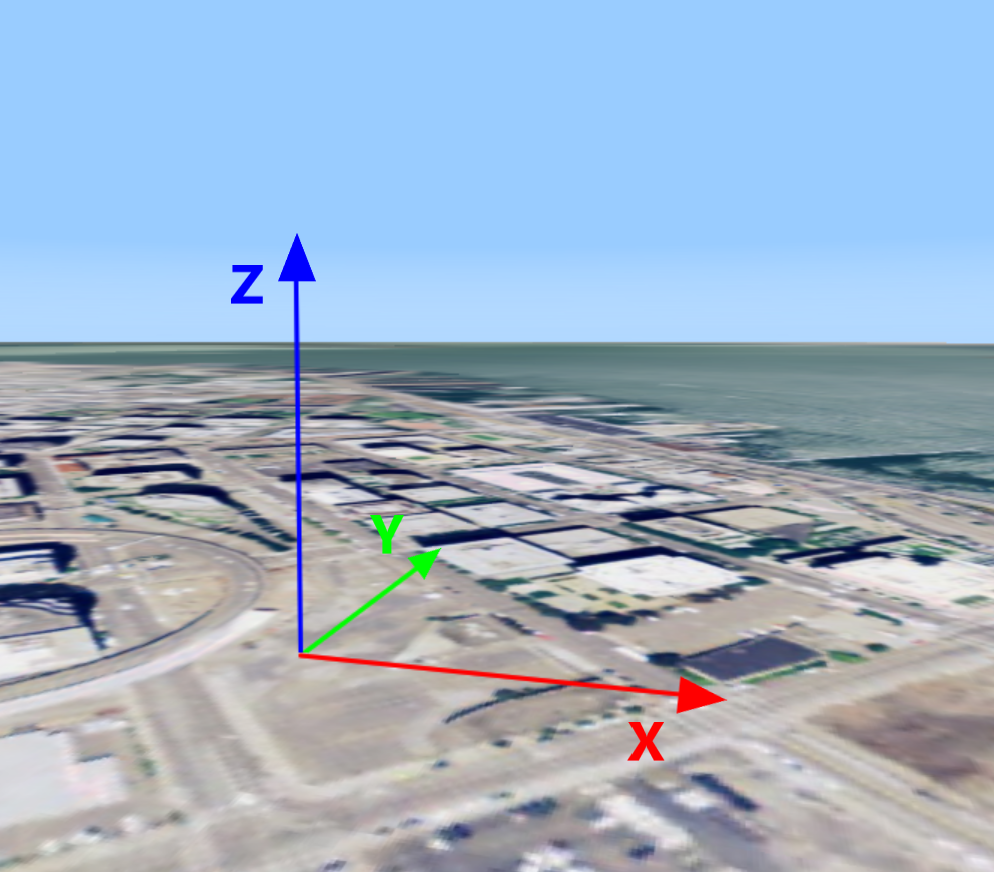
A three.js scene is defined in a simple Cartesian coordinate system. Because it doesn’t have a georeference yet, we must define a local Cartesian coordinate reference for it at the desired position on the globe. Such a reference is called a topocentric reference.
Note that the axis configuration of the three.js coordinate system differs from the axes in a LuciadRIA topocentric reference. More specifically, three.js swaps the Y and Z axes, making the Y axis point upward, while the Z axis denotes depth. This means that we need to apply a 90° rotation along the X axis to get the model upright on our map.
class MyAnimatedModelRenderer {
  // ...

  private _mapToLocal: Transformation;

  constructor(map: RIAMap) {
    // ...

    const localReference = createTopocentricReference({origin: originLLH});
    this._mapToLocal = createTransformation(map.reference, localReference);
  }

}|
In Program: Creating a topocentric reference and transformations, we defined two transformations. They can convert coordinates from the map’s world reference to our topocentric reference, and the other way around. You can create such transformations for any geospatial reference, allowing conversions to and from the topocentric reference according to your needs. See the Topocentric Reference article for an example. |
Convert the LuciadRIA camera to the three.js camera
The LuciadRIA camera is defined in a geocentric coordinate space. The three.js camera must be defined in the local, topocentric reference though. We need a function to convert the global LuciadRIA camera to a local three.js camera, so that three.js renders its scene at the correct place on screen. Program: Converting the global camera to a local camera shows you how to implement this function:
private riaCameraToThreeCamera(riaCamera: PerspectiveCamera, threeCamera: THREE.PerspectiveCamera): void {
  const eye = riaCamera.eyePoint;
  const localEye = this._mapToLocal.transform(eye);

  const tempPoint = eye.copy();
  const mapDirectionToLocal = (dir: Vector3): Vector3 => {
    tempPoint.move3D(eye.x + dir.x, eye.y + dir.y, eye.z + dir.z);
    const localOffsettedPoint = this._mapToLocal.transform(tempPoint);
    return {
      x: localOffsettedPoint.x - localEye.x,
      y: localOffsettedPoint.y - localEye.y,
      z: localOffsettedPoint.z - localEye.z
    };
  }

  const localUp = mapDirectionToLocal(riaCamera.up);
  const localFwd = mapDirectionToLocal(riaCamera.forward);

  threeCamera.near = riaCamera.near;
  threeCamera.far = riaCamera.far;
  threeCamera.fov = riaCamera.fovY;
  threeCamera.aspect = riaCamera.aspectRatio;
  threeCamera.position.set(localEye.x, localEye.y, localEye.z);
  threeCamera.up.set(localUp.x, localUp.y, localUp.z);
  threeCamera.lookAt(localEye.x + localFwd.x, localEye.y + localFwd.y, localEye.z + localFwd.z);
  threeCamera.updateProjectionMatrix();
}|
Only 3D maps use a |
In certain cases, you may want to adapt the global camera to changes in the local camera, instead of the other way around. This can be helpful when the camera follows a moving animated model around, for example, instead of the LuciadRIA navigation controllers manipulating the camera. If that’s the case, you need the reverse function:
Expand
private threeCameraToRiaCamera(threeCamera: THREE.PerspectiveCamera,
                               riaCamera: PerspectiveCamera): PerspectiveCamera {
  const localEye = riaCamera.eyePoint.copy();
  localEye.move3D(threeCamera.position.x, threeCamera.position.y, threeCamera.position.z);
  const worldEye = this._localToMap.transform(localEye);

  const tempPoint = localEye.copy();
  const mapDirectionToWorld = (dir: Vector3): Vector3 => {
    tempPoint.move3D(localEye.x + dir.x, localEye.y + dir.y, localEye.z + dir.z);
    const worldOffsettedPoint = this._localToMap.transform(tempPoint);
    return {
      x: worldOffsettedPoint.x - worldEye.x,
      y: worldOffsettedPoint.y - worldEye.y,
      z: worldOffsettedPoint.z - worldEye.z
    };
  }

  const worldUp = mapDirectionToWorld(threeCamera.up);
  const worldFwd = mapDirectionToWorld(threeCamera.getWorldDirection(new THREE.Vector3(0, 1, 0)));

  return riaCamera.copyAndSet({
    eye: worldEye,
    up: worldUp,
    forward: worldFwd,
    near: threeCamera.near,
    far: threeCamera.far,
    fovY: threeCamera.fov
  });
}
Create a three.js renderer
When we create the three.js WebGPURenderer, we pass the WebGPU context and device that’s used by LuciadRIA.
Make sure to turn off the autoClear option, to stop the renderer from erasing the output buffers before rendering. If you leave it on, it effectively erases
everything in-between this._threeRenderer.render() calls.
One render call needs to take these actions at least:
-
Update the scene, in case an animation is ongoing
-
Match the LuciadRIA camera and the three.js camera
-
Update the three.js output materials to use the LuciadRIA color and depth textures
-
Render the three.js full-screen quad, which has a material for the LuciadRIA rendering output (color and depth textures)
-
Render the three.js scene
class MyAnimatedModelRenderer {
  // ...

  private _threeCamera = new THREE.PerspectiveCamera();
  private _threeRenderer: THREE.WebGPURenderer | null = null;
  private _initialized: boolean = false;
  private _initializing: boolean = false;

  private _copyTexture: GPUTexture | null = null; // an intermediate texture to copy the RIA map colorTexture to three.js
  private _quadMesh: THREE.QuadMesh;

  constructor(map: RIAMap) {
    // ...

  }

  render(colorTexture: GPUTexture, depthTexture: GPUTexture): void {
    // Don't proceed if WebGPU is not yet initialized in the RIA map
    if (!(this._map.webGPUContext && this._map.webGPUDevice)) {
      return;
    }

    // Initialize the three.js WebGPU renderer
    if (!this._initializing) {
      this._initializing = true;
      const context = this._map.webGPUContext;
      this._threeRenderer = new THREE.WebGPURenderer({
        alpha: false,
        context,
        canvas: context.canvas,
        device: this._map.webGPUDevice
      });
      this._threeRenderer.setSize(this._map.camera.width, this._map.camera.height);
      this._threeRenderer.setPixelRatio(this._map.displayScale);
      this._threeRenderer.autoClear = false;
      this._threeRenderer.outputColorSpace = THREE.LinearSRGBColorSpace;
      this._threeRenderer.depth = true;
      this._threeRenderer.init().then(() => {
        this._initialized = true;
      });
    }

    if (!(this._initialized && this._threeRenderer)) {
      return;
    }

    // Set the size and pixel ratio of the three.js renderer to match the RIA map
    if (this._map.viewSize[0] != this._threeRenderer.getSize(new THREE.Vector2()).width ||
        this._map.viewSize[1] != this._threeRenderer.getSize(new THREE.Vector2()).height) {
      this._threeRenderer.setSize(this._map.viewSize[0], this._map.viewSize[1]);
    }

    if (this._threeRenderer.getPixelRatio() !== this._map.displayScale) {
      this._threeRenderer.setPixelRatio(this._map.displayScale);
    }

    // If an animation is ongoing, update the scene accordingly using the animation mixer
    if (this._mixer) {
      this._mixer.update(this._clock.getDelta());
    }

    // Calculate the camera position in the local reference, based on the global camera
    this.riaCameraToThreeCamera(this._map.camera as PerspectiveCamera, this._threeCamera);

    const device = this._map.webGPUDevice;
    const textureSize = {
      width: colorTexture.width,
      height: colorTexture.height,
      depthOrArrayLayers: 1,
    };
    if (!this._copyTexture || this._copyTexture.width != colorTexture.width || this._copyTexture.height !=
        colorTexture.height) {
      this._copyTexture = device.createTexture({
        size: textureSize,
        format: colorTexture.format,
        usage: GPUTextureUsage.COPY_DST | GPUTextureUsage.COPY_SRC | GPUTextureUsage.TEXTURE_BINDING,
        label: `MyAnimatedModelRenderer intermediate color texture for size ${textureSize.width}x${textureSize.height}`
      });

      this.createThreeJSMaterial(depthTexture);
      return; // avoid black flickers while resizing
    }

    const commandEncoder = device.createCommandEncoder();
    commandEncoder.copyTextureToTexture(
        {
          texture: colorTexture,
        },
        {
          texture: this._copyTexture,
        },
        textureSize
    );
    const commandBuffer = commandEncoder.finish();
    device.queue.submit([commandBuffer]);

    // And finally, do the actual rendering
    this._threeRenderer.clear();
    this._threeRenderer.render(this._quadMesh, this._quadMesh.camera);
    this._threeRenderer.render(this._scene, this._threeCamera);
  }

  private createThreeJSMaterial(riaDepthTexture: GPUTexture): void {
    const material = new THREE.NodeMaterial();
    material.depthWrite = true;

    const threeColorTexture = new THREE.ExternalTexture(this._copyTexture!);
    threeColorTexture.minFilter = THREE.NearestFilter;
    threeColorTexture.magFilter = THREE.NearestFilter;

    const threeDepthTexture = new THREE.ExternalTexture(riaDepthTexture);

    // @ts-ignore threeJS doesn't have an ExternalDepthTexture type yet. So we set the properties manually.
    threeDepthTexture.isDepthTexture = true;
    // @ts-ignore
    threeDepthTexture.compareFunction = null;
    threeDepthTexture.flipY = false;
    threeDepthTexture.minFilter = THREE.NearestFilter;
    threeDepthTexture.magFilter = THREE.NearestFilter;

    material.colorNode = texture(threeColorTexture, uv());
    material.depthNode = texture(threeDepthTexture, uv());

    this._quadMesh.material = material;
  }
}
Hook into the render loop
All that’s left now is to hook our class into the render loop, as we said at the beginning of this article.
For each frame, after all the layers have rendered, we prompt three.js to render our 3D model too.
In addition, we immediately invalidate the map again, because we’re dealing with an animated model.
Invalidating the map keeps the frames — and therefore the PostRender events — coming in, even when nothing requires a repaint on the LuciadRIA side.
let renderer: MyAnimatedModelRenderer | null = null;
map.on("PostRender", (colorTexture, depthTexture) => {
  if (renderer === null) {
    renderer = new MyAnimatedModelRenderer(map);
  }
  renderer.render(colorTexture as GPUTexture, depthTexture as GPUTexture);
  map.invalidate(); // Keeps the frames coming
});|
Continuous invalidation should only be used for animated content. Avoid this for static scenes, as it forces continuous re-rendering of the map. |
Full code
import {WMSTileSetModel} from "@luciad/ria/model/tileset/WMSTileSetModel.js";
import {createTopocentricReference, getReference} from "@luciad/ria/reference/ReferenceProvider.js";
import {createPoint} from "@luciad/ria/shape/ShapeFactory.js";
import {Transformation} from "@luciad/ria/transformation/Transformation.js";
import {createTransformation} from "@luciad/ria/transformation/TransformationFactory.js";
import {Vector3} from "@luciad/ria/util/Vector3.js";
import {PerspectiveCamera} from "@luciad/ria/view/camera/PerspectiveCamera.js";
import {RasterTileSetLayer} from "@luciad/ria/view/tileset/RasterTileSetLayer.js";
import {RIAMap} from "@luciad/ria/view/RIAMap.js";

import * as THREE from 'three/webgpu';
import {GLTF, GLTFLoader} from 'three/examples/jsm/loaders/GLTFLoader.js';
import { texture, uv } from "three/tsl";

const map = new RIAMap("map", {reference: "EPSG:4978"});

//Add some WMS background data to the map
const server = "https://sampleservices.luciad.com/wms";
const dataSetName = "4ceea49c-3e7c-4e2d-973d-c608fb2fb07e";
WMSTileSetModel.createFromURL(server, [{layer: dataSetName}])
    .then(model => map.layerTree.addChild(new RasterTileSetLayer(model)));

// pick a location to place the animated 3D model
const wgs84Reference = getReference("EPSG:4326");
const originLLH = createPoint(wgs84Reference, [-122.39318, 37.78975, 0]); // somewhere in San Francisco

// point the camera at this location
map.camera = (map.camera as PerspectiveCamera).lookAt({
  ref: originLLH,
  distance: 200,
  yaw: 0,
  pitch: -30,
  roll: 0
});

class MyAnimatedModelRenderer {
  private _map: RIAMap;

  private _scene = new THREE.Scene();
  private _clock = new THREE.Clock(); // the clock is used to track time for the animation mixer
  private _mixer: THREE.AnimationMixer | null = null;

  private _mapToLocal: Transformation;

  private _threeCamera = new THREE.PerspectiveCamera();
  private _threeRenderer: THREE.WebGPURenderer | null = null;
  private _initialized: boolean = false;
  private _initializing: boolean = false;

  private _copyTexture: GPUTexture | null = null; // an intermediate texture to copy the RIA map colorTexture to three.js
  private _quadMesh: THREE.QuadMesh;

  constructor(map: RIAMap) {
    this._map = map;

    // Let three.js know that we consider the Z axis to represent 'up'
    THREE.Object3D.DEFAULT_UP = new THREE.Vector3(0, 0, 1);

    // A full screen quad to render the color and depth textures  from the RIA map
    this._quadMesh = new THREE.QuadMesh(null); // material is set later, in createThreeJSMaterial()

    // Add some lighting to the scene
    this._scene.add(new THREE.AmbientLight(0xffffff, 1.0));
    this._scene.add(new THREE.DirectionalLight(0x00ff00, 1.0));

    // Decode and add the gltf model to the scene
    const gltfLoader = new GLTFLoader();
    gltfLoader.load('AnimatedMorphCube.glb', (gltf: GLTF) => {
      const model = gltf.scene;
      model.scale.setScalar(10); // increase the size of the model
      model.rotateX(Math.PI / 2); // rotate the model so it's straight up
      const bbox = new THREE.Box3().setFromObject(model);
      model.translateY(-bbox.min.y); // translate the model so it's above the surface

      // Start the first animation, if there are any
      if (gltf.animations.length > 0) {
        this._mixer = new THREE.AnimationMixer(model);
        const animation = gltf.animations[0];
        this._mixer.clipAction(animation).play();
      }

      this._scene.add(model);
    });

    const localReference = createTopocentricReference({origin: originLLH});
    this._mapToLocal = createTransformation(map.reference, localReference);
  }

  render(colorTexture: GPUTexture, depthTexture: GPUTexture): void {
    // Don't proceed if WebGPU is not yet initialized in the RIA map
    if (!(this._map.webGPUContext && this._map.webGPUDevice)) {
      return;
    }

    // Initialize the three.js WebGPU renderer
    if (!this._initializing) {
      this._initializing = true;
      const context = this._map.webGPUContext;
      this._threeRenderer = new THREE.WebGPURenderer({
        alpha: false,
        context,
        canvas: context.canvas,
        device: this._map.webGPUDevice
      });
      this._threeRenderer.setSize(this._map.camera.width, this._map.camera.height);
      this._threeRenderer.setPixelRatio(this._map.displayScale);
      this._threeRenderer.autoClear = false;
      this._threeRenderer.outputColorSpace = THREE.LinearSRGBColorSpace;
      this._threeRenderer.depth = true;
      this._threeRenderer.init().then(() => {
        this._initialized = true;
      });
    }

    if (!(this._initialized && this._threeRenderer)) {
      return;
    }

    // Set the size and pixel ratio of the three.js renderer to match the RIA map
    if (this._map.viewSize[0] != this._threeRenderer.getSize(new THREE.Vector2()).width ||
        this._map.viewSize[1] != this._threeRenderer.getSize(new THREE.Vector2()).height) {
      this._threeRenderer.setSize(this._map.viewSize[0], this._map.viewSize[1]);
    }

    if (this._threeRenderer.getPixelRatio() !== this._map.displayScale) {
      this._threeRenderer.setPixelRatio(this._map.displayScale);
    }

    // If an animation is ongoing, update the scene accordingly using the animation mixer
    if (this._mixer) {
      this._mixer.update(this._clock.getDelta());
    }

    // Calculate the camera position in the local reference, based on the global camera
    this.riaCameraToThreeCamera(this._map.camera as PerspectiveCamera, this._threeCamera);

    const device = this._map.webGPUDevice;
    const textureSize = {
      width: colorTexture.width,
      height: colorTexture.height,
      depthOrArrayLayers: 1,
    };
    if (!this._copyTexture || this._copyTexture.width != colorTexture.width || this._copyTexture.height !=
        colorTexture.height) {
      this._copyTexture = device.createTexture({
        size: textureSize,
        format: colorTexture.format,
        usage: GPUTextureUsage.COPY_DST | GPUTextureUsage.COPY_SRC | GPUTextureUsage.TEXTURE_BINDING,
        label: `MyAnimatedModelRenderer intermediate color texture for size ${textureSize.width}x${textureSize.height}`
      });

      this.createThreeJSMaterial(depthTexture);
      return; // avoid black flickers while resizing
    }

    const commandEncoder = device.createCommandEncoder();
    commandEncoder.copyTextureToTexture(
        {
          texture: colorTexture,
        },
        {
          texture: this._copyTexture,
        },
        textureSize
    );
    const commandBuffer = commandEncoder.finish();
    device.queue.submit([commandBuffer]);

    // And finally, do the actual rendering
    this._threeRenderer.clear();
    this._threeRenderer.render(this._quadMesh, this._quadMesh.camera);
    this._threeRenderer.render(this._scene, this._threeCamera);
  }

  private createThreeJSMaterial(riaDepthTexture: GPUTexture): void {
    const material = new THREE.NodeMaterial();
    material.depthWrite = true;

    const threeColorTexture = new THREE.ExternalTexture(this._copyTexture!);
    threeColorTexture.minFilter = THREE.NearestFilter;
    threeColorTexture.magFilter = THREE.NearestFilter;

    const threeDepthTexture = new THREE.ExternalTexture(riaDepthTexture);

    // @ts-ignore threeJS doesn't have an ExternalDepthTexture type yet. So we set the properties manually.
    threeDepthTexture.isDepthTexture = true;
    // @ts-ignore
    threeDepthTexture.compareFunction = null;
    threeDepthTexture.flipY = false;
    threeDepthTexture.minFilter = THREE.NearestFilter;
    threeDepthTexture.magFilter = THREE.NearestFilter;

    material.colorNode = texture(threeColorTexture, uv());
    material.depthNode = texture(threeDepthTexture, uv());

    this._quadMesh.material = material;
  }
  private riaCameraToThreeCamera(riaCamera: PerspectiveCamera, threeCamera: THREE.PerspectiveCamera): void {
    const eye = riaCamera.eyePoint;
    const localEye = this._mapToLocal.transform(eye);

    const tempPoint = eye.copy();
    const mapDirectionToLocal = (dir: Vector3): Vector3 => {
      tempPoint.move3D(eye.x + dir.x, eye.y + dir.y, eye.z + dir.z);
      const localOffsettedPoint = this._mapToLocal.transform(tempPoint);
      return {
        x: localOffsettedPoint.x - localEye.x,
        y: localOffsettedPoint.y - localEye.y,
        z: localOffsettedPoint.z - localEye.z
      };
    }

    const localUp = mapDirectionToLocal(riaCamera.up);
    const localFwd = mapDirectionToLocal(riaCamera.forward);

    threeCamera.near = riaCamera.near;
    threeCamera.far = riaCamera.far;
    threeCamera.fov = riaCamera.fovY;
    threeCamera.aspect = riaCamera.aspectRatio;
    threeCamera.position.set(localEye.x, localEye.y, localEye.z);
    threeCamera.up.set(localUp.x, localUp.y, localUp.z);
    threeCamera.lookAt(localEye.x + localFwd.x, localEye.y + localFwd.y, localEye.z + localFwd.z);
    threeCamera.updateProjectionMatrix();
  }

}

let renderer: MyAnimatedModelRenderer | null = null;
map.on("PostRender", (colorTexture, depthTexture) => {
  if (renderer === null) {
    renderer = new MyAnimatedModelRenderer(map);
  }
  renderer.render(colorTexture as GPUTexture, depthTexture as GPUTexture);
  map.invalidate(); // Keeps the frames coming
});