Class TLcdGXYTextPainter
- All Implemented Interfaces:
ILcdCloneable,ILcdPropertyChangeSource,ILcdGXYEditor,ILcdGXYEditorProvider,ILcdGXYPainter,ILcdGXYPainterProvider,Serializable,Cloneable
ILcdText objects and enables visual editing of
ILcd2DEditableText objects in an ILcdGXYView.
Painting an ILcdText
Body
This painter does not provides different paint modes to paint the body of an ILcdText object.
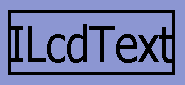
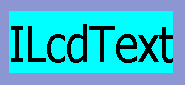
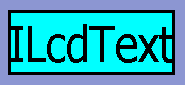
However, a number of properties can be set to change the visualization of the text:
| |
||||||
 |
|
 |
|
 |
|
 |
| A text | |
A framed text |
|
A filled text |
|
A filled and framed text |
Handles
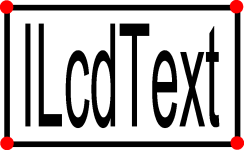
This painter defines the four corner points of the ILcdText object as a handle of the
text. The following image clarifies the handle location, the corner points are represented by red
points.
Snap targets
This painter does not support snapping.
Styling options
The visualization of the ILcdText object is governed by the font style, frame style and fill
style set to this painter. Depending on the different paint properties some of these will be taken into
account.
Locating an ILcdText in a view
Anchor point of an ILcdText
The anchor point of the ILcdText object is located at the center point of the bounds,
calculated by boundsSFCT.
When is an ILcdText touched
A ILcdText object is touched when the mouse pointer is located within the rotated bounds
of the text.
Visually editing an ILcd2DEditableText
Modifying an ILcd2DEditableText
To edit a text object, up to four corner handles are visualized. The amount of handles and their behavior depends on the vertical and horizontal alignment of the text, and on whether the handles are being translated or reshaped.
TRANSLATED: If the interior of the text bounds are touched, the whole shape is translated. If a corner handle is translated, it stretches and rotates the shape starting from an anchor point determined by the alignment. The images below illustrate the editing behavior when the text is aligned to the left and the bottom. The small black arrow indicates the path of the mouse cursor while translating the bounds.
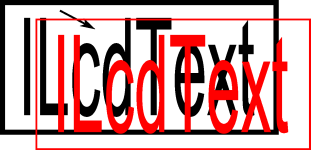
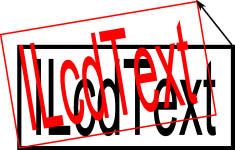
Moving a corner point.
Moving the interior. RESHAPED: The reshaping behavior allows stretching the shape by dragging one of its edges, starting from an anchor point determined by the alignment. When touching a corner point, the behavior is identical as with the TRANSLATED mode. The images below illustrate the editing behavior when the text is aligned to the left and the bottom. The small black arrow indicates the path of the mouse cursor while reshaping the bounds.
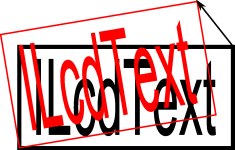

Moving a corner point.
Moving a frame edge.
Initializing an ILcd2DEditableText
When initializing a text via interaction through the view, a number of user interactions are required to
complete the initialization. This number depends on the creation mode and
it is either 1 or 3 for the modes ONE_CLICK or THREE_CLICK.
Whenever the text string of the ILcdText object needs to be edited, the protected method
getText is called. Overwrite this method to customize the editing of the text string.
By default the class TLcdUserDialog is used to pop up an input dialog.
Accepted snap targets
This painter does not support snapping.
Additional properties
If either the width or the height of the text is 0, it will be painted using the original, unscaled font.
- See Also:
-
Field Summary
FieldsModifier and TypeFieldDescriptionstatic CursorThe cursor shown when reshaping a text.static Cursor[]The cursors shown when resizing a text.static CursorThe cursor shown when translating a text.protected static final intConstant value denoting the left bottom corner point of the text.protected static final intConstant value denoting the left top corner point of the text.static final intConstant for the one click creation mode.protected static final intConstant value denoting the right bottom corner point of the text.protected static final intConstant value denoting the right top corner point of the text.static final intConstant for the three click creation mode.Fields inherited from class com.luciad.view.gxy.ALcdGXYPainter
defaultCreationFillStyle, defaultCreationLineStyle, defaultFillStyle, defaultLineStyle, fWorkBoundsFields inherited from interface com.luciad.view.gxy.ILcdGXYEditor
CREATING, END_CREATION, RESHAPED, START_CREATION, TRANSLATEDFields inherited from interface com.luciad.view.gxy.ILcdGXYPainter
BODY, CREATING, DEFAULT, HANDLES, RESHAPING, SELECTED, SNAPS, TRANSLATING -
Constructor Summary
ConstructorsConstructorDescriptionConstructs a defaultTLcdGXYTextPainterand sets the display name to "Text". -
Method Summary
Modifier and TypeMethodDescriptionbooleanacceptSnapTarget(Graphics aGraphics, ILcdGXYContext aGXYContext) Returnsfalsebecause snapping is not supported.voidboundsSFCT(Graphics aGraphics, int aRenderMode, ILcdGXYContext aGXYContext, ILcd2DEditableBounds aBoundsSFCT) Computes the bounds of the representation of anILcdTextin AWT coordinates.clone()MakesObject.clone()public.booleanedit(Graphics aGraphics, int aRenderMode, ILcdGXYContext aGXYContext) This implementation edits theILcdTextobject set to the painter.intReturns either 1 or 3 depending on thecreation mode(ONE_CLICKorTHREE_CLICK) as the number of required user interactions.getCursor(Graphics aGraphics, int aRenderMode, ILcdGXYContext aGXYContext) Returns aCursorthat clarifies the render mode and context this painter is operating in.Returns the style used to fill the background of theILcdTextobject.Returns the style used to paint theILcdTextobject.Returns the style used to paint the frame around theILcdTextobject.getGXYEditor(Object aObject) Returns this instance as editor for editing the specifiedObject.intReturns the number of pixels of the margin used around theILcdTextobject.final ObjectReturns the object that can currently be painted or edited by this painter/editor.Returns the icon that is used to paint snap target points of the object set to this painter.protected voidgetText(ILcdGXYContext aGXYContext, ILcd2DEditableText aTextSFCT) Gets a new text for theILcd2DEditableTextobject.booleanisFilled()Returns whether the text should be painted in a filled background.booleanReturns whether the text should be stretched to fit in itsarea, regardless of font.booleanisFramed()Returns whether a frame should be painted around the text.booleanReturns whether a frame should be painted around the text when it is painted in selected mode.booleanReturns whether the painter allows snapping to the invisible points of the shape.booleanisTouched(Graphics aGraphics, int aRenderMode, ILcdGXYContext aGXYContext) Depending on the rendering mode, returns whether the mouse pointer is within the rotated bounds of theILcdTextobject.protected booleanlinkToSnapTarget(Graphics aGraphics, ILcd2DEditableText aTextSFCT, int aTouchedCorner, ILcdGXYContext aGXYContext) Sets the specified corner point at the given snap target, if the snap target is accepted.voidpaint(Graphics aGraphics, int aRenderMode, ILcdGXYContext aGXYContext) Displays the representation of the object in the given mode on the Graphics passed, taking into account the context passed.voidsetCreationMode(int aCreationMode) Sets the mode to decide how to create anILcdTextobject.voidsetFilled(boolean aFilled) Sets whether the text should be painted in a filled background or not.voidsetFillStyle(ILcdGXYPainterStyle aFillStyle) Sets the style that will be used to fill the background of theILcdTextobject.voidsetFitTextInArea(boolean aFitTextInArea) Sets whether the text should be stretched to fit in itsarea, regardless of font.voidsetFontStyle(ILcdGXYPainterStyle aFontStyle) Sets the style that will be used to paint theILcdTextobject.voidsetFramed(boolean aFramed) Sets whether a frame should be painted around the text or not.voidsetFramedWhenSelected(boolean aFramedWhenSelected) Sets whether a frame should be painted around the text when it is painted in selected mode or not.voidsetFrameStyle(ILcdGXYPainterStyle aFrameStyle) Sets the style that will be used to paint the frame around theILcdTextobject.voidsetMargin(int aMargin) Sets the number of pixels of the margin that will be used around theILcdTextobject for drawing the handles, the frame, the filled background,...voidsetModelModelTransformationClass(Class aModel2ModelTransformationClass) Empty implementation because snapping is not supported.voidSets the object to paint and edit.voidsetSnapIcon(ILcdIcon aSnapIcon) Sets the icon that marks snap targets of the object currently set to this painter.voidsetSnapToInvisiblePoints(boolean aSnapToInvisiblePoints) Sets whether the other shapes can snap to invisible points of this shape.static voidsetStartLetterWidth(int aStartLetterWidth) Sets the start width defined in pixels of the letters when created inONE_CLICKmode.static voidsetStartTextHeight(int aStartTextHeight) Sets the start height defined in pixels of the text when created inONE_CLICKmode.protected voidsetupGraphicsForFill(Graphics aGraphics, int aRenderMode, ILcdGXYContext aGXYContext) Called just before filling the backgrounds on the specifiedGraphicsobject.protected voidsetupGraphicsForFrame(Graphics aGraphics, int aRenderMode, ILcdGXYContext aGXYContext) Called just before painting the frame on the specifiedGraphicsobject.protected voidsetupGraphicsForText(Graphics aGraphics, int aRenderMode, ILcdGXYContext aGXYContext) Called just before drawing the text on the specifiedGraphicsobject.snapTarget(Graphics aGraphics, ILcdGXYContext aGXYContext) Returnsnullbecause snapping is not supported.booleansupportSnap(Graphics aGraphics, ILcdGXYContext aGXYContext) This implementation does not support snapping, always returnsfalse.Methods inherited from class com.luciad.view.gxy.ALcdGXYPainter
addPropertyChangeListener, anchorPointSFCT, firePropertyChangeEvent, firePropertyChangeEvent, getDisplayName, getGXYPainter, isTraceOn, removePropertyChangeListener, setClassTraceOn, setDisplayName, setTraceOnMethods inherited from class java.lang.Object
equals, finalize, getClass, hashCode, notify, notifyAll, toString, wait, wait, waitMethods inherited from interface com.luciad.view.gxy.ILcdGXYEditor
getDisplayNameMethods inherited from interface com.luciad.view.gxy.ILcdGXYPainter
anchorPointSFCT, getDisplayNameMethods inherited from interface com.luciad.util.ILcdPropertyChangeSource
addPropertyChangeListener, removePropertyChangeListener
-
Field Details
-
LEFT_BOTTOM
protected static final int LEFT_BOTTOMConstant value denoting the left bottom corner point of the text.- See Also:
-
LEFT_TOP
protected static final int LEFT_TOPConstant value denoting the left top corner point of the text.- See Also:
-
RIGHT_TOP
protected static final int RIGHT_TOPConstant value denoting the right top corner point of the text.- See Also:
-
RIGHT_BOTTOM
protected static final int RIGHT_BOTTOMConstant value denoting the right bottom corner point of the text.- See Also:
-
ONE_CLICK
public static final int ONE_CLICKConstant for the one click creation mode. The click defines the location point of theILcdTextobject. The initial width and height of the text are defined by the propertiesstartLetterWidthandstartTextHeight.- See Also:
-
THREE_CLICK
public static final int THREE_CLICKConstant for the three click creation mode. The clicks define:- the position of the location point,
- the rotation angle of the text, and
- the width and height of the text.
- See Also:
-
cursorTranslating
The cursor shown when translating a text. -
cursorReshaping
The cursor shown when reshaping a text. -
cursorResizing
The cursors shown when resizing a text. Cursors are sorted per direction in which resizing is done, starting from east, going anti clock wise. The last entry is the same as the first entry.
-
-
Constructor Details
-
TLcdGXYTextPainter
public TLcdGXYTextPainter()Constructs a defaultTLcdGXYTextPainterand sets the display name to "Text".
-
-
Method Details
-
setObject
Sets the object to paint and edit. The object should be an instance of
ILcdTextfor painting and an instance ofILcd2DEditableTextfor editing.This painter/editor can be used to paint the object without using the edit functionality. This method shall therefore only check if the object implements
ILcdTextand shall throw aClassCastExceptionif it does not.When this painter is used as editor with an object that does not implement the interface
ILcd2DEditableText, theeditmethod shall throw the necessary exception.- Specified by:
setObjectin interfaceILcdGXYEditor- Specified by:
setObjectin interfaceILcdGXYPainter- Parameters:
aObject- The object to paint and edit.- Throws:
ClassCastException- when the object does not implementILcdText.- See Also:
-
getObject
Returns the object that can currently be painted or edited by this painter/editor.- Specified by:
getObjectin interfaceILcdGXYEditor- Specified by:
getObjectin interfaceILcdGXYPainter- Returns:
- the object that can currently be painted or edited by this painter/editor.
- See Also:
-
setCreationMode
public void setCreationMode(int aCreationMode) Sets the mode to decide how to create anILcdTextobject. A text can be created in the following modes. The default value isONE_CLICK.ONE_CLICK, which enables setting the location point,THREE_CLICK, which enables setting the location point, the rotation angle, and the width and height of the text.
- Parameters:
aCreationMode- The mode deciding how to create anILcdTextobject.
-
setStartTextHeight
public static void setStartTextHeight(int aStartTextHeight) Sets the start height defined in pixels of the text when created inONE_CLICKmode. The default value of this property is20.- Parameters:
aStartTextHeight- the height of text when created inONE_CLICKmode.
-
setStartLetterWidth
public static void setStartLetterWidth(int aStartLetterWidth) Sets the start width defined in pixels of the letters when created inONE_CLICKmode. The default value of this property is20.- Parameters:
aStartLetterWidth- the width of the letters when created inONE_CLICKmode.
-
setFramed
public void setFramed(boolean aFramed) Sets whether a frame should be painted around the text or not. By default, no frame will be displayed, the value isfalse.- Parameters:
aFramed- A flag indicating whether a frame should be painted around the text or not.- See Also:
-
isFramed
public boolean isFramed()Returns whether a frame should be painted around the text.- Returns:
- whether a frame should be painted around the text.
- See Also:
-
setFramedWhenSelected
public void setFramedWhenSelected(boolean aFramedWhenSelected) Sets whether a frame should be painted around the text when it is painted in selected mode or not. By default, no frame will be displayed, the value isfalse.- Parameters:
aFramedWhenSelected- A flag indicating whether a frame should be painted around the text when it is painted in selected mode or not.- See Also:
-
isFramedWhenSelected
public boolean isFramedWhenSelected()Returns whether a frame should be painted around the text when it is painted in selected mode.- Returns:
- whether a frame should be painted around the text when it is painted in selected mode.
- See Also:
-
setFitTextInArea
public void setFitTextInArea(boolean aFitTextInArea) Sets whether the text should be stretched to fit in itsarea, regardless of font. By default, the text is not stretched, the value isfalse. If set, the text will be stretched such that the displayed text is as wide asILcdText.getTextWidth(), so based oncharacter widthxtext length. This may cause the letters' aspect to change.- Parameters:
aFitTextInArea- A flag indicating whether the text should be stretched to fit in its area.- See Also:
-
isFitTextInArea
public boolean isFitTextInArea()Returns whether the text should be stretched to fit in itsarea, regardless of font.- Returns:
- whether the text should be stretched to fit in its area, regardless of font.
- See Also:
-
setFilled
public void setFilled(boolean aFilled) Sets whether the text should be painted in a filled background or not. The default setting of this property isfalse.- Parameters:
aFilled- A flag indicating whether the text should be painted in a filled background or not.- See Also:
-
isFilled
public boolean isFilled()Returns whether the text should be painted in a filled background.- Returns:
- whether the text should be painted in a filled background.
- See Also:
-
setMargin
public void setMargin(int aMargin) Sets the number of pixels of the margin that will be used around the
ILcdTextobject for drawing the handles, the frame, the filled background,...The default value of this property is
2pixels. Note that negative values are not allowed and are converted to0.- Parameters:
aMargin- the number of pixels of the margin around theILcdTextobject.- See Also:
-
getMargin
public int getMargin()Returns the number of pixels of the margin used around theILcdTextobject.- Returns:
- the number of pixels of the margin used around the
ILcdTextobject. - See Also:
-
setSnapToInvisiblePoints
public void setSnapToInvisiblePoints(boolean aSnapToInvisiblePoints) Sets whether the other shapes can snap to invisible points of this shape. Note that this painter does not support snapping, the property will therefore not be taken into account. The default value isfalse.- Parameters:
aSnapToInvisiblePoints- A flag indicating whether snapping to the invisible points is allowed.- See Also:
-
isSnapToInvisiblePoints
public boolean isSnapToInvisiblePoints()Returns whether the painter allows snapping to the invisible points of the shape.- Returns:
- whether the painter allows snapping to the invisible points of the shape.
- See Also:
-
setFontStyle
Sets the style that will be used to paint theILcdTextobject.- Parameters:
aFontStyle- the style used to paint theILcdTextobject.- See Also:
-
getFontStyle
Returns the style used to paint theILcdTextobject.- Returns:
- the style used to paint the
ILcdTextobject. - See Also:
-
setFrameStyle
Sets the style that will be used to paint the frame around theILcdTextobject.- Parameters:
aFrameStyle- the style used to paint the frame around theILcdTextobject.- See Also:
-
getFrameStyle
Returns the style used to paint the frame around theILcdTextobject.- Returns:
- the style used to paint the frame around the
ILcdTextobject. - See Also:
-
setFillStyle
Sets the style that will be used to fill the background of theILcdTextobject.- Parameters:
aFillStyle- the style used to fill the background of theILcdTextobject.- See Also:
-
getFillStyle
Returns the style used to fill the background of theILcdTextobject.- Returns:
- the style used to fill the background of the
ILcdTextobject. - See Also:
-
setSnapIcon
Sets the icon that marks snap targets of the object currently set to this painter. This icon is painted when thepaintmethod is called with the render modeILcdGXYPainter.SNAPS.- Parameters:
aSnapIcon- The icon that should be used to paint snap target points.- See Also:
-
getSnapIcon
Returns the icon that is used to paint snap target points of the object set to this painter.- Returns:
- the icon that is used to paint snap target points of the object set to this painter.
- See Also:
-
setupGraphicsForText
protected void setupGraphicsForText(Graphics aGraphics, int aRenderMode, ILcdGXYContext aGXYContext) Called just before drawing the text on the specified
Graphicsobject. It can be redefined in order to set specificGraphicsproperties likeColor, etc...This implementation calls
ILcdGXYPainterStyle.setupGraphics(java.awt.Graphics, java.lang.Object, int, com.luciad.view.gxy.ILcdGXYContext)on the fontStyle property if a font style has been set to this instance.- Parameters:
aGraphics- The graphics to paint the object on.aRenderMode- The mode to render the object in.aGXYContext- The context to render the object in.
-
setupGraphicsForFrame
protected void setupGraphicsForFrame(Graphics aGraphics, int aRenderMode, ILcdGXYContext aGXYContext) Called just before painting the frame on the specified
Graphicsobject. It can be redefined in order to set specificGraphicsproperties likeColor, etc...This implementation calls
ILcdGXYPainterStyle.setupGraphics(java.awt.Graphics, java.lang.Object, int, com.luciad.view.gxy.ILcdGXYContext)on the frameStyle property if a frame style has been set to this instance.- Parameters:
aGraphics- The graphics to paint the object on.aRenderMode- The mode to render the object in.aGXYContext- The context to render the object in.
-
setupGraphicsForFill
protected void setupGraphicsForFill(Graphics aGraphics, int aRenderMode, ILcdGXYContext aGXYContext) Called just before filling the backgrounds on the specified
Graphicsobject. It can be redefined in order to set specificGraphicsproperties likeColor, etc...This implementation calls
ILcdGXYPainterStyle.setupGraphics(java.awt.Graphics, java.lang.Object, int, com.luciad.view.gxy.ILcdGXYContext)on the fillStyle property if a fill style has been set to this instance.- Parameters:
aGraphics- The graphics to paint the object on.aRenderMode- The mode to render the object in.aGXYContext- The context to render the object in.
-
getCursor
Returns aCursorthat clarifies the render mode and context this painter is operating in. When no specificCursoris required,nullis returned.- Specified by:
getCursorin interfaceILcdGXYPainter- Overrides:
getCursorin classALcdGXYPainter- Parameters:
aGraphics- The graphics on which the object is painted.aRenderMode- The mode to render the object in.aGXYContext- The context in which the object is rendered.- Returns:
- a cursor to indicate the type of operating mode and context. Returns
nullif no particular cursor is required.
-
boundsSFCT
public void boundsSFCT(Graphics aGraphics, int aRenderMode, ILcdGXYContext aGXYContext, ILcd2DEditableBounds aBoundsSFCT) throws TLcdNoBoundsException Computes the bounds of the representation of anILcdTextin AWT coordinates. The bounds will include the four corner point of the text.- Specified by:
boundsSFCTin interfaceILcdGXYPainter- Parameters:
aGraphics- The graphics to paint the object on.aRenderMode- The mode to render the object in.aGXYContext- The context to render the object in.aBoundsSFCT- The bounds to update.- Throws:
TLcdNoBoundsException- if no bounds can be determined for the representation of the object. This can be when the object does not have a representation in the given context, for example when it is located in a part of the world which is not visible in the projection as set in the views world reference.- See Also:
-
isTouched
Depending on the rendering mode, returns whether the mouse pointer is within the rotated bounds of theILcdTextobject.- Specified by:
isTouchedin interfaceILcdGXYPainter- Parameters:
aGraphics- The graphics to paint the object on.aRenderMode- The mode to render the object in.aGXYContext- The context in which the object is rendered.- Returns:
- whether the mouse pointer is within the bounds of the
ILcdTextobject. - See Also:
-
paint
Displays the representation of the object in the given mode on the Graphics passed, taking into account the context passed.- Specified by:
paintin interfaceILcdGXYPainter- Parameters:
aGraphics- The graphics to paint the object on.aRenderMode- The mode to render the object in.aGXYContext- The context to render the object in.
-
getGXYEditor
Returns this instance as editor for editing the specifiedObject. If thisObjectis not the same as theObjectset to this painter, thesetObject(Object)method is called to update the object set to the painter.- Specified by:
getGXYEditorin interfaceILcdGXYEditorProvider- Parameters:
aObject- the object to be edited.- Returns:
- this instance as editor for editing the specified
Object.
-
getCreationClickCount
public int getCreationClickCount()Returns either 1 or 3 depending on thecreation mode(ONE_CLICKorTHREE_CLICK) as the number of required user interactions.- Specified by:
getCreationClickCountin interfaceILcdGXYEditor- Returns:
- either 1 or 3 depending on the
creation mode. - See Also:
-
edit
This implementation edits the
ILcdTextobject set to the painter. The object needs to implement the interfaceILcd2DEditableTextotherwise aClassCastExceptionwill be thrown.In
ILcdGXYEditor.TRANSLATEDrender mode, theILcdTextobject is edited as follows:- While touching a corner point, the corner point gets translated. This will change the width, height and rotation angle of the text.
- While touching the frame, the object gets translated as a whole.
- While touching the interior, the object gets translated as a whole.
In
ILcdGXYEditor.RESHAPEDrender mode, theILcdTextobject is edited as follows:- While touching a corner point, the corner point will move and the width, the height and the rotation angle will be updated.
- While touching the upper or right edge, the edge line will move while enlarging or reducing the width or height of the text.
The creation render mode behavior is defined by the
creation mode. Further changes have to be done within edition mode.- In the
ONE_CLICKmode, that point will determine the location point of the text. The initial width and height of the text are defined by the propertiesstartLetterWidthandstartTextHeight. - In the
THREE_CLICKmode, the first point determines the location point of the text, the second the rotation angle and the third the width and height of the text.
Note that this painter does not support snapping.
- Specified by:
editin interfaceILcdGXYEditor- Parameters:
aGraphics- The graphics to edit the object on.aRenderMode- The mode to render the object in.aGXYContext- The context to render the object in.- Returns:
- true if the object has changed when this method returns, false otherwise.
- Throws:
ClassCastException- if the painter's object does not implementILcd2DEditableText.- See Also:
-
getText
Gets a new text for theILcd2DEditableTextobject. The default implementation uses thecom.luciad.gui.TLcdUserDialogclass to popup an input dialog.
Overwrite this method to customize the edition of the text object.- Parameters:
aGXYContext- the context in which to create the text.aTextSFCT- theILcd2DEditableTextfor which the text will be set.- See Also:
-
linkToSnapTarget
protected boolean linkToSnapTarget(Graphics aGraphics, ILcd2DEditableText aTextSFCT, int aTouchedCorner, ILcdGXYContext aGXYContext) Sets the specified corner point at the given snap target, if the snap target is accepted. The corner index should be is one of the predefined constants (LEFT_BOTTOM,LEFT_TOP,RIGHT_BOTTOM,RIGHT_TOP). Note that this painter does not support snapping, this implementation is therefore empty.- Parameters:
aGraphics- The graphics to paint the object on.aTextSFCT- The bounds objects to be edited.aTouchedCorner- The corner index to set at the snap target.aGXYContext- The context to render the object in.- Returns:
- whether the corner was successfully linked to the snap target.
- See Also:
-
supportSnap
This implementation does not support snapping, always returnsfalse.- Specified by:
supportSnapin interfaceILcdGXYPainter- Overrides:
supportSnapin classALcdGXYPainter- Parameters:
aGraphics- the graphics on which is worked.aGXYContext- the context of the snapping.- Returns:
false.
-
snapTarget
Returnsnullbecause snapping is not supported.- Specified by:
snapTargetin interfaceILcdGXYPainter- Overrides:
snapTargetin classALcdGXYPainter- Parameters:
aGraphics- the graphics on which is worked.aGXYContext- the context of the snapping.- Returns:
null.- See Also:
-
setModelModelTransformationClass
Empty implementation because snapping is not supported.- Parameters:
aModel2ModelTransformationClass- not taken into account.
-
acceptSnapTarget
Returnsfalsebecause snapping is not supported.- Specified by:
acceptSnapTargetin interfaceILcdGXYEditor- Parameters:
aGraphics- the Graphics on which the snap target should be checked.aGXYContext- the context in which the snap target should be checked.- Returns:
false.- See Also:
-
clone
Description copied from interface:ILcdCloneableMakes
When for example extending fromObject.clone()public.java.lang.Object, it can be implemented like this:public Object clone() { try { return super.clone(); } catch ( CloneNotSupportedException e ) { // Cannot happen: extends from Object and implements Cloneable (see also Object.clone) throw new RuntimeException( e ); } }- Specified by:
clonein interfaceILcdCloneable- Specified by:
clonein interfaceILcdGXYEditorProvider- Specified by:
clonein interfaceILcdGXYPainterProvider- Overrides:
clonein classALcdGXYPainter- Returns:
- a clone of this painter provider.
- See Also:
-