Class TLcdRadar
- All Implemented Interfaces:
ILcdDataObject,ILcdBounded,ILcdOriented
The radar antenna is usually represented in the center of the display. Concentric circles represent the distance from the center and the height above ground. As the radar antenna rotates, a radial trace on the radar sweeps in unison around the center point.
The distance out from the center of the radar position indicates range, and the angle around the center is the azimuth to the target.
While it is rotating 360 degrees around the radar site at a fixed elevation angle, the radar antenna sends pulses. For the next rotation, it can change angle or proceed at the same angle according to requirements. The return echoes from the targets are received by the antenna and processed as radar sweeps.
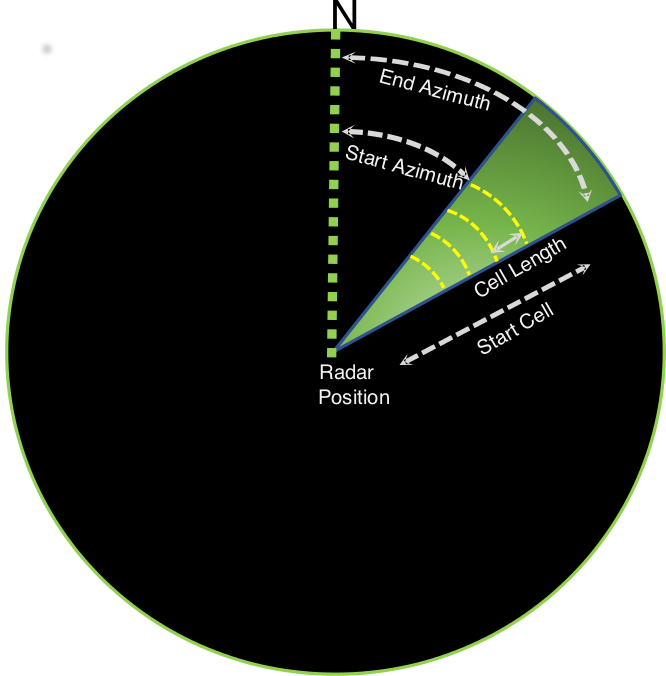
TLcdRadar can be used to display radar sweeps. You specify the radar position by setting the appropriate reference
on the containing model. The ILcdOriented interface is implemented to get the azimuth of the most recently received radar sweep.
This code snippet demonstrates how to create a model reference for the radar position:
    double radarRotation = Math.toRadians(0); // determines the up-direction of the radar
    TLcdLonLatPoint radarPosition = new TLcdLonLatPoint(4, 50);
    ILcdModelReference modelReference = new TLcdGridReference(
        new TLcdGeodeticDatum(),
        new TLcdAzimuthalEquidistant(radarPosition.getX(), radarPosition.getY()),
        0, 0,
        1.0, // scale
        1.0, // unit
        radarRotation
    );
TLspRadarVideoLayerBuilder
for information on how radar video feeds are visualized in a Lightspeed view.- Since:
- 2018.0
-
Constructor Summary
ConstructorsConstructorDescriptionTLcdRadar(TLcdDataType aDataType) Create a new instance ofTLcdRadarwith the specified data type. -
Method Summary
Modifier and TypeMethodDescriptionvoidaddRadarSweep(long aTimeStamp, double aStartAzimuth, double aEndAzimuth, int aStartCell, double aCellLength, int aBitResolution, int[] aCellAmplitudes, int aCellCount) Add a radar record provided by the sweep.clone()Returns theILcdBoundsby which the geometry of thisILcdBoundedobject is bounded.Returns the type of this data object.doubleReturns the orientation of this object in degrees.getValue(TLcdDataProperty aProperty) Returns the value of the given property.Convenience method that returns the value of the property with the given name.booleanhasValue(TLcdDataProperty aProperty) Indicates whether this data object has a value for the given property.booleanIndicates whether this data object has a value for the given property.voidsetValue(TLcdDataProperty aProperty, Object aValue) Sets the value of the given property for this data object.voidConvenience method that sets the value of the property with the given name.
-
Constructor Details
-
TLcdRadar
Create a new instance ofTLcdRadarwith the specified data type. The givenTLcdDataTypemust beTLcdRadarVideoDataTypes.RADAR_VIDEO_DATA_TYPE, or a sub-type thereof. ThatTLcdDataTypehas theRadarRangeproperty. The value forRadarRangeis determined by the data that is given toaddRadarSweep(long, double, double, int, double, int, int[], int)- Parameters:
aDataType- the data type for radar.
-
-
Method Details
-
getBounds
Description copied from interface:ILcdBoundedReturns theILcdBoundsby which the geometry of thisILcdBoundedobject is bounded.If the geometry does not allow retrieving valid bounds (for example a polyline with 0 points) the return value is unspecified. It is highly recommended to return an
undefinedbounds. You can create undefined bounds using the default constructors ofTLcdLonLatBoundsorTLcdXYBounds.- Specified by:
getBoundsin interfaceILcdBounded- Returns:
- the
ILcdBoundsby which the geometry of thisILcdBoundedobject is bounded.
-
addRadarSweep
public void addRadarSweep(long aTimeStamp, double aStartAzimuth, double aEndAzimuth, int aStartCell, double aCellLength, int aBitResolution, int[] aCellAmplitudes, int aCellCount) Add a radar record provided by the sweep. Please refer toTLcdRadardocumentation for limitations.You must call this method within a write lock, using
TLcdLockUtil.writeLock(model)and event modeILcdModel.FIRE_LATER.- Parameters:
aTimeStamp- The timestamp of the sweep in milliseconds since the epoch.aStartAzimuth- The azimuth at which the sweep starts in degrees clock-wise from the up-direction.aEndAzimuth- The azimuth at which the sweep ends in degrees clock-wise from the up-direction.aStartCell- The offset in number of cells at which the given sweep starts. You need this when the data of a single sweep line is split over multiple messages, for instance.aCellLength- The radial size of the radar cells, in meters.aBitResolution- The bit resolution used for the coding of the video data. Expressed in the number of bits that can be used for the amplitudes of the cells. The maximum value is 32.aCellAmplitudes- The amplitudes of the cells. Each element in the array represents a single cell in the sweep line. The values are all treated as unsigned integers. SeeInteger.toUnsignedLong(int). ThisTLcdRadarmakes a copy of the given data. This means that you can reuse the integer array for radar video messages you receive afterwards.aCellCount- The valid cell count. This is the number of cells in the given amplitudes array.- See Also:
-
getOrientation
public double getOrientation()Description copied from interface:ILcdOrientedReturns the orientation of this object in degrees. The orientation should be interpreted as a clockwise angle in degrees starting from 12 o'clock.If there is no rotation known for this object, return
Double.NaN.- Specified by:
getOrientationin interfaceILcdOriented- Returns:
- the orientation of this object in degrees, or
NaNif undefined.
-
clone
-
getDataType
Returns the type of this data object. This can never benull.- Specified by:
getDataTypein interfaceILcdDataObject- Returns:
- the type of this data object
-
getValue
Returns the value of the given property.
If the property is a collection, the returned value will never be null. If the property has not been set, an empty collection of the appropriate type will be returned (Set, List or Map).
The property must not be null, and must be declared in the
data object's typeor in one of its super types. Otherwise anIllegalArgumentExceptionis thrown.- Specified by:
getValuein interfaceILcdDataObject- Parameters:
aProperty- the property for which the value is to be returned- Returns:
- the value of the given property for this data object
-
getValue
Convenience method that returns the value of the property with the given name.
If more than one property exists with the given name, the most specific property should be used (this is the property defined by the most specialized type in this object's data type hierarchy). SeeILcdDataObject.getValue(TLcdDataProperty)for more information.- Specified by:
getValuein interfaceILcdDataObject- Parameters:
aPropertyName- the name of the property of which the value is to be returned- Returns:
- the value of the property with the given name
- See Also:
-
setValue
Sets the value of the given property for this data object. The implementation is allowed to throw an exception if the given value can't be set.
The given property must be declared in thedata object's typeor in one of its super types. In other words, getDataType().getProperties().contains( aProperty ) should always be true. Otherwise, the implementation should throw anIllegalArgumentException.- Specified by:
setValuein interfaceILcdDataObject- Parameters:
aProperty- the property for which the value is to be setaValue- the value to set- See Also:
-
setValue
Convenience method that sets the value of the property with the given name.
If more than one property exists with the given name, the most specific property should be used (this is the property defined by the most specialized type in this object's data type hierarchy). SeeILcdDataObject.setValue(TLcdDataProperty, Object)for more information.- Specified by:
setValuein interfaceILcdDataObject- Parameters:
aPropertyName- the name of the property of which the value is to be setaValue- the value to set
-
hasValue
Indicates whether this data object has a value for the given property.aPropertyis from theright data type, and this instance has a value for it: returnstrueaPropertyis from theright data type, and this instance has no value for it: returnsfalseaPropertyis not from theright data type: not allowed, you will get IllegalArgumentExceptionaPropertyisnull: not allowed, you will get NullPointerException
- Specified by:
hasValuein interfaceILcdDataObject- Parameters:
aProperty- the property for which to return whether a value is present or not.- Returns:
trueif this data object has a value for the given property,falseotherwise.
-
hasValue
Indicates whether this data object has a value for the given property.
SeeILcdDataObject.hasValue(TLcdDataProperty)for more information.- Specified by:
hasValuein interfaceILcdDataObject- Parameters:
aPropertyName- the name of the property for which to return whether a value is present or not.- Returns:
trueif this data object has a value for the property with the given name,falseotherwise.
-