- java.lang.Object
-
- com.luciad.gui.swing.TLcdOverlayLayout
-
- All Implemented Interfaces:
- LayoutManager, LayoutManager2
public class TLcdOverlayLayout
extends Object
implements LayoutManager2
Swing layout manager suitable for aContainerpanel overlaying a map. For JavaFX views, seeTLcdOverlayPane.You can add components to 10 distinct locations, and specify what should happen if multiple components are added to the same location.
To arrange components, use one of the following methods:
- Call the
Container.add(Component, Object)method. You can pass aTLcdOverlayLayout.Locationas constraints object. The defaultResolveClashisTLcdOverlayLayout.ResolveClash.HORIZONTAL. - Call one of the
putConstraint(java.awt.Component, com.luciad.gui.swing.TLcdOverlayLayout.Location, com.luciad.gui.swing.TLcdOverlayLayout.ResolveClash)methods before adding the component to the container using anContainer#addmethod without constraints parameter.
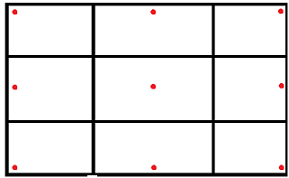
Note: The implementation depends on the
preferredSizeof theComponent. When this is not set, it will use a default Dimension equal to (50, 50). So it's important thatgetPreferredSizereturns an appropriate value for any component you wish to add to a container with thisLayoutManager.- Since:
- 9.1
- See Also:
TLcdOverlayLayout.Location,TLcdOverlayLayout.ResolveClash
-
-
Nested Class Summary
Nested Classes Modifier and Type Class and Description static classTLcdOverlayLayout.LocationThis enumeration identifies the different locations where components can be placed when added to the container.static classTLcdOverlayLayout.ResolveClashThis enumeration can be used to indicate how the LayoutManager should handle multiple components added to the same location.
-
Constructor Summary
Constructors Constructor and Description TLcdOverlayLayout()Default Constructor forTLcdOverlayLayout.
-
Method Summary
All Methods Instance Methods Concrete Methods Modifier and Type Method and Description voidaddLayoutComponent(Component aComponent, Object aConstraints)voidaddLayoutComponent(String aName, Component aComponent)This implementation simply adds the component to theLocation.NORTH_EAST.floatgetLayoutAlignmentX(Container aTarget)floatgetLayoutAlignmentY(Container aTarget)voidinvalidateLayout(Container aTarget)voidlayoutContainer(Container aParent)DimensionmaximumLayoutSize(Container aTarget)DimensionminimumLayoutSize(Container aParent)DimensionpreferredLayoutSize(Container aParent)voidputConstraint(Component aComponent, TLcdOverlayLayout.Location aLocation, TLcdOverlayLayout.ResolveClash aResolveClash)Specifies the location and clash resolution for the given object.voidputConstraint(Component aComponent, TLcdOverlayLayout.Location aLocation, TLcdOverlayLayout.ResolveClash aResolveClash, int aXOffset, int aYOffset)Specifies the location, clash resolution, and padding offsets for the given object.voidremoveLayoutComponent(Component aComponent)
-
-
-
Constructor Detail
-
TLcdOverlayLayout
public TLcdOverlayLayout()
Default Constructor forTLcdOverlayLayout.
-
-
Method Detail
-
putConstraint
public void putConstraint(Component aComponent,
                          TLcdOverlayLayout.Location aLocation,
                          TLcdOverlayLayout.ResolveClash aResolveClash)
Specifies the location and clash resolution for the given object. A standard horizontal and vertical offset will be used (10 px by default).If you call this method, do it before adding the object to the container, without specifying a constraint.
When resolving a clash at a specific location, the
ResolveClashof the last component (according the container's child order) at theLocationis used, .- Parameters:
aComponent- The component to be constrained.aLocation- The location of the component.aResolveClash- TheResolveClashconstraint for the component.- See Also:
putConstraint(java.awt.Component, com.luciad.gui.swing.TLcdOverlayLayout.Location, com.luciad.gui.swing.TLcdOverlayLayout.ResolveClash, int, int)
-
putConstraint
public void putConstraint(Component aComponent,
                          TLcdOverlayLayout.Location aLocation,
                          TLcdOverlayLayout.ResolveClash aResolveClash,
                          int aXOffset,
                          int aYOffset)
Specifies the location, clash resolution, and padding offsets for the given object. The offset parameters specify the distance between a component and his neighbour or the edge of the container.If you call this method, do it before adding the object to the container, without specifying a constraint.
When resolving a clash at a specific location, the
ResolveClashof the last component (according the container's child order) at theLocationis used, .- Parameters:
aComponent- The component to be constrained.aLocation- The location of the component.aResolveClash- TheResolveClashconstraint for the component.aXOffset- The distance in pixels between the component and its left/right (depending on the Location) neighbour or the East/West edge of the container.aYOffset- The distance in pixels between the component and its upper/lower (depending on the Location) neighbour or the North/South edge of the container.
-
addLayoutComponent
public void addLayoutComponent(String aName,
                               Component aComponent)
This implementation simply adds the component to theLocation.NORTH_EAST. Use the methodContainer.add(java.awt.Component, Object)in order to specify the location.- Specified by:
addLayoutComponentin interfaceLayoutManager- Throws:
UnsupportedOperationException- always- See Also:
addLayoutComponent(java.awt.Component, Object)
-
addLayoutComponent
public void addLayoutComponent(Component aComponent,
                               Object aConstraints)
This method will be called when you add a component to a container using the
Container.add(java.awt.Component, Object)method. The constraints should be an instance of theTLcdOverlayLayout.LocationEnumeration. If the passed object is null,NORTH_EASTwill be set as the defaultLocation. If the passed object is not an instance ofLocation, anIllegalArgumentExceptionwill be thrown. To set other constraints (ResolveClash, offsets) use the methodsputConstraint(java.awt.Component, com.luciad.gui.swing.TLcdOverlayLayout.Location, com.luciad.gui.swing.TLcdOverlayLayout.ResolveClash)orputConstraint(java.awt.Component, com.luciad.gui.swing.TLcdOverlayLayout.Location, com.luciad.gui.swing.TLcdOverlayLayout.ResolveClash, int, int).- Specified by:
addLayoutComponentin interfaceLayoutManager2- Parameters:
aComponent- The component to be addedaConstraints- An instance ofTLcdOverlayLayout.Locationthat specifies the location of the component.
-
removeLayoutComponent
public void removeLayoutComponent(Component aComponent)
- Specified by:
removeLayoutComponentin interfaceLayoutManager
-
maximumLayoutSize
public Dimension maximumLayoutSize(Container aTarget)
- Specified by:
maximumLayoutSizein interfaceLayoutManager2
-
getLayoutAlignmentX
public float getLayoutAlignmentX(Container aTarget)
- Specified by:
getLayoutAlignmentXin interfaceLayoutManager2
-
getLayoutAlignmentY
public float getLayoutAlignmentY(Container aTarget)
- Specified by:
getLayoutAlignmentYin interfaceLayoutManager2
-
invalidateLayout
public void invalidateLayout(Container aTarget)
- Specified by:
invalidateLayoutin interfaceLayoutManager2
-
preferredLayoutSize
public Dimension preferredLayoutSize(Container aParent)
- Specified by:
preferredLayoutSizein interfaceLayoutManager
-
minimumLayoutSize
public Dimension minimumLayoutSize(Container aParent)
- Specified by:
minimumLayoutSizein interfaceLayoutManager
-
layoutContainer
public void layoutContainer(Container aParent)
- Specified by:
layoutContainerin interfaceLayoutManager
-
-