About this release
The 2026.0 release of LuciadFusion brings support for the long-awaited S-101 format for Electronic Navigational Charts (ENC). Additionally, this release includes several enhancements to LuciadFusion’s web services that provide convenient new capabilities and better performance for connecting applications.
This document lists the most noteworthy improvements. You can find the full list of changes in the release notes.
Benefits of the new features
Support for ENC in S-101
An Electronic Chart Display and Information System (ECDIS) is a computer-based navigation system which is used to visualize digital nautical data, as an alternative to paper nautical charts. Nautical data includes all information which may be of assistance for the safe navigation of vessels at sea and harbors, such as sea depth information, positions of buoys, lights, or wrecks. The data to be rendered is either vector or raster data.
Data for vector-based ECDIS systems are called Electronic Navigational Charts (ENC). In early 2025, the new format for ENC, S-101, was officially adopted. This LuciadFusion release follows suit with support for the S-101 format, in addition to the existing support for S-57.
S-101 introduces several important changes that improve usability and interoperability, and future-proof ENC. Examples of such changes are GML encoding and the use of portrayal catalogs. S-101 also allows symbols and display rules to evolve independently from the data itself, and focuses on the interoperability between distinct maritime data sources, to bring them together on one map more easily.
This new capability is offered as part of the Maritime Standards product option.
Decoding and visualizing S-101 data
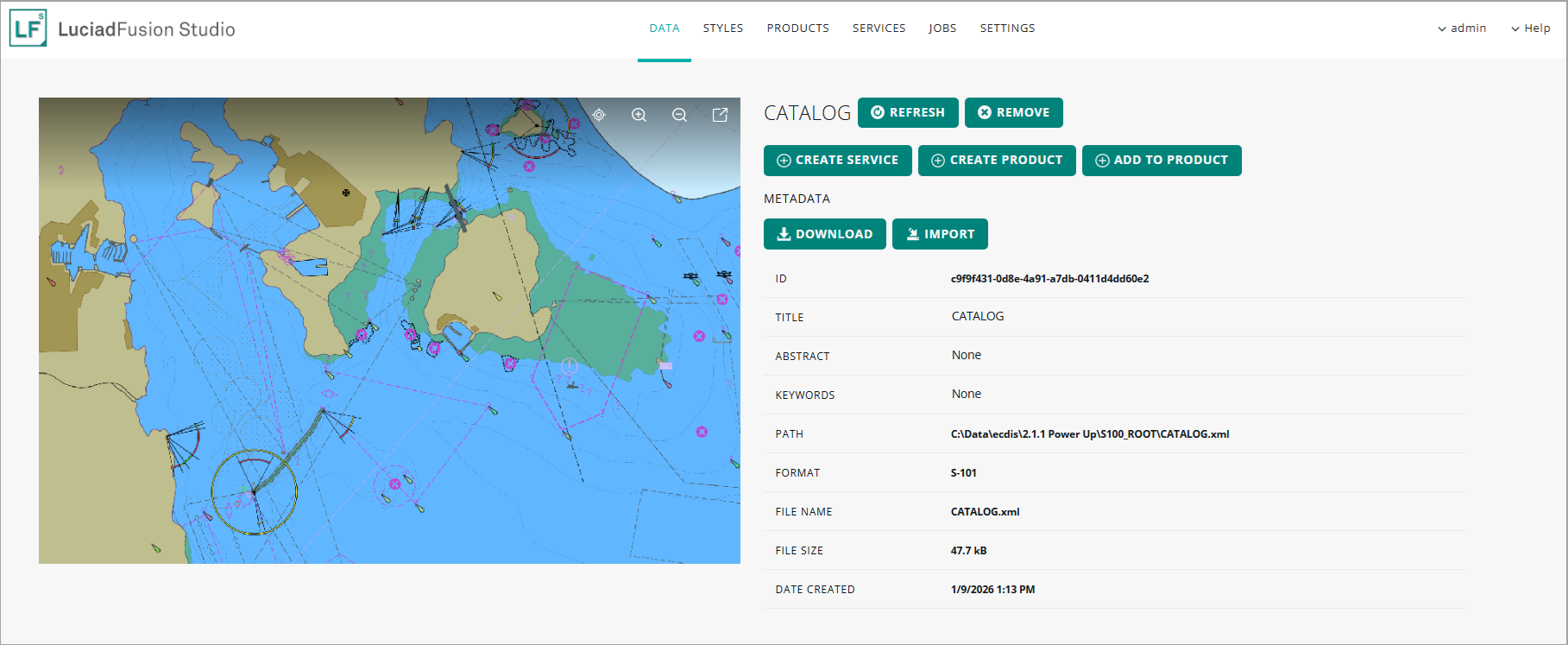
LuciadFusion now offers you the capability to decode S-101 data, in the form of either a data catalog or an individual data cell. The use of catalogs is recommended, because it allows the cells to be loaded lazily, based on the current extents and zoom level of the map.
Serving S-101 data as an OGC WMS/WMTS service
Like S-57 and S-63 data, S-101 data can be disseminated via WMS and WMTS services as well. The LuciadFusion WMS server specifically supports the use of SLD styles in WMS requests. A WMS client can use this capability to customize the styling of data published in a WMS layer. By default, an SLD style contains generic styling settings for vector and raster data. LuciadFusion extends this SLD styling capability by also supporting SLD styles with display settings for ECDIS data:
-
S-52 display settings configure the styling of ECDIS S-57 data.
-
S-101 display settings configure the styling of ECDIS S-101 data.
Because of that support, WMS clients can customize the styling of ECDIS S-57 or S-101 data published in a WMS layer.
Sample code/documentation to get you started
These articles explain how to decode S-101 data and how to configure the display settings:
We also updated the article that explains what was already possible in terms of custom SLD styling for S-57 and S-63. Using client-defined SLD styles with an ECDIS-enabled LuciadFusion WMS server now also covers the interactive use of S-101 data through WMS.
APP-6E cyber units support
This release of LuciadFusion offers partial support for the APP-6E standard (Version 1). In future releases, we will complete this support.
For this release, the focus is on the cyberspace icons:
-
60: Cyberspace
-
61: Cyberspace - Space
-
62: Cyberspace - Air
-
63: Cyberspace - Land Unit
-
64: Cyberspace - Land Equipment
-
65: Cyberspace - Land Installation
-
66: Cyberspace - Dismounted Individual
-
67: Cyberspace - Sea Surface
-
68: Cyberspace - Sea Subsurface
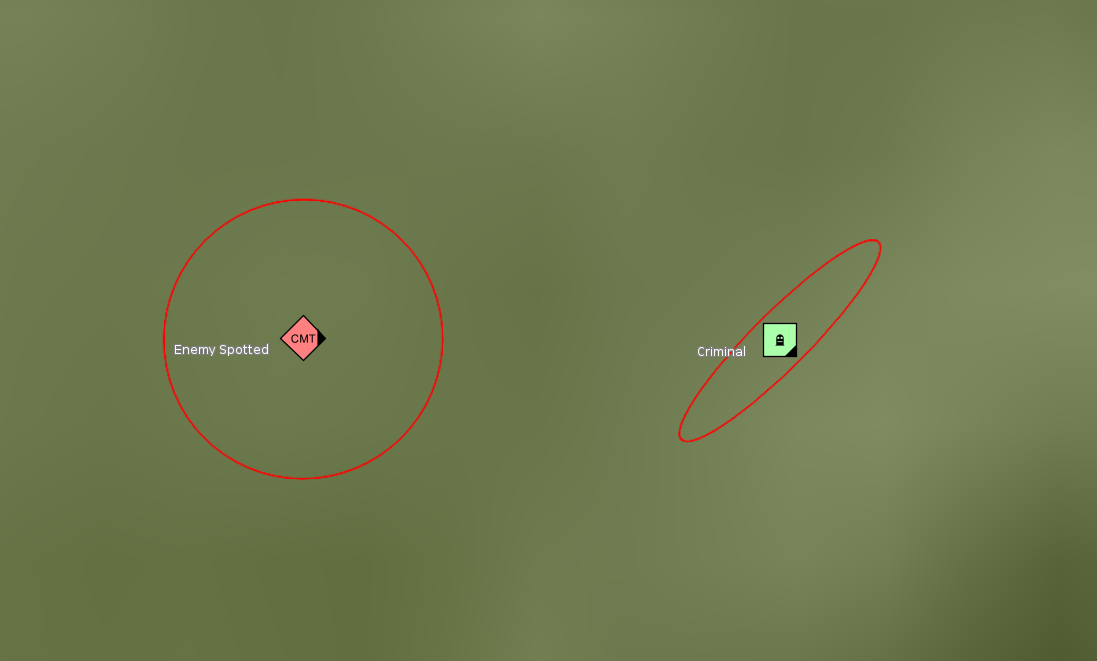
This support also includes the handling of areas of uncertainty, a new graphic modifier in APP-6E.
Sample code/documentation to get you started
The new support for APP-6E is seamlessly integrated into the existing military symbology capability. We refer to the article What are the supported standards? for an overview.
The new area of uncertainty indication is further explained in the article How to visualize the area of uncertainty indicator.
Improvements to the support for OGC services
Configure which tile matrix sets are exposed for a WMTS service
OCG WMTS services deliver data in a tiled and multi-leveled way. Knowing how these tiles are organized in a matrix, and what levels are available, greatly helps clients to efficiently request and display map data at various zoom levels. For each level, the organization of the tiles is defined as a tile matrix, and the collection of tile matrices for all available levels of details is called a tile matrix set.
You can now configure the list of available tile matrix sets that your LuciadFusion WMTS services offer, as well as the specific tile matrix sets exposed for certain data products.
The WMTS specification defines a list of well-known and common tile matrix sets. These are available by default. An example of a well-known tile matrix set is "GoogleMapsCompatible", for example. It’s compatible with implementations such as Google Maps, Microsoft Bing Maps and Open Street Map tiles.
Use the hybrid return type "jpgpng" in OGC WMS and WMTS services
Typically, service users can choose either JPEG or PNG as the return type for WMS or WMTS results.
The JPEG format provides fast, lossy compression, resulting in a small payload and quick loading times. It’s ideal for imagery or maps without transparency, such as aerial photographs or satellite imagery. However, JPEG doesn’t support transparency, and the lossy compression may reduce image quality slightly.
The PNG format supports lossless compression, ensuring high-quality images without sacrificing data integrity. It supports transparency, making it suitable for overlay maps or maps that require transparent backgrounds. PNG is typically used for maps with vector data, text, or overlays, but its file size is larger compared to JPEG, which can impact performance.
With this new option "jpgpng", the LuciadFusion service automatically chooses either JPEG or PNG based on the content of the requested map or tile. If it detects transparency, the service outputs the map or tile in PNG format to preserve the transparency. If it doesn’t detect transparency, it defaults to JPEG, taking advantage of its smaller file size and faster loading times. This dynamic behavior allows users to optimize both transparency and performance without manually choosing a format.
Publish collections of products via OGC WCS
The LuciadFusion WCS service now supports the publication of products that consist of multiple data items. A use case is the publication of multiple tiled raster data items into a single WCS coverage. The publication in a WCS service does require that the product’s data items all have the same band semantics and geographic reference.
Other improvements
- More output formats for WCS services
-
The LuciadFusion WCS server now supports
image/jp2(JPEG 2000),image/jpegandimage/pngas output formats next to GeoTIFF. - Add your own output formats to WCS services
-
You can now extend the output formats supported by a LuciadFusion WCS service by plugging in your own
ILcdWCSModelEncoderFactory. Using this interface, the LuciadFusion WCS creates anILcdModelEncoderthat can encode the result of aGetCoveragerequest to a format requested by the WCS client.
Improvements to the LuciadFusion platform
Support for custom properties of type polygon and multipolygon
LuciadFusion supports ISO metadata, but also allows you to define custom metadata properties and even use those properties for querying your catalog. See Extending LuciadFusion with custom properties and Using custom properties with Data for more information.
The supported EWKT geometry types for custom properties have been extended to support both POLYGON and MULTIPOLYGON, with the limitation that they can’t contain any holes. This allows you, for instance, to augment the data bounds with geometries representing the precise data footprint.
Data compression
The LuciadFusion server now supports data compression in HTTP(S) responses by default. When a client includes Accept-Encoding: gzip in the request header, the server enables data compression if the response is at least 1024 bytes in length and if its content
type is application/json, application/xml, text/html, text/xml, or text/plain. The article How to configure data compression in a service describes the configuration options in more detail.
Improved OpenAPI specification of the LuciadFusion REST API
The OpenAPI specification now offers the following improvements:
-
The specification now uses re-usable enums.
-
The names of the operations have been standardized and are now all unique.
-
The security on each operation is now defined.
-
The required property is now correctly set on the response schemas.
For a pointer to the REST API documentation, see Where can I find the LuciadFusion Studio REST API documentation.
Other improvements
This LuciadFusion release also features a number of smaller improvements, for example:
- Compatible with Java 25
-
LuciadFusion now supports Java 25. The supported Java versions are documented with the Hardware and software requirements in the product documentation.
- Security updates
-
The 2026.0 release of LuciadFusion includes several security updates. The release notes provide full details on the dependencies that were added, updated, or removed. Please look for security updates under the upgrade considerations in the release notes.
- Deprecated formats
-
-
The ASDI format for streaming air traffic data has fallen out of use in recent years, in favor of more recent air traffic management systems. Therefore, the ASDI model decoder and related classes have been deprecated.
-
The JPIP imagery streaming format has been deprecated. JPIP isn’t widely adopted, and we recommend the use of LuciadFusion with WM(T)S or ECWP as an alternative to serve large amounts of imagery to clients.
-